ASUS C31N1539 57Wh Laptop Battery Replacement Guide
Is your ASUS ZenBook struggling to hold a charge? Our comprehensive guide covers everything Australian and New Zealand users need to know about replacing their laptop battery with the genuine C31N1539 57Wh model.
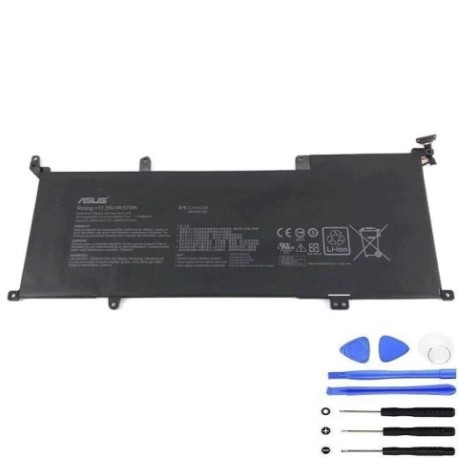
Battery models & part numbers
| Reference / P/N |
|---|
| 0B200-01180200 |
| 359190B1 SMP |
| Asus-C31N1539-57Wh |
| C31N1539 |
| C31Pn9H 31CP4/91/91 |
Compatible models
| Model |
|---|
| Asus ZenBook U305U |
| UX305U |
| UX305UA |
| UX305UAB |
Introduction
Your ASUS ZenBook is designed for mobility and productivity, but a failing battery can quickly turn your reliable companion into a desktop-bound device. The C31N1539 57Wh battery is the genuine replacement that restores your laptop’s original performance and portability. Whether you’re a student, professional, or casual user in Australia or New Zealand, understanding when and how to replace your battery ensures you get the most from your investment.
Common signs you need a replacement
| Symptom | Cause | Verification | Recommendation |
|---|---|---|---|
| Battery drains quickly (under 2 hours) | Reduced capacity from age/cycles | Check battery health in Windows | Consider replacement if below 60% capacity |
| Laptop shuts down unexpectedly | Voltage drops under load | Monitor during intensive tasks | Replace to prevent data loss |
| Battery won’t charge to 100% | Charging circuit protection | Check charging indicator | Replace if stuck below 80% |
| Battery swelling or bulging | Internal gas buildup | Visual inspection | Replace immediately – safety risk |
| Overheating during charging | Internal resistance increase | Touch test (be careful) | Replace to prevent damage |
How to check compatibility
Before purchasing any replacement battery, verifying compatibility is crucial. For ASUS ZenBook owners, start by checking your laptop’s model number on the bottom casing or under the battery compartment. The C31N1539 battery specifically fits the U305 and UX305 series models listed above. You can also use ASUS’s official support website by entering your serial number to confirm compatible parts. Many Australian computer repair centres offer free compatibility checks if you’re uncertain. Remember that using incompatible batteries can damage your laptop and void warranties.
When to replace
Most laptop batteries last 2-4 years with regular use. If your ZenBook is over two years old and showing reduced performance, it’s likely time for replacement. Consider replacing sooner if you rely on battery power for work or study. In Australia’s climate, heat accelerates battery degradation, so laptops used in warmer regions may need replacement earlier. The 57Wh capacity provides optimal balance between runtime and weight for the ultra-portable ZenBook design.
Installation guide
Replacing your ASUS ZenBook battery is straightforward with proper preparation. First, power down completely and disconnect the charger. Place your laptop on a clean, static-free surface. For most UX305 models, you’ll need a Phillips #00 screwdriver to remove the bottom panel. Carefully disconnect the battery connector from the motherboard – never force it. Align the new C31N1539 battery properly and reconnect the connector. Replace the bottom panel and screws. After installation, charge fully before first use. Many Australian users complete this in under 15 minutes with basic tools.
Usage & care tips
Maximise your new battery’s lifespan with proper care. Avoid frequent full discharges – partial charges are better for lithium-ion batteries. Don’t leave your laptop plugged in constantly at 100%; occasional discharge to 20-30% helps calibration. Store in cool conditions (15-25°C ideal) and avoid direct sunlight, especially important in Australian summers. Calibrate monthly by charging to 100%, then discharging to 5% before recharging. These practices can extend your battery’s effective life by 6-12 months.
Safety & recycling in AU/NZ
Battery safety is paramount. Never attempt to open or modify lithium-ion batteries. If you notice swelling, overheating, or damage, stop using immediately and contact professionals. In Australia, most council waste centres accept old laptop batteries for recycling. Major retailers like Officeworks and JB Hi-Fi also provide battery recycling services. In New Zealand, check with local council transfer stations. Proper disposal prevents environmental harm and potential fire risks. Always transport old batteries in separate bags to prevent short circuits.
FAQ
How long does the C31N1539 57Wh battery last on a full charge?
With normal usage (web browsing, document editing), expect 6-8 hours. Intensive tasks like video editing may reduce this to 3-4 hours. Actual runtime depends on screen brightness, background applications, and Wi-Fi usage.
Is this battery genuine ASUS or compatible?
The C31N1539 is the original ASUS part number. Ensure you purchase from authorised retailers to guarantee genuine quality and compatibility with your ZenBook’s charging system.
Will replacing the battery void my warranty?
If your laptop is still under manufacturer warranty, have replacement performed by authorised ASUS service centres. For out-of-warranty devices, self-replacement doesn’t affect other components’ warranties.
How do I check my current battery’s health?
In Windows, open Command Prompt as administrator and type “powercfg /batteryreport”. This generates a detailed report showing design capacity versus current capacity and cycle count.
Can I use a higher capacity battery?
No, the C31N1539 is specifically designed for UX305 series laptops. Higher capacity batteries won’t fit physically and may damage your laptop’s charging circuitry.
How should I store my laptop if not using for extended periods?
Charge to 50-60% before storage in a cool, dry place. Avoid full charge or complete discharge during storage. In Australia’s variable climate, consider climate-controlled storage if possible.
What if my new battery isn’t recognised?
Ensure the connector is fully seated. Try resetting the EC (Embedded Controller) by holding the power button for 40 seconds with battery and charger disconnected. If issues persist, contact the retailer.