ASUS C31 X402 44Wh Battery Replacement Guide for Australian & New Zealand Users
Is your ASUS VivoBook struggling to hold a charge? You’re not alone. Many Australian and New Zealand users experience battery degradation over time, especially with frequent use in our varied climate conditions. This comprehensive guide covers everything you need to know about replacing your ASUS battery with the genuine C31 X402 44Wh model.
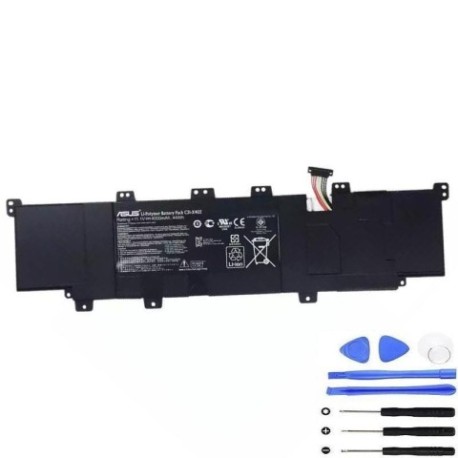
Battery models & part numbers
| Reference / P/N |
|---|
| 0B200-00300000 |
| 0B200-00300100 |
| 0B200-00300200 |
| 0B200-00300300 |
| 0B200-00300400 |
| Asus-C31-X402-44Wh |
| ICP615490L1 LG |
Compatible models
| Model |
|---|
| Asus VivoBook S300 |
| Asus VivoBook S300C |
| Asus VivoBook S300CA |
| Asus VivoBook S300E |
| Asus VivoBook S400 |
| Asus VivoBook S400C |
| Asus VivoBook S400CA |
| Asus VivoBook S400E |
| Asus VivoBook S500CA |
| Asus VivoBook S550CA |
| Asus VivoBook X402 |
| Asus VivoBook X402C |
| Asus VivoBook X402CA |
Introduction
The ASUS C31 X402 44Wh battery serves as the power source for multiple VivoBook models popular in Australia and New Zealand. These lightweight laptops are favoured by students, professionals, and casual users alike for their portability and performance. However, like all lithium-ion batteries, they gradually lose capacity over time and with usage cycles.
Understanding when and how to replace your battery can save you from unexpected shutdowns during important work or study sessions. Many users report noticeable battery degradation after 18-24 months of regular use, particularly in warmer Australian climates where heat accelerates battery aging.
Common signs you need a replacement
| Symptom | Cause | Verification | Recommendation |
|---|---|---|---|
| Rapid power drain | Reduced battery capacity | Check battery health in Windows | Consider replacement if under 2 hours |
| Laptop shuts down unexpectedly | Battery can’t maintain voltage | Monitor battery percentage drops | Replace to prevent data loss |
| Battery won’t charge fully | Charging circuit issues | Check charging indicator | Test with different charger first |
| Laptop bulging or uneven | Battery swelling | Visual inspection | Replace immediately – safety risk |
| Overheating during use | Battery internal resistance | Feel bottom case temperature | Replace to prevent damage |
How to check compatibility
Before purchasing any replacement battery, verifying compatibility is crucial. For ASUS VivoBook owners in Australia and New Zealand, several methods exist to confirm your laptop’s exact model and battery requirements.
Finding Your Model Information: The easiest way is to check the bottom case of your laptop. Look for a sticker or engraved text showing the complete model name. For VivoBook S300, S400, S500, and X402 series, this should be clearly marked. You can also check through Windows System Information (press Windows key + R, type “msinfo32”, and look for System Model).
Using Official Tools: ASUS provides support tools on their Australian and New Zealand websites where you can enter your serial number or model to access compatible parts. The MyASUS app (available on supported models) also displays battery information and health status.
Physical Inspection: If you’re comfortable doing so, you can remove the current battery (after proper shutdown) and check the part number printed on it. The C31 X402 44Wh battery measures approximately 207mm x 138mm x 5mm and features a specific connector type compatible with these VivoBook models.
When to replace
Timing your battery replacement correctly balances cost with performance needs. Most ASUS VivoBook batteries last 2-3 years with typical use in Australian conditions. Consider replacement when:
- Battery life drops below 50% of original capacity
- Your laptop can’t complete important tasks on battery power
- You notice physical changes like swelling
- System warnings indicate battery replacement needed
- You’re planning extended travel or remote work
Many Australian users find the autumn months ideal for battery replacement, avoiding extreme summer temperatures that can affect battery performance during the break-in period.
Installation guide
Replacing the battery in your ASUS VivoBook is generally straightforward. Before beginning, ensure you have a clean, static-free workspace and the correct tools – typically a small Phillips head screwdriver.
Step 1: Preparation
Shut down your laptop completely and disconnect the AC adapter. Turn the laptop over and place it on a soft surface to prevent scratching.
Step 2: Access the Battery
For most VivoBook models compatible with the C31 X402 battery, you’ll need to remove the bottom panel. Locate and remove all screws securing the panel. Some models may have screws of different lengths, so keep them organised.
Step 3: Disconnect Old Battery
Once the panel is removed, locate the battery connector. Gently disconnect it from the motherboard. You may need to release a locking mechanism first. Then remove any screws securing the battery itself.
Step 4: Install New Battery
Position the new C31 X402 44Wh battery in place, secure it with screws, and reconnect the battery cable firmly. Ensure the connection is secure but don’t force it.
Step 5: Reassembly and Testing
Replace the bottom panel and all screws. Connect the AC adapter and power on your laptop. The system should recognise the new battery automatically. Allow it to charge fully before first use.
Usage & care tips
Proper battery maintenance extends the life of your new C31 X402 44Wh battery and maintains optimal performance in Australian conditions:
- Avoid Extreme Temperatures: Don’t leave your laptop in hot cars or direct sunlight, especially during Australian summers. Ideal operating temperature is 10°C to 35°C.
- Charge Smartly: Lithium-ion batteries prefer partial discharges rather than full cycles. Try to keep between 20-80% charge for daily use.
- Storage Considerations: If storing your laptop for extended periods, charge to about 50% and store in a cool, dry place.
- Power Management: Use ASUS Battery Health Charging software (if available) to optimise charging patterns based on your usage.
- Regular Use: Batteries perform best when used regularly. If you primarily use your laptop plugged in, discharge the battery to 50% at least once a month.
Safety & recycling in AU/NZ
Battery safety and proper disposal are particularly important in Australia and New Zealand due to our strict environmental regulations.
Safety Precautions:
Never attempt to open or puncture a lithium-ion battery. If you notice any swelling, overheating, or unusual odour, stop using the battery immediately and contact professional disposal services. Always use genuine or high-quality replacement batteries from authorised retailers to ensure safety standards are met.
Recycling Options:
In Australia, most council waste centres accept laptop batteries for recycling. Major retailers like Officeworks and JB Hi-Fi also provide battery recycling bins. In New Zealand, the TechCollect NZ programme offers free recycling at participating locations. Never dispose of batteries in household rubbish as they can cause fire hazards in landfill.
Both countries have producer responsibility schemes where manufacturers like ASUS must provide or contribute to recycling programmes for their products.
FAQ
How long does the C31 X402 44Wh battery typically last?
With normal use, expect 2-3 years of good performance. Heavy users might see reduced capacity after 18 months, while light users might get 4 years or more.
Will replacing my battery void my ASUS warranty?
In Australia and New Zealand, consumer law protects your rights. Replacing the battery yourself shouldn’t void your overall warranty, though any damage caused during installation wouldn’t be covered. For peace of mind, consider using ASUS authorised service centres.
How do I calibrate my new battery?
After installation, charge fully to 100%, then use on battery until it shuts down (around 5-10%). Charge fully again without interruption. This helps the battery gauge accuracy.
Can I use a higher capacity battery?
No, you must use the specified 44Wh capacity. Higher capacity batteries may not fit physically or could cause compatibility issues with your VivoBook’s power management system.
My laptop won’t turn on after battery replacement – what should I do?
First, ensure the battery connector is firmly seated. Try holding the power button for 30 seconds with the AC adapter connected. Ifstill no power, disconnect the battery and AC adapter, then hold the power button for 60 seconds before reconnecting just the AC adapter. If issues persist, contact the retailer.
Is the C31 X402 battery compatible with both Australian and New Zealand power standards?
Yes, the battery itself is identical. The compatibility depends on your laptop’s internal power management, not regional power differences. Both AU and NZ use the same voltage standards (230V).
How can I maximise battery life in hot Australian climates?
Avoid leaving your laptop in direct sunlight or hot cars. Use power-saving modes, reduce screen brightness, and close unnecessary applications. Consider using a laptop cooling pad during summer months.
Replacing your ASUS VivoBook battery doesn’t have to be stressful. With the genuine C31 X402 44Wh battery and this comprehensive guide, you can restore your laptop’s mobility and performance. Whether you’re a student needing reliable power for classes, a professional working remotely, or simply want the freedom to use your laptop anywhere around your home, a fresh battery makes all the difference. Remember to recycle your old battery responsibly at one of the many collection points across Australia and New Zealand.