Battery models & part numbers
| Reference / P/N |
|---|
| Asus 0B200-02940000 |
| Asus C41N1731 |
| Asus-C41N1731-A-66Wh |
Compatible models
| Model |
|---|
| Asus G515GV |
| Asus G515GW |
| Asus G715GV |
| Asus G715GW |
| Asus GL504GM |
| Asus GL504GS |
| Asus GL504GV |
| Asus GL764GV |
| Asus GL764GW |
| Asus ROG GL504GM |
| Asus ROG GL504GV |
| Asus ROG GL504GW |
| Asus ROG SCAR II GL504 |
| Asus ROG SCAR II GL504GW |
| Asus ROG SCAR2 G715GV |
| Asus ROG Strix GL504 SCAR II |
| Asus ROG Strix GL504GM |
| Asus ROG Strix GL504GS |
| Asus ROG STRIX GL504GV |
| Asus ROG Strix GL504GW |
| Asus ROG Strix Hero II |
| Asus ROG STRIX HERO II G515GV |
| Asus ROG STRIX HERO II GL504GV |
| Asus ROG STRIX SCAR II G515GW |
| Asus ROG STRIX SCAR II G715GW |
| Asus ROG STRIX SCAR II GL504GV |
| Asus ROG Strix Scar II GL504GW |
Introduction
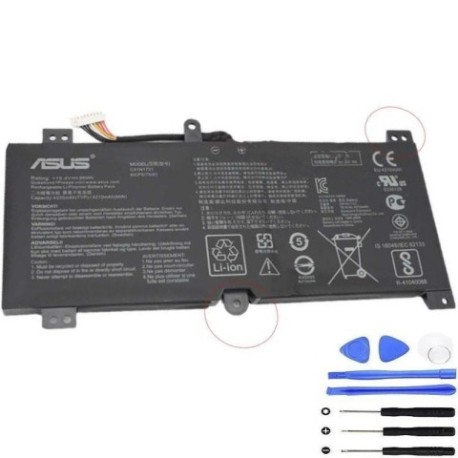
Keep your ASUS ROG gaming laptop performing at its peak with our genuine C41N1731 A 66Wh replacement battery. Compatible with multiple ROG Strix and Scar II models across the G-series range.
Common signs you need a replacement
| Symptom | Cause | Verification | Recommendation |
|---|---|---|---|
| Battery drains quickly during gaming | High-performance components drawing more power than aged battery can supply | Check battery health in Windows Power Report | Replace if capacity below 60% of original |
| Laptop shuts down unexpectedly | Battery can’t maintain stable voltage under load | Monitor battery voltage during gaming sessions | Immediate replacement recommended |
| Battery won’t charge to 100% | Cell degradation and charge circuit issues | Check charging status in ASUS Battery Health Charging utility | Replace if maximum charge below 80% |
| Laptop bulging or battery swelling | Gas buildup from chemical breakdown | Visual inspection of battery compartment | Stop using immediately and replace |
| Overheating during charging | Internal resistance increase in aged cells | Monitor temperature with HWMonitor software | Replace if temperatures exceed 45°C |
How to check compatibility
To verify your ASUS ROG laptop’s compatibility with the C41N1731 battery:
- Locate your model number – Check the bottom label of your laptop or type “msinfo32” in Windows search to find System Model
- Cross-reference with our compatibility list – Match your exact model against our verified compatible models table
- Use ASUS official tools – Visit the ASUS support centre and enter your serial number for official part compatibility
- Physical verification – Remove your current battery (if safe) and compare connector type and physical dimensions (typically 205mm x 60mm x 5mm)
When to replace
Replace your ASUS battery when: battery life drops below 2 hours for normal use, charging cycles exceed 500, physical swelling occurs, or system reports battery health below 60%. For gaming laptops used frequently, consider replacement every 18-24 months.
Installation guide
- Power off laptop completely and disconnect AC adapter
- Flip laptop over and locate battery compartment release latches
- Slide latches to unlock and carefully remove old battery
- Align new C41N1731 battery connector with motherboard port
- Gently press until connector clicks into place
- Secure battery with compartment latches
- Connect AC adapter and charge for 4 hours before first use
- Calibrate battery by charging to 100%, then discharging to 5%
Usage & care tips
- Maintain battery between 20-80% charge for daily use to extend lifespan
- Avoid exposing laptop to temperatures above 35°C during charging
- Use ASUS Battery Health Charging utility to set maximum charge level
- Perform full calibration cycle monthly for accurate battery reporting
- Store in cool, dry environment if not used for extended periods
Safety & recycling in AU/NZ
In Australia and New Zealand, lithium-ion batteries must be recycled responsibly. Do not dispose in household waste. Use authorised battery recycling programmes available at most electronics retailers, council waste centres, or through Batteryback programmes. Damaged or swollen batteries should be handled with care and taken to specialised recycling facilities immediately.
FAQ
How long does shipping take to AU/NZ?
Standard shipping to Australia and New Zealand typically takes 7-14 business days. Express options available for faster delivery.
Is this battery genuine ASUS?
Yes, this is an original ASUS C41N1731 battery with full manufacturer specifications and compatibility.
What warranty is provided?
All our ASUS replacement batteries come with 12 months warranty covering manufacturing defects and performance issues.
Will this battery work with my ROG Strix Hero II?
Yes, the C41N1731 is fully compatible with all ROG Strix Hero II models including G515GV and GL504GV variants.
How do I maximise battery lifespan?
Use the ASUS Battery Health Charging utility to limit maximum charge to 60-80% for daily use, only charging to 100% when needed for extended unplugged sessions.
Can I install this battery myself?
Yes, most ASUS ROG laptops feature user-replaceable batteries with simple latch mechanisms. Follow our installation guide for safe replacement.
What if my model isn’t listed?
Contact our support team with your exact model number and serial number for personalised compatibility verification.