Battery models & part numbers
| Reference / P/N |
|---|
| 0B200-03020000 |
| Asus-C41N1805-50Wh |
Compatible models
| Model |
|---|
| Asus GX531GM |
| Asus GX531GS |
| Asus GX531GW |
| Asus GX531GX |
| Asus ROG GX531GV |
| Asus ROG GX531GXR |
| Asus ROG Zephyrus S GX531 |
| Asus ROG Zephyrus S GX531G |
| Asus ROG Zephyrus S GX531GM |
| Asus ROG Zephyrus S GX531GS |
| Asus ROG Zephyrus S GX531GWR |
| Asus ROG Zephyrus S GX531GX |
| Asus ROG Zephyrus S GX531GXR |
| Asus Zephyrus GX531GXR |
| Asus Zephyrus S GX531GM |
| Asus Zephyrus S GX531GS |
| Asus Zephyrus S GX531GX |
Introduction
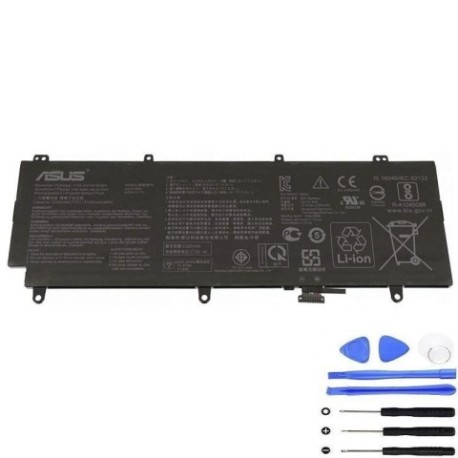
Keep your ASUS ROG Zephyrus S GX531 series laptop performing at its best with our genuine replacement battery. This 50Wh power solution restores your gaming laptop’s mobility and ensures reliable performance for work and play.
Common signs you need a replacement
| Symptoms | Causes | Verification | Recommendation |
|---|---|---|---|
| Battery drains quickly (under 1 hour) | Ageing cells, charge cycles | Check battery health in Windows | Immediate replacement |
| Laptop shuts down unexpectedly | Voltage drops under load | Monitor during gaming sessions | Urgent replacement needed |
| Battery won’t charge past 60-80% | Battery protection circuit | Check charging indicator | Replace to restore capacity |
| Laptop bulging or uneven surface | Battery swelling | Visual inspection | Stop use immediately |
| System reports “battery not detected” | Connection issues or failure | Device Manager check | Professional assessment |
How to check compatibility
For ASUS ROG Zephyrus S GX531 models, locate the model number on the bottom label near the serial number. The exact model (e.g., GX531GM, GX531GS) must match our compatibility list. You can also check through ASUS’s official support centre using your serial number or use their compatibility checker tool online.
When to replace
Replace your battery when it holds less than 50% of its original capacity, shows physical damage, or causes system instability. For gaming laptops like the Zephyrus S series, optimal battery health is crucial for peak performance during mobile use.
Installation guide
For GX531 models: Power off completely, remove all cables. Use a plastic spudger to carefully remove the bottom panel (start from vents). Disconnect the battery connector from motherboard. Remove screws securing battery. Lift battery out and replace with new unit. Reverse steps for reassembly. Always use anti-static precautions.
Usage & care tips
Avoid complete discharges; charge between 20-80% for longevity. Store at room temperature (15-25°C). Don’t leave plugged in constantly. Calibrate monthly by charging to 100% then discharging to 5%. Keep ventilation clear for proper cooling.
Safety & recycling in AU/NZ
In Australia and New Zealand, lithium-ion batteries must be recycled at authorised collection points. Never dispose in household waste. Check with your local council for battery recycling programmes. Damaged batteries should be handled by professionals due to fire risk.
FAQ
Q: Is this battery genuine ASUS?
A: Yes, this is an original ASUS C41N1805-50Wh battery with full compatibility.
Q: How long does installation take?
A: Approximately 15-20 minutes with basic tools and careful handling.
Q: Will this affect my warranty?
A: In AU/NZ, replacing the battery yourself may void remaining warranty – check with ASUS first.
Q: What’s the battery lifespan?
A: Typically 2-3 years with normal use, or 300-500 charge cycles.
Q: Can I use this with different ASUS models?
A: Only with the compatible GX531 models listed – using with other models may cause damage.
Q: How do I recycle my old battery?
A> Use council e-waste services or return to authorised ASUS service centres.