Dell 4P8PH 56Wh Laptop Battery Replacement
Keep your Dell Inspiron running at peak performance with our genuine 56Wh replacement battery. Authorised supplier with fast delivery across Australia and New Zealand.
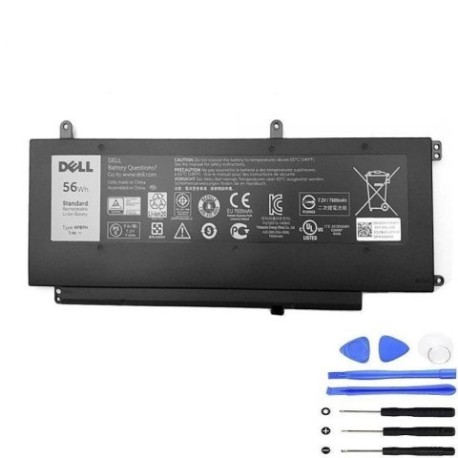
Battery models & part numbers
| Reference / P/N |
|---|
| 04P8PH |
| 4P8PH |
| Dell-4P8PH |
Compatible laptop models
| Model |
|---|
| Dell Inspiron 15 7000 |
| Dell Inspiron 15 7547 |
| Dell Inspiron 15 7548 |
| Dell Inspiron G05H0 5000 N7547 N7548 |
Introduction
The Dell 4P8PH 56Wh battery is designed specifically for Inspiron 15 7000 series laptops, providing reliable power for work, study, and entertainment across Australia and New Zealand.
Common signs you need a replacement
| Symptoms | Causes | Verification | Recommendation |
|---|---|---|---|
| Battery drains quickly (under 1 hour) | Ageing cells, reduced capacity | Check battery health in Windows | Replace if capacity below 60% |
| Laptop won’t hold charge | Faulty battery circuit | Test with power adapter only | Immediate replacement needed |
| Battery swelling or overheating | Internal damage, safety risk | Visual inspection, temperature check | Replace immediately, recycle old |
| Inconsistent charging | Worn connectors, aged battery | Monitor charging patterns | Replace for reliable performance |
How to check compatibility
Verify your laptop model matches our compatibility list above. Check your current battery’s part number (usually printed on the battery) or use Dell’s support centre website with your service tag.
When to replace
Replace your battery when runtime drops below 60 minutes, charging becomes unreliable, or physical damage/swelling occurs. Most batteries last 2-3 years with regular use.
Installation guide (overview)
Power off and unplug your laptop. Remove the bottom panel (usually 8-10 screws). Disconnect the old battery connector and remove mounting screws. Install the new battery, reconnect, and reassemble. Full video guides available on our support centre.
Usage & care tips
Avoid extreme temperatures (ideal range 15-25°C). Don’t leave laptop plugged in constantly. Calibrate monthly by fully draining then charging. Store in cool, dry place if not used for extended periods.
Safety & recycling in AU/NZ
Never puncture or disassemble batteries. Recycle at authorised e-waste centres across Australia and New Zealand. Many office supply stores and council facilities accept old laptop batteries free of charge.
FAQ
How long does delivery take in Australia?
Most metro areas receive orders within 2-3 business days. Regional areas may take 3-5 business days.
Is this battery genuine Dell?
Yes, we supply original Dell batteries with full manufacturer warranty and Australian compliance.
What’s the warranty period?
All our Dell batteries come with 12 months warranty from date of purchase.
Can I install this myself?
Yes, most users can install following our guide. Basic screwdriver skills required. Professional installation available if preferred.
How do I recycle my old battery?
Drop off at any Battery World, Officeworks, or council recycling centre across Australia and New Zealand.
What if it doesn’t fit my laptop?
Check compatibility before purchase. We offer 30-day returns for incompatible items (unopened).
Is fast charging supported?
Yes, this battery supports Dell’s ExpressCharge technology for rapid charging capability.