Battery models & part numbers
| Reference / P/N |
|---|
| 07PWXV |
| 0DT9XG |
| 7PWKV |
| DT9XG |
| Dell-DT9XG-90Wh |
| KJYFY |
Compatible laptop models
| Model |
|---|
| Dell Alienware Area 51m ALWA51M-D1733B |
| Dell Alienware Area 51m ALWA51M-D1733PB |
| Dell Alienware Area 51m ALWA51M-D1735DB |
| Dell Alienware Area 51m ALWA51M-D1741DB |
| Dell Alienware Area 51m ALWA51M-D1746B |
| Dell Alienware Area 51m ALWA51M-D1746W |
| Dell Alienware Area 51m ALWA51M-D1748DB |
| Dell Alienware Area 51m ALWA51M-D1748DW |
| Dell Alienware Area 51m ALWA51M-D1766B |
| Dell Alienware Area 51m ALWA51M-D1766PB |
| Dell Alienware Area 51m ALWA51M-D1766PW |
| Dell Alienware Area 51m ALWA51M-D1766W |
| Dell Alienware Area 51m ALWA51M-D1968B |
| Dell Alienware Area 51m ALWA51M-D1968W |
| Dell Alienware Area 51m ALWA51M-D1969PW |
| Dell Alienware Area-51m |
| Dell Alienware Area-51M ALWA51M-1766PB |
| Dell Alienware Area-51m ALWA51M-D1969DB |
| Dell Alienware Area-51m i9-9900K RTX 2080 |
| Dell Alienware Area-51m P38E P38E001 |
| Dell Alienware Area-51m R2 |
Introduction
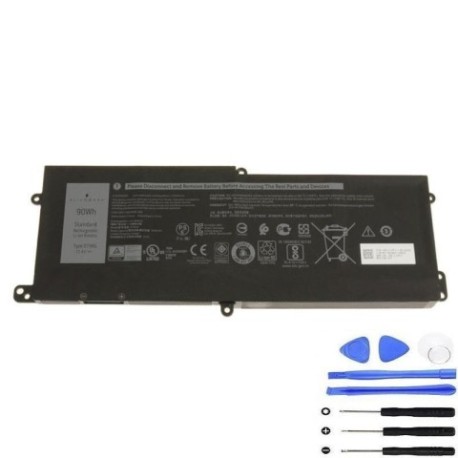
Keep your Dell Alienware Area 51m performing at its peak with our genuine replacement battery. This 90Wh power solution ensures maximum gaming performance and mobility for Australian and New Zealand users.
Common signs you need a replacement
| Symptom | Cause | Verification | Recommendation |
|---|---|---|---|
| Short battery life | Ageing cells | Check power settings | Consider replacement |
| Laptop won’t hold charge | Battery degradation | Monitor charge cycles | Replace battery |
| Swelling/bulging | Internal damage | Visual inspection | Replace immediately |
| Overheating during use | Failing components | Check temperature | Professional assessment |
How to check compatibility
Verify your laptop model matches our compatibility list above. Check your current battery’s part number or consult your device’s system information.
When to replace
Replace your battery when you notice significant performance decline, typically after 2-3 years of regular use or 300-500 charge cycles.
Installation guide (overview)
Power off your laptop, disconnect all cables, and remove the bottom panel. Carefully disconnect the old battery and install the new one, ensuring proper alignment.
Usage & care tips
Avoid extreme temperatures (store between 15-25°C), don’t fully discharge regularly, and use authorised chargers only. Calibrate monthly for optimal performance.
Safety & recycling in AU/NZ
Dispose of old batteries at designated recycling centres. Never incinerate or dispose in household waste. Check with your local council for battery recycling options.
FAQ
How long does delivery take in Australia?
Typically 3-7 business days depending on your location.
Is this battery genuine Dell?
Yes, this is an authentic Dell replacement battery with full compatibility.
What’s the warranty period?
12 months warranty from date of purchase.
Can I use this with Area 51m R2?
Yes, this battery is fully compatible with Area 51m R2 models.
How do I check my current battery health?
Use Dell Power Manager or check battery report in Windows settings.
What’s the battery capacity?
90Wh capacity providing extended gaming sessions.
Is installation difficult?
Moderate difficulty – recommended for users comfortable with laptop disassembly.