Battery models & part numbers
| Reference / P/N |
|---|
| Dell-V6W33-54Wh |
Compatible laptop models
| Model |
|---|
| Dell 0MVK11 |
| Dell 0WV3K8 |
| Dell 0XDY9K |
| Dell 0XPHX8 |
| Dell Inspiron 13 (5310) |
| Dell Inspiron 13 (5310-NJ24J) |
| Dell Inspiron 13 5000 (5310) |
| Dell Inspiron 13 5000 (5320) |
| Dell Inspiron 13 5000 (5330) |
| Dell Inspiron 14 (5410) |
| Dell Inspiron 14 (5410-23WHR) |
| Dell Inspiron 14 (5410-3TDPT) |
| Dell Inspiron 14 (5410-D3D7T) |
| Dell Inspiron 14 2in1 (5410) |
| Dell Inspiron 14 2in1 (5410-1MGGN) |
| Dell Inspiron 14 2in1 (5410-23WHR) |
| Dell Inspiron 14 2in1 (5410-D3D7T) |
| Dell Inspiron 14 2in1 (7415) |
| Dell Inspiron 14 2in1 (7415-30G0C) |
| Dell Inspiron 14 2in1 (7415-40G6X) |
| Dell Inspiron 14 2in1 (7415-4JM09) |
| Dell Inspiron 14 2in1 (7415-6JDWR) |
| Dell Inspiron 14 2in1 (7415-97Y33) |
| Dell Inspiron 14 5000 (5410) |
| Dell Inspiron 14 5000 (5410) 2-in-1 |
| Dell Inspiron 14 5000 (5420) |
| Dell Inspiron 14 5000 (5425) |
| Dell Inspiron 14 5000 (5430) |
| Dell Inspiron 14 5000 (5435) |
| Dell Inspiron 14 7000 (7415) 2-in-1 |
| Dell Inspiron 14 7000 (7420) |
| Dell Inspiron 14 7000 (7420) 2-in-1 |
| Dell Inspiron 14 7000 (7430) |
| Dell Inspiron 14 7000 (7430) 2-in-1 |
| Dell Inspiron 14 7000 (7435) 2-in-1 |
| Dell Inspiron 15 (3515) |
| Dell Inspiron 15 (3515-8D7JD) |
| Dell Inspiron 15 (3515-JGFMM) |
| Dell Inspiron 15 (3515-XN1DN) |
| Dell Inspiron 15 (3521) |
| Dell Inspiron 15 (5515) |
| Dell Inspiron 15 (5515-25HGV) |
| Dell Inspiron 15 (5515-H8P8F) |
| Dell Inspiron 15 (5515-TYH1P) |
| Dell Inspiron 15 3000 (3511) |
| Dell Inspiron 15 3000 (3515) |
| Dell Inspiron 15 3000 (3521) |
| Dell Inspiron 15 3000 (3525) |
| Dell Inspiron 15 3000 (3530) |
| Dell Inspiron 15 3000 (3535) |
| Dell Inspiron 15 3000 3520 (launched in 2022) |
| Dell Inspiron 15 5000 (5510) |
| Dell Inspiron 15 5000 (5515) |
| Dell Inspiron 16 5000 (5620) |
| Dell Inspiron 16 5000 (5625) |
| Dell Inspiron 16 5000 (5630) |
| Dell Inspiron 16 5000 (5635) |
| Dell Inspiron 16 7000 (7635) 2-in-1 |
| Dell Latitude 13 (3320) |
| Dell Latitude 13 (3320-77XDV) |
| Dell Latitude 13 (3320-86P9N) |
| Dell Latitude 13 (3320-D6N9J) |
| Dell Latitude 13 (3320-JDGF6) |
| Dell Latitude 14 (3420) |
| Dell Latitude 14 (3420-06WR7) |
| Dell Latitude 14 (3420-27D71) |
| Dell Latitude 14 (3420-538R1) |
| Dell Latitude 14 (3420-75CF4) |
| Dell Latitude 14 (3420-938DV) |
| Dell Latitude 14 (3420-DDT4X) |
| Dell Latitude 14 (3420-HPP2C) |
| Dell Latitude 14 (3420-WNC19) |
| Dell Latitude 14 (3420-WY3FJ) |
| Dell Latitude 14 (5430) Chromebook |
| Dell Latitude 15 (3520) |
| Dell Latitude 15 (3520-4NRX2) |
| Dell Latitude 15 (3520-7D36T) |
| Dell Latitude 15 (3520-KRJDV) |
| Dell Latitude 15 (3520-R3D2W) |
| Dell Latitude 15 (3520-WCCGF) |
| Dell Latitude 3320 |
| Dell Latitude 3330 |
| Dell Latitude 3420 |
| Dell Latitude 3430 |
| Dell Latitude 3520 |
| Dell Latitude 3530 |
| Dell Latitude Chromebook 14 5430 |
| Dell Vostro 13 (5320) |
| Dell Vostro 13 5000 (5310) |
| Dell Vostro 13 5000 (5320) |
| Dell Vostro 14 (3425) |
| Dell Vostro 14 (5410) |
| Dell Vostro 14 3000 (3420) |
| Dell Vostro 14 3000 (3430) |
| Dell Vostro 14 3000 (3435) |
| Dell Vostro 14 5000 (5410) |
| Dell Vostro 15 3000 (3510) |
| Dell Vostro 15 3000 (3520) |
| Dell Vostro 15 3000 (3530) |
| Dell Vostro 15 3000 (3535) |
| Dell Vostro 15 5000 (5510) |
| Dell Vostro 16 5000 (5620) |
| Dell WV3K8 |
| Dell XDY9K |
| Dell XPHX8 |
Introduction
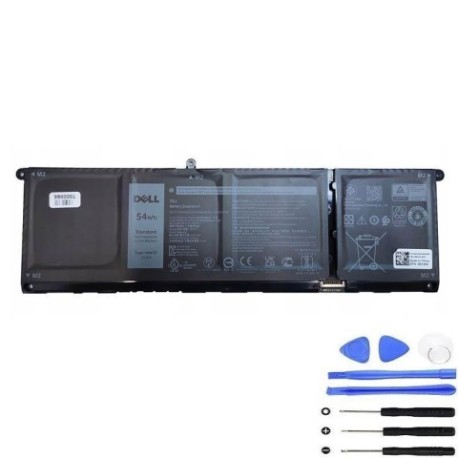
If your Dell laptop is showing signs of battery fatigue, our authorised Dell V6W33 54Wh replacement battery offers reliable performance for numerous Inspiron, Latitude, and Vostro models across Australia and New Zealand.
Common signs you need a replacement
| Symptom | Cause | Verification | Recommendation |
|---|---|---|---|
| Short battery life | Ageing cells, reduced capacity | Check power settings, monitor usage | Consider replacement if under 2 hours |
| Laptop shuts down unexpectedly | Voltage drops under load | Test under normal workload | Replace immediately |
| Battery won’t charge fully | Charging circuit failure | Check charging indicator | Replace battery |
| Swelling or physical damage | Internal chemical breakdown | Visual inspection | Replace urgently for safety |
How to check compatibility
Verify your laptop model matches our compatibility list above. Check your current battery’s part number (usually printed on the battery) or use Dell’s online support centre with your service tag.
When to replace
Replace your battery when it holds less than 50% of its original capacity, shows physical damage, or causes system instability. Most laptop batteries last 2-3 years with regular use.
Installation guide (overview)
1. Power off laptop and disconnect charger
2. Remove bottom panel screws
3. Carefully disconnect old battery connector
4. Install new battery and reconnect
5. Replace panel and power on
Always consult your device’s service manual for specific instructions.
Usage & care tips
• Avoid extreme temperatures (ideal range 15-25°C)
• Don’t leave laptop plugged in constantly
• Perform occasional full discharge cycles
• Store at 40-60% charge if not using for extended periods
Safety & recycling in AU/NZ
Batteries contain hazardous materials. In Australia, use Batteryback or council recycling programmes. In New Zealand, utilise accredited e-waste recycling centres. Never dispose of batteries in household waste.
FAQ
How long does delivery take in Australia?
Typically 3-7 business days depending on location.
Is this battery genuine Dell?
This is a high-quality compatible replacement meeting original specifications.
What warranty do you offer?
12-month warranty covering manufacturing defects.
Will this work with my specific model?
Check the compatibility table above for your exact model number.
How do I recycle my old battery?
Use local council e-waste services or dedicated battery recycling points.
What’s the battery capacity?
54Wh capacity, providing typical usage of 4-6 hours depending on model and settings.
Do you ship to New Zealand?
Yes, we ship to both Australia and New Zealand with similar delivery times.