Fujitsu FMVNBP233 45Wh Laptop Battery Replacement
Find the perfect replacement battery for your Fujitsu laptop with our comprehensive compatibility guide and expert installation advice.
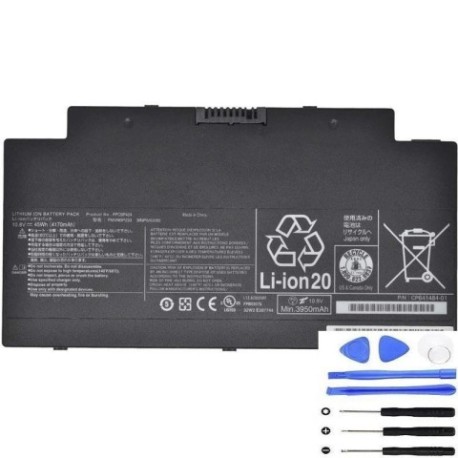
Battery models & part numbers
| Reference / P/N |
|---|
| 34049511 |
| CP700538-01 |
| CP700538-XX |
| FMVNBP233 |
| FPB0307S |
| FPCBP424 |
| FUJ:CP700538-XX |
| Fujitsu-FMVNBP233-45Wh |
Compatible laptop models
| Model |
|---|
| Fujitsu LifeBook A556 |
| Fujitsu LifeBook A556/G |
| Fujitsu Lifebook AH77 U727 AH77/S AH77/M AH556s |
| Fujitsu Stylistic Q736 |
| Fujitsu Stylistic Q775 |
Introduction
The Fujitsu FMVNBP233 45Wh battery is a high-quality replacement power solution designed specifically for compatible Fujitsu laptop models. This lithium-ion battery provides reliable performance and extended usage time for your mobile computing needs.
Common signs you need a replacement
| Symptoms | Causes | Verification | Recommendation |
|---|---|---|---|
| Battery drains quickly | Ageing cells, reduced capacity | Check battery health in system settings | Consider replacement if under 50% capacity |
| Laptop won’t hold charge | Failed battery cells | Test with power adapter disconnected | Immediate replacement needed |
| Battery swelling | Internal gas buildup | Visual inspection of battery case | Replace immediately for safety |
| Overheating during use | Inefficient power delivery | Monitor temperature with software | Replace to prevent damage |
How to check compatibility
Verify your laptop’s compatibility by checking the model number on the bottom casing or in system information. Cross-reference with our compatibility tables above. For tablets like the Stylistic series, check the original battery part number in device settings or physical labelling.
When to replace
Replace your battery when it no longer holds sufficient charge for your needs, shows physical damage or swelling, or fails to power your device without being connected to mains power. Most lithium-ion batteries last 2-3 years with regular use.
Installation guide (overview)
Power off your laptop and disconnect from mains. Remove the battery compartment cover (if applicable) or access panel. Carefully disconnect the old battery connector and remove any securing screws. Install the new battery, reconnect the connector, and secure with screws. Replace covers and charge fully before first use.
Usage & care tips
For optimal battery life, avoid complete discharges and store between 20-80% charge when possible. Keep your laptop in cool environments (15-25°C) and avoid leaving it in hot cars. Use only authorised chargers and perform occasional calibration cycles for accurate battery reporting.
Safety & recycling in AU/NZ
In Australia and New Zealand, lithium-ion batteries must be recycled through authorised collection centres. Never dispose of batteries in household waste due to fire risk. Many electronics retailers offer free battery recycling services. Check with your local council for specific disposal guidelines.
FAQ
How long does shipping take to AU/NZ?
Most orders arrive within 7-14 business days depending on your location and customs processing.
Is this battery genuine Fujitsu?
This is a high-quality compatible replacement battery that meets or exceeds original specifications.
What warranty do you offer?
Our batteries come with a 12-month warranty covering manufacturing defects.
Can I use this battery with different Fujitsu models?
Only use with compatible models listed in our tables to ensure proper fit and function.
How do I maximise battery lifespan?
Avoid extreme temperatures, don’t leave plugged in constantly, and perform occasional full charge cycles.
Is installation difficult?
Most Fujitsu laptop batteries are user-replaceable with basic tools. Follow our installation guide or consult a professional if unsure.
Do you provide technical support?
Yes, our support team can assist with compatibility questions and installation guidance.