Battery models & part numbers
| Reference / P/N |
|---|
| 01A-Z180314 |
| 02A-Z16062300 |
| 1544-3531 |
| 34045888 |
| 34046616 |
| 34046759 |
| 34062524 |
| 34063177 |
| 34067780 |
| 34068255 |
| 34068319 |
| 38035305 |
| 38035306 |
| 38037479 |
| 38039797 |
| 38039798 |
| 38039799 |
| 38039800 |
| 38041041 |
| 38043985 |
| 38045976 |
| 38045977 |
| 38045978 |
| 38046029 |
| 38046627 |
| 38060903 |
| CP629842-XX |
| CP629843-XX |
| CP645580-01 |
| CP651527-01 |
| CP651527-XX |
| CP651529-01 |
| CP651529-XX |
| CP656337-XX |
| CP656338-XX |
| CP656339-XX |
| CP656340-01 |
| CP656340-XX |
| CP671396-01 |
| CP671396-XX |
| CP671397-01 |
| CP671397-XX |
| CP671398-XX |
| CP700279-XX |
| CP700280-01 |
| CP700281-01 |
| CP700281-XX |
| CP700282-01 |
| CP700282-02 |
| CP700283-01 |
| CP700283-XX |
| CP700285-01 |
| CP700285-02 |
| CP700286-02 |
| CP753170-01 |
| CP753172 |
| CP753172-01 |
| CP753173-01 |
| FMVNBP227 |
| FMVNBP227A |
| FMVNBP228 |
| FMVNBP231 |
| FMVNBP234 |
| FPB0297S |
| FPB0298S |
| FPB0311S |
| FPB0313S |
| FPCBC041 |
| FPCBP404 |
| FPCBP404BP |
| FPCBP404BQ |
| FPCBP405 |
| FPCBP416 |
| FPCBP426 |
| FPCBP429 |
| FUJ:CP629842-XX |
| FUJ:CP629843-XX |
| FUJ:CP645580-01 |
| FUJ:CP651527-XX |
| FUJ:CP651529-XX |
| FUJ:CP656337-XX |
| FUJ:CP656338-XX |
| FUJ:CP656339-XX |
| FUJ:CP656340-XX |
| FUJ:CP656352-XX |
| FUJ:CP671397-XX |
| FUJ:CP700279-XX |
| FUJ:CP700280-01 |
| FUJ:CP700280-XX |
| FUJ:CP700281-XX |
| FUJ:CP700282-XX |
| FUJ:CP700283-XX |
| FUJ:CP708751-XX |
| FUJ:CP708752-XX |
| FUJ:CP753170-XX |
| FUJ:CP753171-XX |
| FUJ:CP753172-XX |
| FUJ:CP753173-XX |
| FUJ:CP753175-XX |
| Fujitsu-FMVNBP235-72Wh |
| S26391-F1246-L200 |
| S26391-F1316-B200 |
| S26391-F1316-E200 |
| S26391-F1316-L200 |
| S26391-F1386-L100 |
Compatible laptop models
| Model |
|---|
| LifeBook A357 |
| LifeBook A359 |
| LifeBook A514 |
| LifeBook A544 |
| LifeBook A555 |
| LifeBook A555/G |
| LifeBook A557 |
| LifeBook AH544 |
| LifeBook AH544/G32 |
| LifeBook AH564 |
| LifeBook E544 |
| LifeBook E546 |
| LifeBook E547 |
| LifeBook E554 |
| LifeBook E556 |
| LifeBook E557 |
| LifeBook E733 |
| LifeBook E734 |
| LifeBook E736 |
| LifeBook E743 |
| LifeBook E744 |
| LifeBook E746 |
| LifeBook E753 |
| LifeBook E754 |
| LifeBook E756 |
| LifeBook S904 |
| LifeBook S935 |
| LifeBook S936 |
| LifeBook S937 |
Introduction
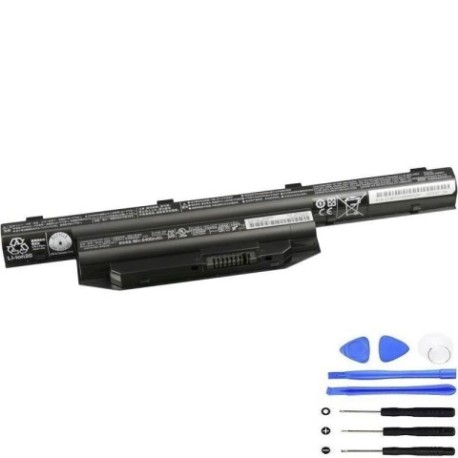
Is your Fujitsu laptop not holding charge like it used to? The Fujitsu FMVNBP235 72Wh replacement battery is the authorised solution for dozens of Fujitsu LifeBook models across Australia and New Zealand. This high-capacity battery delivers reliable performance and extended usage time for your business or personal computing needs.
Common signs you need a replacement
| Symptom | Cause | Verification | Recommendation |
|---|---|---|---|
| Battery drains quickly | Reduced capacity from age/cycles | Check battery health in system settings | Replace if capacity below 60% |
| Laptop shuts down unexpectedly | Voltage drops under load | Monitor during intensive tasks | Immediate replacement needed |
| Battery won’t charge fully | Charging circuit degradation | Check charging percentage | Replace to prevent damage |
| Battery swelling/bulging | Internal chemical breakdown | Visual inspection | Replace immediately – safety risk |
| Overheating during use | Internal resistance increase | Monitor temperature | Replace to prevent damage |
How to check compatibility
Verify your laptop’s compatibility by checking the battery compartment for part numbers matching those listed above. You can also check your system information in Windows (type “msinfo32” in Run) or check the original battery’s label. All compatible models and part numbers are listed in the tables above for easy reference.
When to replace
Replace your battery when it holds less than 60% of its original capacity, shows physical damage or swelling, or fails to charge properly. Most laptop batteries need replacement after 2-3 years of regular use. Don’t wait until complete failure – proactive replacement ensures uninterrupted productivity.
Installation guide (overview)
1. Power off your laptop and disconnect the charger
2. Remove the old battery (usually secured with latches or screws)
3. Insert the new Fujitsu FMVNBP235 battery, ensuring proper alignment
4. Secure the battery in place
5. Charge fully before first use for optimal performance
Always refer to your laptop’s user manual for specific instructions.
Usage & care tips
• Avoid extreme temperatures (ideal range 15-25°C)
• Don’t leave laptop plugged in constantly
• Perform occasional full discharge cycles
• Store at 40-60% charge if not using for extended periods
• Keep battery contacts clean and dry
Safety & recycling in AU/NZ
Never attempt to open or modify the battery. Dispose of old batteries responsibly at authorised recycling centres – most electronics retailers in Australia and New Zealand offer free battery recycling services. Do not dispose of in household waste due to environmental regulations.
FAQ
How long does this battery last?
Typically 2-3 years with normal use, or 500-800 charge cycles.
Is this battery compatible with my specific LifeBook model?
Check the compatibility tables above – if your model or part number is listed, it’s compatible.
Do you ship to both Australia and New Zealand?
Yes, we ship to both countries with reliable delivery services.
What warranty do you offer?
This battery comes with a 12-month warranty covering manufacturing defects.
How do I maximise battery life?
Avoid full discharges, keep between 20-80% charge when possible, and store in cool conditions.
Can I use this battery if my original had different specifications?
Only if your laptop model and part number match the compatibility lists provided.
What if the battery doesn’t fit my laptop?
Double-check your laptop’s model number and battery part number against our compatibility lists before purchase.