Battery models & part numbers
| Reference / P/N |
|---|
| 34037484 |
| 34045895 |
| 34050040 |
| 38017114 |
| 38018055 |
| 38023044 |
| CP293530-01 |
| CP293530-03 |
| CP293550-XX |
| CP293570-01 |
| CP293590-01 |
| CP293590-02 |
| CP458102-01 |
| CP458102-XX |
| CP470834-XX |
| CP483691-02 |
| CP518202-01 |
| CP518584-XX |
| CP556150-01 |
| CP556150-02 |
| CP556150-XX |
| CP669832-01 |
| CP669832-XX |
| CP704821-01 |
| CP704821-XX |
| FMVNBP146 |
| FMVNBP210 |
| FPB0221 |
| FPB0262 |
| FPCBP282 |
| Fujitsu-FPCBP325-72Wh |
| FUJ:CP293530-03 |
| FUJ:CP293530-XX |
| FUJ:CP293550-XX |
| FUJ:CP293570-01 |
| FUJ:CP293590-01 |
| FUJ:CP458102-XX |
| FUJ:CP470834-XX |
| FUJ:CP518584-XX |
| FUJ:CP556150-XX |
| FUJ:CP669832-XX |
| FUJ:CP704821-XX |
| S26391-F514-L200 |
Compatible laptop models
| Model |
|---|
| Fujitsu LifeBook E752 |
| Fujitsu LifeBook E782 |
| Fujitsu LifeBook P701 |
| Fujitsu LifeBook P770 |
| Fujitsu LifeBook P771 |
| Fujitsu LifeBook P772 |
| Fujitsu LifeBook P8110 |
| Fujitsu LifeBook S710 |
| Fujitsu LifeBook S751 |
| Fujitsu LifeBook S760 |
| Fujitsu LifeBook S761 |
| Fujitsu LifeBook T580 |
Introduction
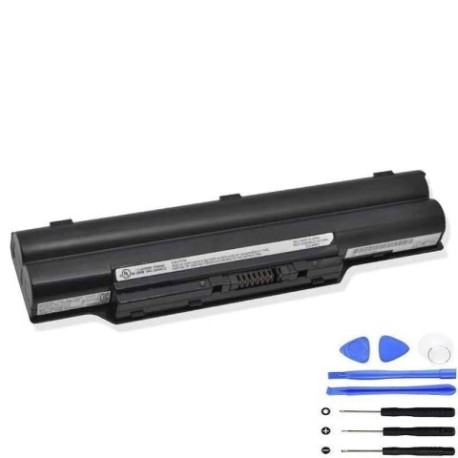
Keep your Fujitsu laptop running at peak performance with our genuine replacement battery. Compatible with multiple LifeBook models and part numbers across Australia and New Zealand.
Common signs you need a replacement
| Symptom | Cause | Verification | Recommendation |
|---|---|---|---|
| Battery drains quickly | Reduced capacity from age/cycles | Check power settings & usage | Consider replacement if under 2 hours |
| Laptop shuts down unexpectedly | Battery can’t maintain voltage | Monitor battery health in system | Replace immediately for data safety |
| Battery won’t charge fully | Charging circuit or cell failure | Check charger and charging port | Replace if persistent charging issues |
| Physical swelling or overheating | Internal damage or manufacturing fault | Visual inspection and temperature check | Replace urgently – safety hazard |
| Battery age over 2-3 years | Normal degradation over time | Check purchase date or manufacture | Proactive replacement recommended |
How to check compatibility
Verify your laptop model matches our compatibility list above. Check your current battery’s part number (usually printed on the battery itself) against our reference numbers. For Australian and New Zealand customers, ensure you’re purchasing the correct regional variant.
When to replace
Replace your battery when it holds less than 50% of its original capacity, shows physical damage, or causes system instability. Most Fujitsu batteries last 2-3 years with regular use in AU/NZ conditions.
Installation guide (overview)
1. Power off laptop and disconnect charger
2. Remove old battery (usually slide-lock mechanism)
3. Insert new battery until it clicks into place
4. Charge fully before first use
5. Calibrate by charging to 100% then discharging to 5%
Usage & care tips
• Avoid extreme temperatures (ideal range 10-35°C)
• Store at 40-60% charge if not used for extended periods
• Use authorised Fujitsu chargers only
• Allow battery to cool before charging after heavy use
• Keep contacts clean and free from debris
Safety & recycling in AU/NZ
Batteries must be recycled responsibly. In Australia, use Batteryback or council e-waste services. In New Zealand, utilise accredited e-waste recyclers. Never dispose of lithium batteries in household waste due to fire risk.
FAQ
How long does delivery take in Australia?
Most metro areas receive delivery within 3-5 business days. Regional areas may take 5-7 business days.
Is this battery genuine Fujitsu?
Yes, this is an authentic Fujitsu replacement battery meeting all original specifications and safety standards.
What warranty do you offer?
All our batteries come with a 12-month warranty covering manufacturing defects and premature failure.
Will this work with my New Zealand purchased laptop?
Yes, our batteries are compatible with all regional variants of the supported Fujitsu models sold in NZ.
How do I recycle my old battery?
Contact your local council e-waste centre or use dedicated battery recycling programs available throughout Australia and New Zealand.
What’s the battery capacity?
This 72Wh battery provides extended runtime, typically 4-6 hours depending on usage and laptop model.
Do you provide installation service?
While we don’t offer installation services, our batteries are designed for easy DIY replacement with clear instructions provided.