HP BL04XL 56.2Wh Battery Replacement Guide
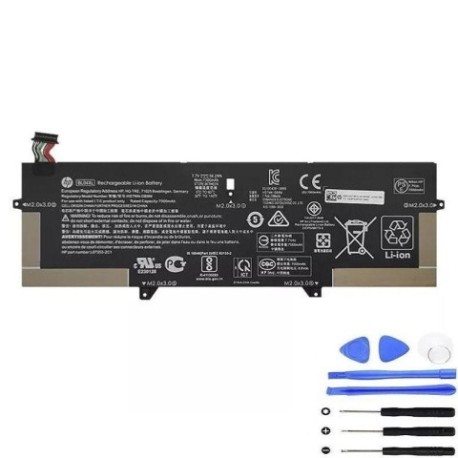
Battery models & part numbers
| Reference / P/N |
|---|
| HP-BL04XL-56.2Wh |
Compatible laptop models
| Model |
|---|
| HP EliteBook X360 1040 G5s |
| HP EliteBook X360 1040 G6s |
| HP HSTNN-DB8M |
| HP HSTNN-UB7N |
| HP L07041-855 |
| HP L07353-241 |
| HP L07353-2C1 |
| HP L07353-541 |
Introduction
Keep your HP EliteBook running at peak performance with our genuine HP BL04XL 56.2Wh replacement battery. This high-quality battery is specifically designed for compatibility with multiple HP EliteBook models commonly used in Australian and New Zealand workplaces.
Common signs you need a replacement
| Symptoms | Causes | Verification | Recommendation |
|---|---|---|---|
| Battery drains quickly | Ageing battery cells | Check battery health in system settings | Consider replacement if under 2 hours runtime |
| Laptop won’t hold charge | Battery degradation | Test with different power adapters | Replace if battery doesn’t charge properly |
| Battery swelling | Internal damage or overheating | Visual inspection of battery compartment | Replace immediately for safety |
| Overheating during use | Failing battery components | Monitor temperature with system tools | Replace to prevent damage to laptop |
How to check compatibility
Verify your laptop model matches one of the compatible models listed above. Check your laptop’s bottom label or system information in Windows Settings > System > About. The model number should exactly match one of the entries in our compatibility table.
When to replace
Replace your HP battery when you notice significant performance decline, typically after 2-3 years of regular use. Most batteries retain about 80% of their original capacity after 300-500 charge cycles. If your battery health shows “Replace Soon” or similar warnings, it’s time for a new one.
Installation guide (overview)
Power off your laptop and disconnect all cables. Remove the bottom panel using the appropriate screwdriver. Carefully disconnect the old battery connector and remove any securing screws. Install the new HP BL04XL battery, reconnect the connector, and reassemble your laptop. For detailed instructions, consult your laptop’s service manual or seek professional assistance.
Usage & care tips
For optimal battery life, avoid extreme temperatures (ideal range 15-25°C). Don’t leave your laptop plugged in constantly – occasional discharge cycles help maintain battery health. Store in a cool, dry place when not in use for extended periods. Use only HP-authorised chargers and accessories.
Safety & recycling in AU/NZ
In Australia and New Zealand, battery recycling is mandatory. Don’t dispose of old batteries in household waste. Take them to authorised collection points at electronics retailers or local council recycling centres. Damaged or swollen batteries should be handled with care and recycled immediately.
FAQ
How long does the HP BL04XL battery last?
Typically 2-4 years with normal use, or approximately 300-500 charge cycles.
Is this battery genuine HP?
Yes, this is an authentic HP BL04XL 56.2Wh replacement battery with full compatibility.
Do you offer warranty?
Yes, our batteries come with a standard 12-month warranty covering manufacturing defects.
How do I recycle my old battery in Australia?
Use Batteryback.org.au or drop at any Officeworks, Bunnings, or Aldi store with battery recycling bins.
What’s the delivery time to NZ?
Typically 5-7 business days to major New Zealand centres with express shipping options available.
Can I install this battery myself?
Yes, with basic technical skills and proper tools. However, professional installation is recommended if unsure.
What if my laptop model isn’t listed?
Contact our support team with your exact laptop model for compatibility verification.