HP BP02XL 41Wh Laptop Battery Replacement Guide
Find the perfect replacement battery for your HP laptop with our comprehensive AU/NZ guide. This HP BP02XL 41Wh battery is designed to restore your device’s performance and mobility.
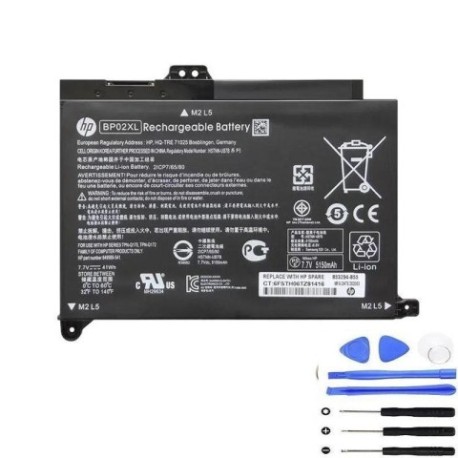
Battery models & part numbers
| Reference / P/N |
|---|
| HP BP02 |
| HP-BP02XL-41Wh |
Compatible laptop models
| Model |
|---|
| HP 15t-au000s |
| HP 15t-au100s |
| HP 849569-541 |
| HP 849909-850 |
| HP 849909-855 |
| HP Pavilion 15-AU 15-AWs |
| HP Pavilion 15-au000s |
| HP Pavilion 15-au100s |
| HP Pavilion 15-au500s |
| HP Pavilion 15-aw000s |
| HP TPN-Q172 |
| HP TPN-Q175 |
Common signs you need a replacement
| Symptoms | Causes | Verification | Recommendation |
|---|---|---|---|
| Battery drains quickly (under 1 hour) | Ageing cells, reduced capacity | Check battery health in system settings | Replace if capacity below 50% |
| Laptop won’t hold charge | Failed battery cells | Test with power adapter removed | Immediate replacement needed |
| Battery swelling or overheating | Chemical degradation | Visual inspection, temperature check | Replace immediately for safety |
How to check compatibility
Verify your laptop model matches our compatibility list above. Check your current battery’s part number (usually printed on the battery) or look up your laptop’s model number in system information.
When to replace
Replace your battery when you notice significant performance decline, typically after 2-3 years of regular use. Most batteries retain about 80% capacity after 300 charge cycles.
Installation guide (overview)
Power off and unplug your laptop. Remove the bottom panel (usually secured with screws). Disconnect the old battery connector and remove any mounting screws. Install the new battery, reconnect, and reassemble.
Usage & care tips
Avoid extreme temperatures (ideal range 15-25°C). Don’t leave your laptop plugged in constantly. Calibrate your battery monthly by fully charging and discharging. Store at 40-60% charge if not using for extended periods.
Safety & recycling in AU/NZ
Never puncture or disassemble batteries. Dispose of old batteries at authorised collection centres. In Australia, use Batteryback or council recycling services. In New Zealand, utilise accredited e-waste recyclers.
FAQ
How long does delivery take in Australia?
Most metro areas receive orders within 3-5 business days.
Is this battery genuine HP?
This is a high-quality replacement battery compatible with HP laptops.
What warranty do you offer?
Our batteries come with a 12-month warranty covering manufacturing defects.
Can I install this myself?
Yes, most HP laptops have user-replaceable batteries with simple installation.
How do I recycle my old battery?
Take it to any authorised battery recycling centre in your area.
Will this work with my specific model?
Check our compatibility table above – if your model is listed, it will work.
What’s the battery capacity?
This is a 41Wh battery providing standard runtime for compatible HP models.