HP BT04XL 52W Battery Replacement Guide
Find the perfect replacement battery for your HP laptop with our comprehensive compatibility guide for Australian and New Zealand customers.
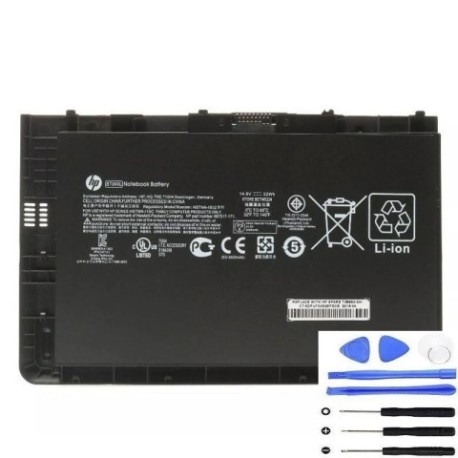
Battery models & part numbers
| Reference / P/N |
|---|
| 687517-171 |
| 687517-241 |
| 687945-001 |
| HP BA06XL |
| HP BT04 |
| HP H4Q47AA |
| HP H4Q47UT |
| HP HSTNN-IB3Z |
| HP HSTNN-W02C |
| HP TPN-I10C |
| HP-BT04XL-52W |
Compatible laptop models
| Model |
|---|
| HP EliteBook Folio 9470ms |
| HP EliteBook Folio 9480ms |
Introduction
The HP BT04XL 52W battery is a high-quality replacement designed specifically for HP EliteBook Folio series laptops. This genuine-compatible battery offers reliable performance and extended usage time for your business or personal computing needs.
Common signs you need a replacement
| Symptoms | Causes | Verification | Recommendation |
|---|---|---|---|
| Battery drains quickly | Ageing battery cells | Check battery health in system settings | Consider replacement if below 50% capacity |
| Laptop won’t hold charge | Failed battery circuitry | Test with different power adapter | Replace battery immediately |
| Battery swelling | Internal chemical breakdown | Visual inspection | Stop using and replace urgently |
| Overheating during use | Inefficient power delivery | Monitor temperature with software | Replace to prevent damage |
How to check compatibility
Verify your laptop’s compatibility by checking the part number on your current battery or consulting your laptop’s specifications in the system information. Cross-reference with our compatibility tables above to ensure perfect fit and performance.
When to replace
Replace your battery when you notice significant performance degradation, typically after 2-3 years of regular use. Most batteries show reduced capacity after 300-500 charge cycles. For safety, replace immediately if you notice any swelling or physical damage.
Installation guide (overview)
1. Power off your laptop and disconnect all cables
2. Remove the bottom panel using appropriate screwdriver
3. Disconnect the old battery connector carefully
4. Remove any securing screws and lift out the old battery
5. Insert the new HP BT04XL 52W battery and secure with screws
6. Reconnect the battery connector and replace the bottom panel
7. Charge fully before first use
Usage & care tips
• Avoid complete discharges – recharge when battery reaches 20-30%
• Store in cool, dry conditions between 15-25°C
• Calibrate your battery monthly by fully charging and discharging
• Use only authorised HP chargers for optimal performance
• Keep battery contacts clean and free from debris
Safety & recycling in AU/NZ
In Australia and New Zealand, laptop batteries must be recycled responsibly through authorised collection centres. Never dispose of batteries in household waste. Many electronics retailers offer free battery recycling services. Check with your local council for approved recycling facilities.
FAQ
How long does shipping take to AU/NZ?
Typically 7-14 business days depending on your location.
Is this battery genuine HP?
This is a high-quality compatible battery that meets or exceeds original specifications.
What warranty is provided?
Most suppliers offer 12-24 months warranty on replacement batteries.
Can I use this battery with other HP models?
Only use with compatible models listed in our compatibility tables.
How do I recycle my old battery?
Contact your local council or electronics retailer for battery recycling options.
What’s the battery capacity?
The HP BT04XL 52W provides 52Wh capacity for extended usage.
Is installation difficult?
Most users can install it following our guide, but professional installation is available.