HP EL04XL 52Wh Battery Replacement Guide for AU/NZ Users
Find the perfect replacement battery for your HP laptop with our comprehensive compatibility guide and expert installation advice.
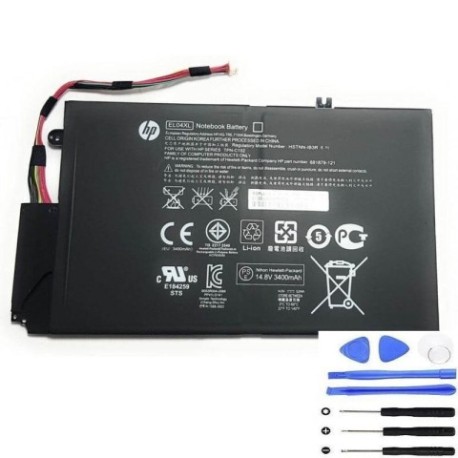
Battery models & part numbers
| Reference / P/N |
|---|
| 681879-171 |
| 681879-1C1 |
| 681879-541 |
| 681949-001 |
| HP EL04052XL-PL |
| HP-EL04XL-52Wh |
| HSTNN-IB3R |
| TPN-C102 |
Compatible laptop models
| Model |
|---|
| HP Envy 4-1000s |
| HP Envy 4-1100s |
| HP Envy 4-1200s |
| HP Envy 4s |
| HP Envy Touch Smart 4 |
| HP Envy Touch Smart 4-1000s |
Introduction
Welcome to your complete guide for replacing the HP EL04XL 52Wh battery. This high-quality replacement battery is designed specifically for HP Envy series laptops commonly used across Australia and New Zealand.
Common signs you need a replacement
| Symptoms | Causes | Verification | Recommendation |
|---|---|---|---|
| Battery drains quickly | Ageing cells, reduced capacity | Check battery health in system settings | Replace if capacity below 60% |
| Laptop won’t hold charge | Failed battery cells | Test with power adapter removed | Immediate replacement needed |
| Battery swelling | Internal gas buildup | Visual inspection, uneven surfaces | Replace immediately for safety |
| Overheating during use | Internal resistance increase | Monitor temperature with software | Replace if consistently over 45°C |
| Random shutdowns | Voltage drops under load | Monitor system performance | Replace to restore stability |
How to check compatibility
Verify your laptop’s compatibility by checking the part number on your current battery or consulting your laptop’s documentation. Cross-reference with our compatibility tables above to ensure perfect fit and performance.
When to replace
Replace your battery when you notice significant performance degradation, typically after 2-3 years of regular use. Most lithium-ion batteries maintain optimal performance for 300-500 charge cycles before capacity begins to decline noticeably.
Installation guide (overview)
1. Power down your laptop and disconnect all cables
2. Remove the bottom panel using appropriate screwdrivers
3. Disconnect the old battery connector carefully
4. Install the new HP EL04XL 52Wh battery
5. Reassemble and charge fully before first use
Usage & care tips
• Avoid complete discharges – recharge when battery reaches 20-30%
• Store in cool, dry conditions between 15-25°C
• Use only authorised HP chargers for optimal performance
• Calibrate your battery monthly by fully charging and discharging
Safety & recycling in AU/NZ
In Australia and New Zealand, laptop batteries must be recycled responsibly. Never dispose of batteries in household waste. Use authorised recycling centres or return to electronics retailers offering battery recycling services.
FAQ
How long does shipping take to AU/NZ?
Typically 7-14 business days depending on your location.
Is this battery genuine HP?
This is a high-quality replacement battery compatible with HP laptops.
What warranty is provided?
Most replacement batteries come with 12-24 months warranty.
Can I install this myself?
Yes, with basic technical skills and proper tools, self-installation is straightforward.
How do I recycle my old battery?
Contact your local council or electronics retailer for battery recycling options.
What’s the battery capacity?
52Wh capacity providing reliable performance for your HP laptop.
Is fast charging supported?
Yes, compatible with standard HP charging technology.