HP FM08 86Wh 16Pin Battery Replacement Guide
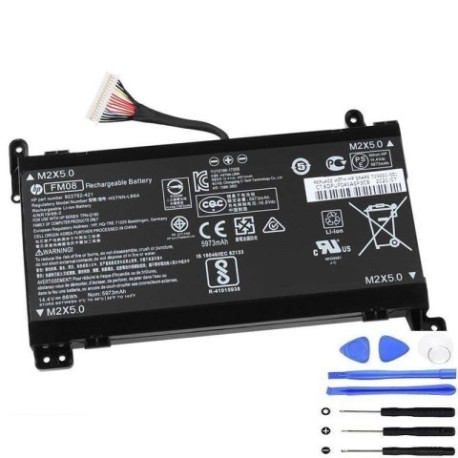
Find the perfect replacement battery for your HP Omen 17 laptop with our comprehensive compatibility guide and installation tips.
Battery models & part numbers
| Reference / P/N |
|---|
| 922753-421 |
| 922977-855 |
| HP-FM08-86Wh-16Pin |
| HSTNN-LB8B |
| TPN-Q195 |
Compatible laptop models
| Model |
|---|
| HP Omen 17-an000 (GTX 1070/1060)s |
| HP Omen 17-an000s |
| HP Omen 17-an100 (GTX 1070)s |
| HP Omen 17-an100s |
Introduction
Your HP Omen 17 gaming laptop deserves reliable power. Our HP FM08 86Wh 16Pin battery replacement ensures optimal performance for Australian and New Zealand users.
Common signs you need a replacement
| Symptoms | Causes | Verification | Recommendation |
|---|---|---|---|
| Battery drains quickly | Ageing cells | Check battery health in Windows | Replace if capacity below 60% |
| Laptop won’t charge | Faulty battery circuit | Test with different charger | Replace battery immediately |
| Battery swelling | Internal damage | Visual inspection | Replace urgently for safety |
| Overheating during use | Degraded components | Monitor temperature | Replace if consistently hot |
How to check compatibility
Verify your laptop model matches our compatibility list. Check the original battery part number or use HP’s official support centre for confirmation.
When to replace
Replace your battery when it holds less than 60% of original capacity, shows physical damage, or causes system instability. Most batteries last 2-3 years with regular use.
Installation guide (overview)
Power down your laptop, remove the back cover, disconnect the old battery, install the new HP FM08 battery, and reassemble. Always use proper anti-static precautions.
Usage & care tips
Avoid extreme temperatures (ideal range 15-25°C), don’t leave laptop plugged in constantly, and perform regular calibration cycles for optimal battery life.
Safety & recycling in AU/NZ
Dispose of old batteries at authorised recycling centres. Never incinerate or dispose in household waste. Check with your local council for battery recycling programs.
FAQ
How long does delivery take in Australia?
Most orders arrive within 3-7 business days depending on your location.
Is this battery genuine HP?
This is a high-quality replacement battery compatible with HP Omen 17 models.
What’s the warranty period?
Our batteries come with a 12-month warranty for peace of mind.
Can I install it myself?
Yes, with basic technical skills and proper tools. Follow our installation guide carefully.
Will this affect my laptop’s performance?
No, it will restore original performance levels when your old battery was new.
How do I check battery health?
Use Windows Battery Report or third-party tools to monitor capacity and health.
What if my model isn’t listed?
Contact our support team with your laptop’s exact model number for assistance.