HP GB02XL 47.3Wh Battery Replacement Guide
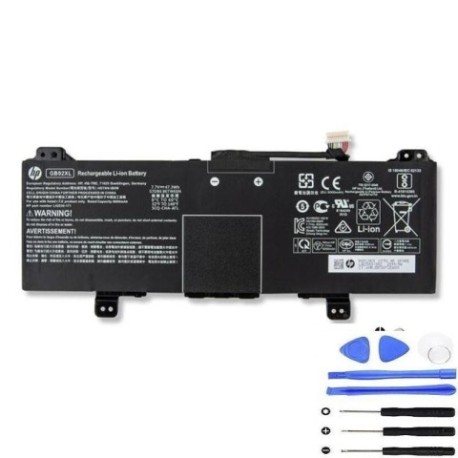
Find the right replacement battery for your HP Chromebook with our comprehensive compatibility guide and installation advice.
Battery models & part numbers
| Reference / P/N |
|---|
| HP-GB02XL-47.3Wh |
| HSTNN-IB8W |
| L42550-2C1 |
| L42583-005 |
Compatible laptop models
| Model |
|---|
| HP Chromebook 11 G7 EE |
| HP Chromebook 11A G6 EE |
| HP Chromebook 14A G5 |
| HP Chromebook x360 11 G2 EE |
| HP Chromebookx 360 14b-ca0000 |
Introduction
The HP GB02XL 47.3Wh battery is a genuine replacement power source designed specifically for various HP Chromebook models used in Australian and New Zealand educational and business environments.
Common signs you need a replacement
| Symptom | Cause | Verification | Recommendation |
|---|---|---|---|
| Rapid power drain | Battery degradation | Check battery health in settings | Consider replacement if below 60% capacity |
| Swelling or bulging | Internal damage | Visual inspection | Replace immediately for safety |
| Not charging properly | Faulty battery cells | Test with different charger | Replace if charger works with other devices |
| Overheating during use | Ageing battery | Monitor temperature | Replace if consistently hot |
How to check compatibility
Verify your laptop model matches our compatibility list above. Check your current battery’s part number (usually printed on the battery itself) against our reference numbers. For HP Chromebooks, you can also check compatibility in your device’s system information.
When to replace
Replace your battery when it holds less than 60% of its original capacity, shows physical damage, fails to charge properly, or causes unexpected shutdowns. Most HP Chromebook batteries last 2-3 years with regular use in Australian and New Zealand conditions.
Installation guide (overview)
Power off your Chromebook completely. Remove the bottom cover using the appropriate screwdriver. Disconnect the old battery connector carefully. Install the new HP GB02XL battery, reconnect the power connector, and reassemble. Always refer to official HP documentation for detailed instructions.
Usage & care tips
Avoid extreme temperatures – store and use between 10°C and 35°C. Don’t leave your Chromebook plugged in constantly. Calibrate your new battery by fully charging and discharging it once every few months. Use only authorised HP chargers for optimal performance.
Safety & recycling in AU/NZ
Never attempt to open or modify the battery. Damaged batteries should be disposed of properly at your local e-waste recycling centre. In Australia, check with your council for battery recycling programs. In New Zealand, use designated battery recycling facilities to prevent environmental harm.
FAQ
How long does the HP GB02XL battery last?
Typically 4-6 hours depending on usage and Chromebook model settings.
Is this battery compatible with my HP Chromebook 14A G5?
Yes, the HP GB02XL is fully compatible with the HP Chromebook 14A G5 model.
Do you ship to Australia and New Zealand?
Yes, we offer shipping to both Australia and New Zealand with local delivery options.
What warranty do you offer?
Our HP GB02XL batteries come with a 12-month warranty covering manufacturing defects.
How do I check my current battery’s health?
On your Chromebook, go to Settings > Device > Power to view battery health information.
Can I install this battery myself?
Yes, with basic technical skills and proper tools, though professional installation is recommended.
What’s the difference between all these part numbers?
They’re different reference numbers for the same HP GB02XL 47.3Wh battery model.