HP KB06XL 79.2Wh Replacement Battery for HP Spectre X360 Laptops
Find the perfect battery replacement for your HP Spectre X360 laptop with our comprehensive compatibility guide and expert installation advice.
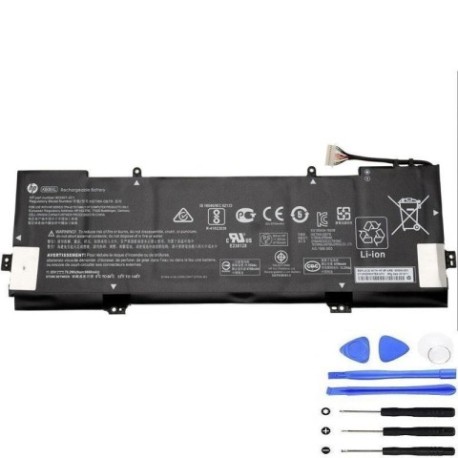
Battery models & part numbers
| Reference / P/N |
|---|
| HP 902401-2C1 |
| HP 902499-855 |
| HP 902499-856 |
| HP HSTNN-DB8I |
| HP KB06079XL |
| HP KB06XL |
| HP TPN-Q179 |
| HP-KB06XL-79.2Wh |
Compatible laptop models
| Model |
|---|
| HP Spectre X360 15-BLs |
| HP Spectre x360 15-bl000s |
| HP Spectre x360 15t-bl000s |
| HP Spectre x360 15t-bl100s |
Introduction
Welcome to your complete guide for replacing the battery in your HP Spectre X360 laptop. Our HP KB06XL 79.2Wh battery is designed to restore your laptop’s performance and mobility, ensuring you get back to work or entertainment without interruption.
Common signs you need a replacement
| Symptoms | Causes | Verification | Recommendation |
|---|---|---|---|
| Battery drains quickly | Ageing battery cells | Check battery health in system settings | Replace if capacity below 70% |
| Laptop won’t hold charge | Battery degradation | Test with power adapter removed | Immediate replacement needed |
| Battery swelling | Internal chemical breakdown | Visual inspection of battery compartment | Replace immediately for safety |
| Overheating during use | Failing battery components | Monitor temperature with software | Replace to prevent damage |
How to check compatibility
Verify your laptop model matches our compatibility list above. Check your current battery’s part number by removing the bottom cover or checking system information. Our HP KB06XL 79.2Wh battery is compatible with all listed HP Spectre X360 models and part numbers.
When to replace
Replace your battery when you notice significant performance decline, typically after 2-3 years of regular use. If your battery shows any swelling or doesn’t hold charge for more than an hour, immediate replacement is recommended for safety and performance.
Installation guide (overview)
1. Power off your laptop and disconnect all cables
2. Remove the bottom cover screws
3. Carefully disconnect the battery connector
4. Remove old battery and install new one
5. Reconnect battery and replace cover
6. Charge fully before first use
Usage & care tips
• Avoid complete discharges – recharge when battery reaches 20%
• Store in cool, dry conditions between 15-25°C
• Use only authorised HP chargers
• Calibrate battery monthly by fully charging and discharging
• Avoid exposing to extreme temperatures
Safety & recycling in AU/NZ
In Australia and New Zealand, battery recycling is mandatory. Do not dispose of old batteries in household waste. Take them to authorised collection centres or electronic retailers for proper recycling. Our batteries meet Australian and New Zealand safety standards.
FAQ
How long does shipping take to AU/NZ?
Typically 7-14 business days with free shipping options available.
Is this battery genuine HP?
This is a high-quality replacement battery compatible with HP Spectre X360 models.
What warranty do you offer?
All our batteries come with a 12-month warranty for peace of mind.
Can I install this myself?
Yes, with basic technical skills and our installation guide, most users can install it themselves.
How do I recycle my old battery?
Take it to any Officeworks, JB Hi-Fi, or authorised e-waste recycling centre in Australia or New Zealand.
What’s the battery capacity?
79.2Wh capacity providing optimal performance for your HP Spectre X360.
Do you provide installation support?
Yes, we offer email support and detailed installation guides for all our customers.