Battery models & part numbers
| Reference / P/N |
|---|
| 2ICP7/60/80 |
| 916365-421 |
| 916365-541 |
| 916366-541 |
| 916809-855 |
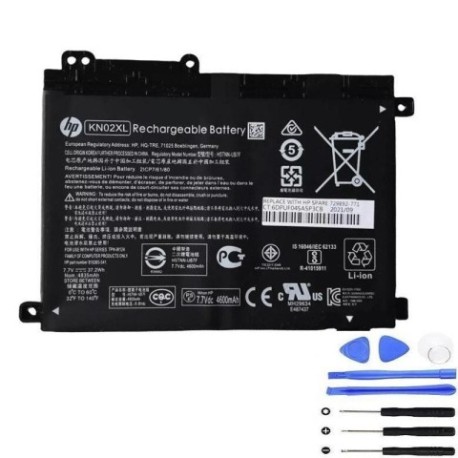
| HP-KN02XL-37.2Wh |
| HSTNN-LB7R |
| HSTNN-UB7F |
| TPN-W124 |
Compatible laptop models
| Model |
|---|
| HP Pavilion x360 11-ad000s |
| HP Pavilion x360 11m-ad000s |
| HP Pavilion X360 11Ms |
Introduction
Keep your HP Pavilion x360 running smoothly with a genuine HP-KN02XL 37.2Wh replacement battery. This guide helps AU/NZ users identify compatibility, recognise replacement signs, and install safely.
Common signs you need a replacement
| Symptom | Cause | How to check | Recommendation |
|---|---|---|---|
| Short battery life | Ageing cells | Note usage time | Consider replacement |
| Laptop shuts down unexpectedly | Voltage drops | Check power settings | Test with charger |
| Battery not charging fully | Worn components | Monitor charge percentage | Inspect battery health |
| Physical swelling | Internal damage | Visual inspection | Replace immediately |
How to check compatibility
Match your laptop model or part number with the lists above. Verify the battery compartment label or system information for exact references like HSTNN-LB7R or TPN-W124.
When to replace
Replace when battery health drops below 80%, runtime is significantly reduced, or physical defects like bulging appear. In AU/NZ climates, avoid exposing batteries to temperatures above 45°C.
Installation guide (overview)
Power off and unplug the laptop. Remove the bottom panel, disconnect the old battery, and secure the new one. Ensure all connections are firm before reassembling.
Usage & care tips
Store in a cool, dry place. Avoid full discharges; partial charges between 20-80% prolong lifespan. Keep contacts clean and use authorised chargers.
Safety & recycling in AU/NZ
Do not disassemble batteries. Dispose of old batteries at designated recycling centres—check local council guidelines for safe handling in Australia and New Zealand.
FAQ
What laptops use the HP-KN02XL battery?
Compatible models include HP Pavilion x360 11-ad000s, 11m-ad000s, and 11Ms.
How do I find my battery part number?
Check the battery compartment, system info, or original documentation for codes like 2ICP7/60/80.
Is this battery genuine?
Yes, it matches OEM specifications for listed part numbers and models.
What is the battery capacity?
37.2Wh, providing reliable power for compatible HP laptops.
How long does installation take?
Typically 10-15 minutes with basic tools.
Can I recycle the old battery?
Yes, use local e-waste services in AU/NZ for safe disposal.
Does it come with a warranty?
Check the product page for warranty details specific to AU/NZ purchases.