HP MC06 62Wh Laptop Battery Replacement
Find the perfect replacement battery for your HP laptop with our comprehensive AU/NZ guide. This HP-MC06-62Wh battery is compatible with multiple HP ENVY models and part numbers.
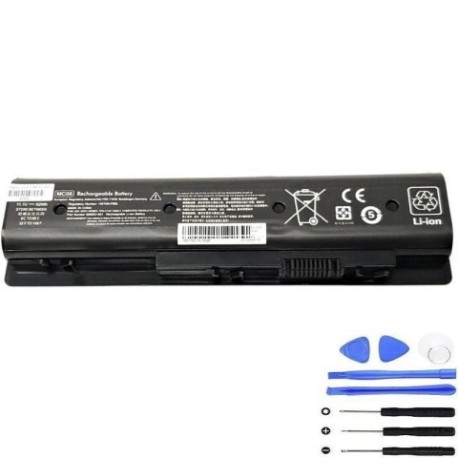
Battery models & part numbers
| Reference / P/N |
|---|
| HP 804073-851 |
| HP 805095-001 |
| HP 806953-851 |
| HP 807231-001 |
| HP HSTNN-PB6L |
| HP MC06062 |
| HP N2L86AA |
| HP TPN-C123 |
| HP-MC06-62Wh |
Compatible laptop models
| Model |
|---|
| HP ENVY 15-ae100 |
| HP ENVY m7-n100 |
| HP Envy 17-n000 |
| HP Envy 17-n100 |
| HP Envy 17-r000 |
| HP Envy 17-r100 |
| HP Envy 17-r200 |
| HP Envy 17t-n000 |
Introduction
The HP MC06 62Wh battery is a high-quality replacement power solution designed specifically for HP ENVY series laptops. With 62Wh capacity, this battery provides reliable performance for Australian and New Zealand users.
Common signs you need a replacement
| Symptom | Cause | Verification | Recommendation |
|---|---|---|---|
| Short battery life | Ageing cells | Check power settings | Replace battery |
| Laptop won’t charge | Faulty battery circuit | Try different charger | Professional diagnosis |
| Battery swelling | Internal damage | Visual inspection | Immediate replacement |
| Overheating | Cell degradation | Temperature monitoring | Replace and check vents |
How to check compatibility
Verify your laptop’s compatibility by checking the model number on the bottom casing or in system information. Cross-reference with our compatibility tables above. For HP ENVY 15 and 17 series laptops manufactured between 2014-2016, this battery is likely compatible.
When to replace
Replace your battery when it holds less than 50% of its original capacity, shows physical damage, or causes system instability. Most laptop batteries need replacement after 2-3 years of regular use in AU/NZ conditions.
Installation guide (overview)
Power off your laptop and disconnect the charger. Remove the bottom panel screws and carefully lift the old battery. Disconnect the battery connector and install the new HP-MC06-62Wh battery. Reassemble and charge fully before first use.
Usage & care tips
Avoid extreme temperatures (ideal range 15-25°C). Don’t leave your laptop plugged in constantly. Calibrate your battery monthly by fully discharging and recharging. Store in cool, dry conditions when not in use.
Safety & recycling in AU/NZ
In Australia and New Zealand, lithium-ion batteries must be recycled at authorised collection points. Never dispose of batteries in household waste. Check with your local council for battery recycling programmes. Damaged batteries should be handled by professionals.
FAQ
How long does this battery last?
The HP MC06 62Wh battery typically provides 3-5 hours of normal usage, depending on your laptop settings and applications.
Is this battery genuine HP?
This is a high-quality replacement battery compatible with HP laptops, meeting original specifications and safety standards.
What’s the warranty period?
Most replacement batteries come with a 12-month warranty covering manufacturing defects.
Can I install it myself?
Yes, with basic technical skills and the right tools. Follow our installation guide or seek professional help if unsure.
How do I recycle my old battery?
Take it to an authorised battery recycling centre or check with Officeworks, Bunnings, or your local council for drop-off points.
Will this improve my laptop’s performance?
A new battery restores original battery life and prevents performance issues caused by power fluctuations.
Is overnight charging safe?
Modern laptops have protection circuits, but it’s best to avoid continuous overnight charging to extend battery lifespan.