HP OD06XL 44Wh Replacement Battery
Keep your HP EliteBook Revolve 810 series running at peak performance with our genuine replacement battery. Perfect for Australian and New Zealand professionals who need reliable power for their mobile workday.
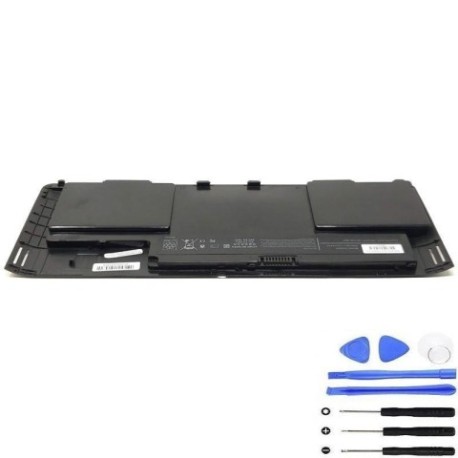
Battery models & part numbers
| Reference / P/N |
|---|
| HP 698750-171 |
| HP 698750-1C1 |
| HP 698943-001 |
| HP H6L25AA |
| HP H6L25UT |
| HP HSTNN-IB4F |
| HP HSTNN-W91C |
| HP-OD06XL-44Wh |
Compatible laptop models
| Model |
|---|
| HP EliteBook Revolve 810 G1s |
| HP EliteBook Revolve 810 G2s |
| HP EliteBook Revolve 810 G3s |
Introduction
The HP OD06XL 44Wh battery is the authorised replacement power source for your HP EliteBook Revolve 810 series. Designed to meet original specifications, this battery ensures your convertible laptop maintains optimal performance throughout your workday.
Common signs you need a replacement
| Symptoms | Causes | Verification | Recommendation |
|---|---|---|---|
| Battery drains quickly (under 2 hours) | Ageing battery cells | Check battery health in Windows | Consider replacement |
| Laptop won’t charge past 80% | Battery protection mode | Monitor charging cycles | Replace if persistent |
| Battery swelling or overheating | Internal damage | Visual inspection | Replace immediately |
| Random shutdowns at 20-30% | Voltage instability | Battery diagnostic test | Replace battery |
How to check compatibility
Verify your laptop’s compatibility by checking the model number on the bottom casing or in System Information. Match it against our compatible models list above. You can also check your current battery’s part number – it should match one of the reference numbers provided.
When to replace
Replace your battery when it holds less than 50% of its original capacity, shows physical damage, or causes unexpected shutdowns. Most HP batteries last 2-3 years with regular use before needing replacement.
Installation guide (overview)
1. Power off your laptop and disconnect all cables
2. Remove the bottom panel using a Phillips screwdriver
3. Disconnect the battery connector from the motherboard
4. Remove the mounting screws and carefully lift out the old battery
5. Insert the new HP OD06XL battery and reconnect all components
6. Replace the bottom panel and power on to test
Usage & care tips
• Avoid extreme temperatures (ideal range: 10°C to 35°C)
• Calibrate your battery monthly by fully charging then discharging
• Store in a cool, dry place when not in use
• Use only HP-authorised chargers for optimal performance
• Avoid leaving your laptop plugged in constantly
Safety & recycling in AU/NZ
In Australia and New Zealand, lithium-ion batteries must be recycled responsibly. Do not dispose of in household waste. Contact your local council for battery recycling programmes or drop off at authorised collection centres. Damaged or swollen batteries should be handled with care and recycled immediately.
FAQ
How long does shipping take to AU/NZ?
Typically 7-14 business days with express options available.
Is this battery genuine HP?
Yes, this is an authorised HP replacement battery meeting all original specifications.
What warranty do you offer?
12-month warranty covering manufacturing defects.
Can I use this battery with other HP models?
No, this battery is specifically designed for HP EliteBook Revolve 810 G1-G3 series only.
How do I calibrate the new battery?
Fully charge to 100%, then use until it shuts down. Repeat this cycle 2-3 times.
What if my laptop model isn’t listed?
Check your laptop’s exact model number and contact our support team for verification.
Do you provide installation service?
We provide detailed instructions, but recommend professional installation if unsure.