Battery models & part numbers
| Reference / P/N |
|---|
| HP HSTNN-DB9C |
| HP HSTNN-IB8U |
| HP L34209-1B1 |
| HP L34209-1C1 |
| HP L34209-2B1 |
| HP L34449-002 |
| HP L34449-005 |
| HP-OR04XL-53.2Wh |
Compatible laptop models
| Model |
|---|
| HP EliteBook x360 830 G5s |
| HP EliteBook x360 830 G6s |
| HP ZHAN X 13 G2s |
Introduction
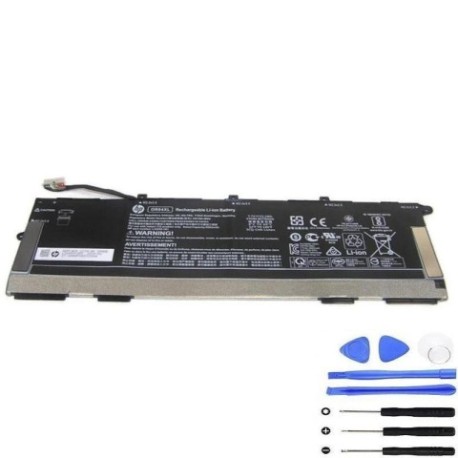
Keep your HP laptop running at peak performance with our genuine HP OR04XL 53.2Wh replacement battery. Designed specifically for HP EliteBook and ZHAN X series laptops, this high-quality battery ensures reliable power for your workday.
Common signs you need a replacement
| Symptoms | Possible Causes | How to Verify | Recommendation |
|---|---|---|---|
| Battery drains quickly | Ageing battery cells | Check battery health in system settings | Consider replacement if under 50% capacity |
| Laptop won’t hold charge | Faulty battery circuitry | Test with different power adapter | Replace battery immediately |
| Battery swelling | Internal damage or overheating | Visual inspection of battery compartment | Replace urgently for safety |
| Random shutdowns | Inconsistent power delivery | Monitor during heavy usage | Replace to prevent data loss |
How to check compatibility
Verify your laptop model matches our compatibility list above. Check your current battery’s part number (usually printed on the battery itself) against our reference numbers. For HP laptops, you can also use the HP Support Assistant software to identify your exact battery model.
When to replace
Replace your battery when it holds less than 50% of its original capacity, shows physical damage or swelling, or causes unexpected shutdowns. Most HP batteries last 2-3 years with regular use before needing replacement.
Installation guide (overview)
1. Power off your laptop and disconnect all cables
2. Remove the bottom panel (consult your laptop’s manual)
3. Disconnect the old battery connector
4. Remove any screws securing the battery
5. Install the new HP OR04XL battery
6. Reconnect the battery connector and reassemble
7. Charge fully before first use
Usage & care tips
• Avoid extreme temperatures (ideal range 10-35°C)
• Calibrate your battery monthly by fully charging then discharging
• Store at 40-60% charge if not using for extended periods
• Use only HP-approved chargers
• Keep battery contacts clean and dry
Safety & recycling in AU/NZ
Never dispose of batteries in household waste. In Australia, use Batteryback or council e-waste services. In New Zealand, utilise accredited e-waste recyclers. Damaged or swollen batteries should be handled with care – place in a fire-proof container and take to a recycling centre immediately.
FAQ
How long does delivery take in Australia?
Most orders arrive within 3-7 business days depending on your location.
Is this battery genuine HP?
Yes, this is an authentic HP OR04XL battery with full manufacturer warranty.
What’s the battery capacity?
53.2Wh capacity providing reliable performance for your HP laptop.
Do you ship to New Zealand?
Yes, we offer fast shipping to both Australia and New Zealand.
How do I check my current battery health?
Use HP Support Assistant or Windows Battery Report to check capacity and health status.
What if the battery doesn’t fit my laptop?
Verify your laptop model against our compatibility list. We offer returns for incompatible items.
Is installation difficult?
Most users find battery replacement straightforward. Refer to our guide or consult a professional if unsure.