HP PG03XL 52.5Wh Battery Replacement Guide
Find the perfect replacement battery for your HP gaming laptop with our comprehensive compatibility guide and installation tips for Australian and New Zealand users.
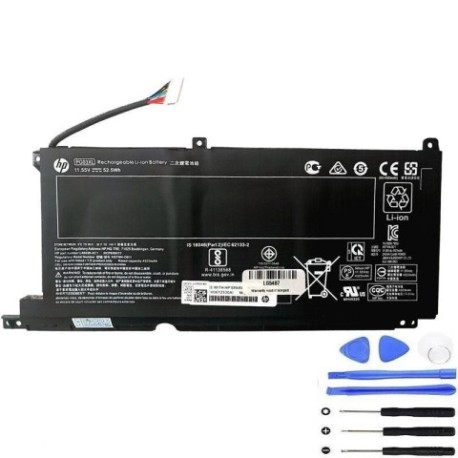
Battery models & part numbers
| Reference / P/N |
|---|
| HP PG03 |
| HP PG03052 |
| HP-PG03XL-52.5Wh |
Compatible laptop models
| Model |
|---|
| HP HSTNN-0B1I |
| HP HSTNN-OB1I |
| HP L48430-AC2 |
| HP L48495-005 |
| HP Pavilion Gaming 15-dk0000s |
| HP Pavilion Gaming 15-dk1000s |
| HP Pavilion Gaming 15-dk2000s |
| HP Pavilion Gaming 15-ec0000s |
| HP Pavilion Gaming 15-ec1000s |
| HP Pavilion Gaming 15-ec2000s |
| HP Pavilion Gaming 16-a0000s |
Introduction
The HP PG03XL 52.5Wh battery is designed specifically for HP Pavilion Gaming laptops, providing reliable power for gaming and productivity. This genuine replacement ensures optimal performance and safety for your device.
Common signs you need a replacement
| Symptom | Cause | Verification | Recommendation |
|---|---|---|---|
| Battery drains quickly | Ageing cells, reduced capacity | Check battery health in Windows | Replace if capacity below 60% |
| Laptop won’t hold charge | Failed battery circuit | Test with power adapter removed | Immediate replacement needed |
| Battery swelling | Internal gas buildup | Visual inspection | Replace immediately – safety risk |
| Overheating during use | Internal resistance increase | Monitor temperature | Replace if consistently hot |
How to check compatibility
Verify your laptop model matches our compatibility list above. Check your current battery’s part number (usually printed on the battery) or use HP’s official support website with your serial number.
When to replace
Replace your battery when it no longer holds sufficient charge for your needs, shows physical damage, or is over 2-3 years old with noticeable performance decline.
Installation guide (overview)
1. Power off laptop and disconnect charger
2. Remove bottom panel screws
3. Carefully disconnect old battery connector
4. Install new HP PG03XL battery
5. Reconnect and test functionality
Usage & care tips
• Avoid complete discharge cycles
• Store between 15-25°C when not in use
• Use authorised HP chargers only
• Calibrate battery monthly for accurate readings
Safety & recycling in AU/NZ
Never dispose of lithium batteries in household waste. Use approved battery recycling centres available at most electronics retailers across Australia and New Zealand. Damaged batteries should be handled by professionals.
FAQ
How long does shipping take to Australia/New Zealand?
Typically 7-14 business days depending on your location.
Is this battery genuine HP?
Yes, this is an authentic HP PG03XL replacement battery.
What’s the warranty period?
12 months warranty from date of purchase.
Can I install this myself?
Yes, with basic technical skills and proper tools.
How do I check battery health?
Use Windows Battery Report or HP Support Assistant.
What’s the battery capacity?
52.5Wh with standard lithium-ion technology.
Are installation tools included?
No, you’ll need appropriate screwdrivers for your model.