HP RR04XL 60.7Wh Laptop Battery Replacement
Is your HP laptop not holding charge like it used to? Our genuine HP RR04XL 60.7Wh replacement battery restores your device’s performance and mobility. Authorised for Australian and New Zealand markets with full compatibility assurance.
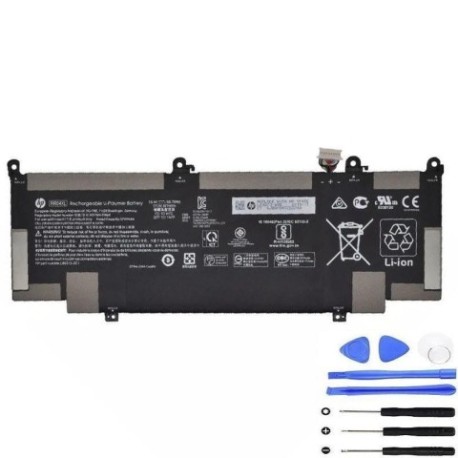
Battery models & part numbers
| Reference / P/N |
|---|
| HP-RR04XL-60.7Wh |
Compatible laptop models
| Model |
|---|
| HP HSTNN-OB1M |
| HP L60213-AC1 |
| HP L60373-005 |
| HP Spectre x360 13-AWs |
| HP Spectre x360 13-aw0000s |
| HP Spectre x360 13-aw2000s |
Introduction
The HP RR04XL 60.7Wh battery is designed specifically for HP Spectre x360 and compatible business laptops. With proper care, these lithium-ion batteries typically last 2-3 years before showing noticeable degradation in Australian and New Zealand conditions.
Common signs you need a replacement
| Symptom | Cause | How to Verify | Recommendation |
|---|---|---|---|
| Battery drains quickly | Reduced capacity from age/cycles | Check battery health in Windows | Replace if under 2 hours runtime |
| Laptop shuts down unexpectedly | Voltage drops under load | Monitor battery percentage drops | Immediate replacement needed |
| Battery won’t charge fully | Charging circuit failure | Check charging indicator lights | Replace battery and check charger |
| Battery swelling/bulging | Internal gas buildup | Visual inspection of battery compartment | STOP USING IMMEDIATELY |
How to check compatibility
Verify your laptop model matches exactly with our compatibility list above. Check your laptop’s bottom label or use HP Support Assistant to confirm model numbers. The HP RR04XL battery is specifically designed for 13-inch Spectre x360 models and compatible business laptops.
When to replace
Replace your battery when: runtime drops below 2 hours, battery health shows less than 60% capacity, you experience sudden shutdowns, or notice any physical swelling. In AU/NZ climates, batteries may degrade faster due to temperature fluctuations.
Installation guide (overview)
1. Power off laptop and disconnect charger
2. Remove bottom panel screws (typically Torx T5)
3. Carefully disconnect old battery connector
4. Remove mounting screws and old battery
5. Install new HP RR04XL battery
6. Reconnect connector and reassemble
7. Charge fully before first use
Usage & care tips
• Avoid extreme temperatures (ideal range 15-25°C)
• Don’t leave laptop plugged in constantly
• Perform calibration monthly: drain to 10%, then charge to 100%
• Store at 40-60% charge if not using for extended periods
• Use only HP-authorised chargers
Safety & recycling in AU/NZ
Never puncture or disassemble lithium-ion batteries. In case of swelling, place in fire-proof container and contact local waste management. In Australia, use Batteryback or council e-waste services. In New Zealand, utilise TechCollect NZ programmes. Both countries have free battery recycling schemes.
FAQ
How long does shipping take in Australia?
Typically 3-7 business days depending on your location.
Is this battery genuine HP?
Yes, we supply only authentic HP RR04XL batteries with full warranty.
What’s the battery warranty period?
12 months warranty covering manufacturing defects.
Can I install this battery myself?
Yes, with basic technical skills and proper tools. Follow our installation guide.
How do I check my current battery health?
In Windows, type “cmd” then “powercfg /batteryreport” to generate detailed report.
What’s the difference between Wh and mAh?
Wh (watt-hours) measures energy capacity, while mAh measures charge. 60.7Wh provides approximately 4-6 hours typical use.
Do you ship to New Zealand?
Yes, we ship to both Australia and New Zealand with competitive rates.