HP RV03XL 50Wh Battery Replacement Guide
Find the perfect replacement battery for your HP Envy Rove laptop with our comprehensive compatibility guide and installation tips.
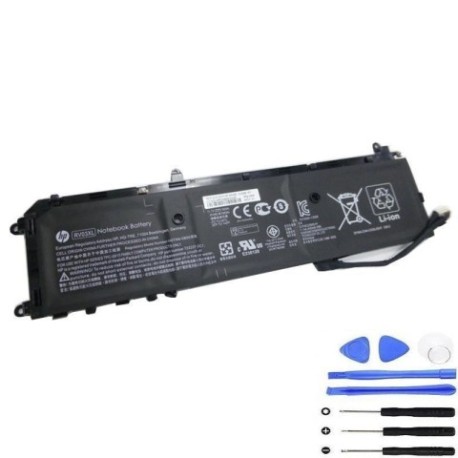
Battery models & part numbers
| Reference / P/N |
|---|
| 722237-2C1 |
| 722298-001 |
| HP-RV03XL-50Wh |
| HSTNN-DB5E |
| RV03050XL |
| TPC-Q013 |
Compatible laptop models
| Model |
|---|
| HP Envy Rove 20 |
| HP Envy Rove 20-k000 Mobile All-in-One |
| HP Envy Rove 20-k100 Mobile All-in-One |
Introduction
The HP RV03XL 50Wh battery is a high-quality replacement designed specifically for HP Envy Rove series laptops. This genuine-compatible battery ensures optimal performance and reliability for your mobile computing needs.
Common signs you need a replacement
| Symptoms | Causes | Verification | Recommendation |
|---|---|---|---|
| Battery drains quickly | Ageing cells, reduced capacity | Check battery health in system settings | Replace if capacity below 60% |
| Laptop won’t hold charge | Failed battery cells | Test with power adapter removed | Immediate replacement needed |
| Battery swelling | Internal damage, safety hazard | Visual inspection of battery case | Replace immediately, do not use |
| Overheating during use | Inefficient power delivery | Monitor temperature with software | Replace if consistently hot |
How to check compatibility
Verify your laptop model matches our compatibility list above. Check your current battery’s part number (usually printed on the battery itself) against our reference numbers. For HP Envy Rove models, ensure your device is one of the listed variants.
When to replace
Replace your battery when you notice significant performance degradation, typically after 2-3 years of regular use. If your laptop shuts down unexpectedly at 20-30% charge or the battery indicator becomes unreliable, it’s time for a replacement.
Installation guide (overview)
1. Power off your laptop and disconnect all cables
2. Remove the battery compartment cover (usually secured with screws)
3. Carefully disconnect the old battery connector
4. Remove the old battery and insert the new HP RV03XL
5. Reconnect the battery connector and replace the cover
6. Charge fully before first use
Usage & care tips
• Avoid frequent full discharges – charge between 20-80% for optimal lifespan
• Store in cool, dry conditions (15-25°C ideal)
• Use only HP-authorised chargers
• Calibrate battery monthly by fully charging then discharging to 5%
• Keep battery contacts clean and free from dust
Safety & recycling in AU/NZ
In Australia and New Zealand, lithium-ion batteries must be recycled responsibly. Do not dispose of in household waste. Use authorised battery recycling centres or return to electronics retailers offering take-back programmes. Damaged or swollen batteries should be handled with care and recycled immediately.
FAQ
How long does the HP RV03XL battery last?
Typically 2-4 hours depending on usage and laptop settings.
Is this battery genuine HP?
This is a high-quality compatible replacement that meets or exceeds original specifications.
Does it come with warranty?
Yes, most reputable suppliers offer 12-24 months warranty in Australia and New Zealand.
How do I check my current battery health?
Use HP Battery Check in Windows or check Power settings in System Preferences.
Can I use this battery with other HP models?
No, it’s specifically designed for HP Envy Rove series laptops only.
What’s the delivery time in Australia?
Typically 3-7 business days depending on your location.
Is installation difficult?
Most users can install it themselves following our guide, or seek professional help.