Battery models & part numbers
| Reference / P/N |
|---|
| HP TD06XL |
| HP TD09 |
| HP TD09093-CL |
| HP TD09100 |
| HP TD09100-CL |
| HP-TD06-55Wh |
Compatible laptop models
| Model |
|---|
| HP 455771-002 |
| HP 455771-003 |
| HP 455771-004 |
| HP 455771-005 |
| HP 455771-006 |
| HP 455771-007 |
| HP 455771-008 |
| HP 456946-001 |
| HP 458640-122 |
| HP 458640-123 |
| HP 458640-141 |
| HP 458640-142 |
| HP 458640-143 |
| HP 458640-161 |
| HP 458640-162 |
| HP 458640-163 |
| HP 458640-164 |
| HP 458640-241 |
| HP 458640-251 |
| HP 458640-522 |
| HP 458640-542 |
| HP 458640-543 |
| HP 458840-161 |
| HP 463303-142 |
| HP 463303-722 |
| HP 463303-723 |
| HP 463303-724 |
| HP 463303-761 |
| HP 463303-762 |
| HP 463303-763 |
| HP 463303-764 |
| HP 463310-122 |
| HP 463310-124 |
| HP 463310-125 |
| HP 463310-132 |
| HP 463310-134 |
| HP 463310-141 |
| HP 463310-142 |
| HP 463310-144 |
| HP 463310-145 |
| HP 463310-241 |
| HP 463310-242 |
| HP 463310-251 |
| HP 463310-521 |
| HP 463310-542 |
| HP 463310-543 |
| HP 463310-544 |
| HP 463310-545 |
| HP 463310-724 |
| HP 482961-001 |
| HP 482962-001 |
| HP 484786-001 |
| HP 486295-001 |
| HP 486296-001 |
| HP 491173-542 |
| HP 491173-543 |
| HP 532497-221 |
| HP 532497-222 |
| HP 532497-241 |
| HP 532497-421 |
| HP 532497-422 |
| HP 534095-001 |
| HP 534095-002 |
| HP 534095-003 |
| HP 5704327759737 |
| HP 574677-291 |
| HP 582033-001 |
| HP 583256-001 |
| HP 583878-800 |
| HP 586031-001 |
| HP 586597-121 |
| HP 586597-122 |
| HP 586597-141 |
| HP 586597-241 |
| HP 586597-541 |
| HP 586597-542 |
| HP 592911-221 |
| HP 592911-241 |
| HP 592942-003 |
| HP 593578-001 |
| HP 593579-001 |
| HP 627971-001 |
| HP 99001082 |
| HP AT908AA |
| HP AT908AA#ABA |
| HP AT908AA#AC3 |
| HP AU213AA |
| HP Compaq 6530b Business Notebooks |
| HP Compaq 6535b Business Notebooks |
| HP Compaq 6730bs |
| HP Compaq 6735bs |
| HP EliteBook 6930ps |
| HP EliteBook 8440ps |
| HP EliteBook 8440Ws |
| HP HSTNN-C66C |
| HP HSTNN-C66C-4 |
| HP HSTNN-C66C-5 |
| HP HSTNN-C67C |
| HP HSTNN-C67C-4 |
| HP HSTNN-C67C-5 |
| HP HSTNN-C68C |
| HP HSTNN-CB68 |
| HP HSTNN-CB69 |
| HP HSTNN-DB0E |
| HP HSTNN-DB69 |
| HP HSTNN-I44C-A |
| HP HSTNN-I44C-B |
| HP HSTNN-I45C-A |
| HP HSTNN-I45C-B |
| HP HSTNN-I87C-4 |
| HP HSTNN-I87C-5 |
| HP HSTNN-I88C-4 |
| HP HSTNN-I88C-5 |
| HP HSTNN-IB1C |
| HP HSTNN-IB68 |
| HP HSTNN-IB69 |
| HP HSTNN-LB0E |
| HP HSTNN-UB68 |
| HP HSTNN-UB69 |
| HP HSTNN-W42C-A |
| HP HSTNN-W42C-B |
| HP HSTNN-W4C-A |
| HP KU531AA |
| HP ProBook 6440bs |
| HP ProBook 6445bs |
| HP ProBook 6450bs |
| HP ProBook 6540bs |
| HP ProBook 6545bs |
| HP ProBook 6550bs |
| HP ProBook 6555bs |
Introduction
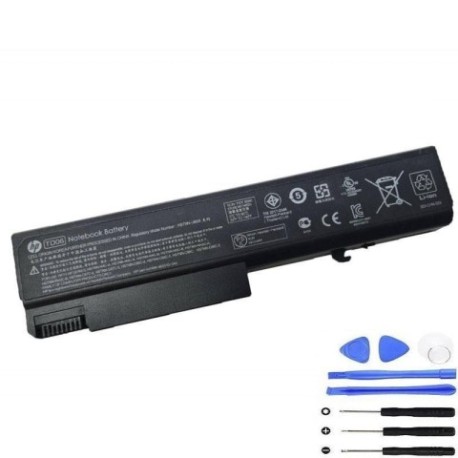
If your HP laptop battery isn’t holding charge like it used to, our genuine HP TD06 55Wh replacement battery restores your device’s mobility and performance. Compatible with numerous HP business notebooks across the EliteBook, ProBook, and Compaq series, this high-quality battery ensures you stay productive throughout your workday.
Common signs you need a replacement
| Symptom | Cause | Verification | Recommendation |
|---|---|---|---|
| Short battery life | Ageing cells, reduced capacity | Check power settings, monitor discharge rate | Consider replacement if under 2 hours |
| Battery not charging | Faulty battery circuit, worn connectors | Try different power outlet, check charging light | Test with known working charger first |
| Laptop shutting down unexpectedly | Voltage drops under load | Monitor battery health in system settings | Replace if frequent shutdowns occur |
| Battery swelling or overheating | Internal damage, safety risk | Visual inspection, feel for heat | Replace immediately, do not use |
| Incorrect battery percentage | Calibration issues, faulty sensors | Reset power management, update drivers | Replace if recalibration fails |
How to check compatibility
Verify your laptop model matches our compatibility list above. Check your current battery’s part number (usually printed on the battery) against our reference numbers. For additional confirmation, consult your laptop’s documentation or HP’s official support site.
When to replace
Most laptop batteries last 2-4 years with regular use. Replace when battery life drops below 50% of original capacity, charging takes significantly longer, or you notice physical damage like swelling. In Australia and New Zealand’s climate, batteries may degrade faster due to temperature fluctuations.
Installation guide (overview)
1. Power off laptop and disconnect charger
2. Remove the old battery (usually slides or clips out)
3. Insert new battery until it clicks into place
4. Connect charger and allow full charge before first use
5. Calibrate by charging to 100% then discharging completely
Usage & care tips
• Avoid extreme temperatures (ideal range 10°C to 35°C)
• Don’t leave laptop plugged in constantly
• Perform full discharge cycles monthly
• Store at 40-60% charge if not using for extended periods
• Use only authorised HP chargers
Safety & recycling in AU/NZ
Never dispose of batteries in household waste. In Australia, use Batteryback or council e-waste services. In New Zealand, take to designated recycling centres. Damaged or swollen batteries should be handled with care – place in non-flammable container and recycle immediately.
FAQ
How long does delivery take in Australia?
Typically 3-7 business days depending on your location.
Is this battery genuine HP?
Yes, all our batteries are authentic HP parts with full warranty.
What’s the warranty period?
12 months warranty covering manufacturing defects.
Will this work with my HP EliteBook 8440p?
Yes, check the compatibility list above for your specific model.
How do I calibrate the new battery?
Charge to 100%, use until it shuts down, then recharge fully.
Can I use this battery overseas?
Yes, but check voltage requirements for your destination.
What if my model isn’t listed?
Contact our support team with your laptop’s exact model number.