HP TP02XL 18Wh Battery Replacement Guide
Find the perfect replacement battery for your HP laptop with our comprehensive AU/NZ guide. We stock genuine-compatible batteries with fast shipping across Australia and New Zealand.
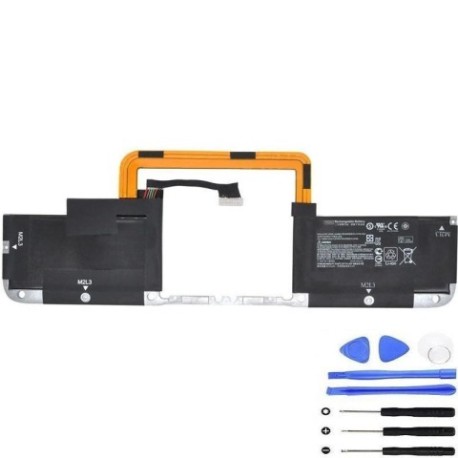
Battery models & part numbers
| Reference / P/N |
|---|
| 741348-171 |
| 741523-005 |
| HSTNN-IB5U |
| HP-TP02XL-18Wh.jpg |
| TP02018XL-PL |
| TPN-W110 |
Compatible laptop models
| Model |
|---|
| HP Spectre 13 x2 Pro |
Introduction
The HP TP02XL 18Wh battery is a high-quality replacement power solution designed specifically for compatible HP laptop models. This battery delivers reliable performance and meets Australian and New Zealand safety standards.
Common signs you need a replacement
| Symptoms | Causes | Verification | Recommendation |
|---|---|---|---|
| Battery drains quickly | Ageing cells, reduced capacity | Check battery health in system settings | Replace if capacity below 60% |
| Laptop won’t hold charge | Failed battery cells | Test with power adapter removed | Immediate replacement needed |
| Battery swelling | Gas buildup, internal damage | Visual inspection, uneven surfaces | Replace immediately for safety |
| Overheating during use | Internal resistance increase | Monitor temperature, check vents | Replace to prevent damage |
| Random shutdowns | Voltage drops under load | Monitor during intensive tasks | Replace for stable performance |
How to check compatibility
Verify your laptop’s compatibility by checking the existing battery’s part number (usually printed on the battery itself) or your laptop’s model number. Cross-reference with our compatibility tables above. For additional confirmation, consult your laptop’s user manual or HP’s official support website.
When to replace
Replace your battery when you notice significant performance degradation, typically after 2-3 years of regular use. Key indicators include reduced runtime (less than 60% of original capacity), swelling, overheating, or failure to hold a charge. In Australia and New Zealand, extreme temperatures can accelerate battery ageing, so monitor performance closely.
Installation guide (overview)
1. Power off your laptop and disconnect all cables
2. Remove the bottom panel (consult your model’s service manual)
3. Disconnect the battery connector carefully
4. Remove any screws securing the battery
5. Lift out the old battery and insert the replacement
6. Reconnect the battery connector and reassemble
7. Charge fully before first use
Usage & care tips
• Avoid complete discharges – recharge when battery reaches 20-30%
• Store in cool, dry conditions (15-25°C ideal)
• Use original or authorised chargers only
• Calibrate battery monthly by fully charging then discharging
• Avoid leaving laptop plugged in constantly
• Remove battery if storing laptop for extended periods
Safety & recycling in AU/NZ
In Australia and New Zealand, lithium-ion batteries must be disposed of responsibly. Never dispose of batteries in household waste. Use authorised battery recycling centres available at most electronics retailers, council waste facilities, or through battery stewardship programs like B-cycle in Australia. Damaged or swollen batteries should be handled with care and recycled immediately.
FAQ
How long does shipping take to AU/NZ?
Most orders ship within 1-2 business days with delivery typically 3-7 business days across Australia and New Zealand.
Is this battery genuine HP?
We supply high-quality compatible batteries that meet or exceed original specifications and Australian safety standards.
What warranty do you offer?
Our batteries come with a 12-month warranty covering manufacturing defects and performance issues.
Can I install this battery myself?
Yes, most HP laptop batteries are user-replaceable. Follow our installation guide or consult a professional if unsure.
How do I recycle my old battery?
Take your old battery to any authorised e-waste recycling centre or participating electronics retailer in Australia or New Zealand.
Will this battery work with my specific HP model?
Check the compatibility tables above or contact our support team with your laptop’s model number for confirmation.
What’s the battery capacity in watt-hours?
This battery has an 18Wh capacity, providing reliable power for compatible HP laptop models.