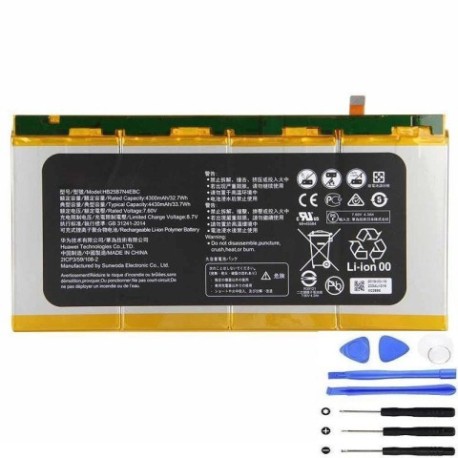
Battery models & part numbers
| Reference / P/N |
|---|
| Huawei-HB25B7N4EBC-33.7Wh |
Compatible laptop models
| Model |
|---|
| Huawei MateBook E |
| Huawei MateBook HZ-W19 |
| Huawei MateBook M5-6Y54 |
Introduction
Keep your Huawei MateBook running at peak performance with our genuine HB25B7N4EBC 33.7Wh replacement battery. This high-quality battery is specifically designed for compatible Huawei laptop models and meets original equipment specifications.
Common signs you need a replacement
| Symptom | Cause | Verification | Recommendation |
|---|---|---|---|
| Rapid battery drain | Ageing battery cells | Check battery health in system settings | Consider replacement if below 80% capacity |
| Laptop won’t hold charge | Battery degradation | Test with power adapter disconnected | Replace battery for portable use |
| Swelling or bulging | Internal damage or overheating | Visual inspection of battery compartment | Immediate replacement required |
| Overheating during use | Faulty battery management | Monitor temperature with system tools | Replace to prevent damage |
How to check compatibility
Verify your laptop model matches one of the compatible models listed above. Check your device’s model number on the bottom casing or in system information. The HB25B7N4EBC battery is specifically designed for Huawei MateBook E, HZ-W19, and M5-6Y54 models.
When to replace
Replace your battery when you notice significant performance decline, typically after 2-3 years of regular use. Look for reduced runtime, charging issues, or physical damage. Regular battery replacement maintains optimal laptop performance and prevents unexpected shutdowns.
Installation guide (overview)
Power off your laptop and disconnect all cables. Remove the bottom cover using appropriate screwdrivers. Disconnect the old battery connector and remove mounting screws. Install the new HB25B7N4EBC battery, reconnect the connector, and reassemble. For detailed instructions, consult authorised service documentation.
Usage & care tips
Avoid extreme temperatures – ideal operating range is 10°C to 35°C. Don’t leave your laptop plugged in constantly; occasional discharge cycles help maintain battery health. Store in a cool, dry place when not in use for extended periods. Use only Huawei-approved chargers.
Safety & recycling in AU/NZ
Always purchase from authorised retailers to ensure genuine, safe products. In Australia and New Zealand, dispose of old batteries at designated recycling centres. Never dispose of lithium batteries in household waste due to fire risk and environmental concerns.
FAQ
How long does this battery last?
The HB25B7N4EBC provides approximately 4-6 hours of typical use, depending on your usage patterns and laptop settings.
Is this battery genuine Huawei?
Yes, this is an original Huawei battery with part number HB25B7N4EBC, meeting all manufacturer specifications.
Do you provide installation service?
We supply the battery only. For installation, we recommend consulting authorised Huawei service centres in Australia or New Zealand.
What’s the warranty period?
This battery comes with a 12-month warranty covering manufacturing defects.
How do I check my current battery health?
In Windows, use the battery report feature or check power settings. On Huawei systems, use PC Manager software for detailed battery analysis.
Can I use this battery with other MateBook models?
No, this battery is specifically designed for the compatible models listed above. Using it with incompatible devices may cause damage.
How should I store a spare battery?
Store at 40-60% charge in a cool, dry place away from direct sunlight. Ideal storage temperature is 15-25°C.