Lenovo 00HW026 44Wh Replacement Battery
Keep your Lenovo ThinkPad Yoga running at peak performance with our genuine 44Wh replacement battery. Compatible with multiple Yoga models across the 260, 370 and X380 series.
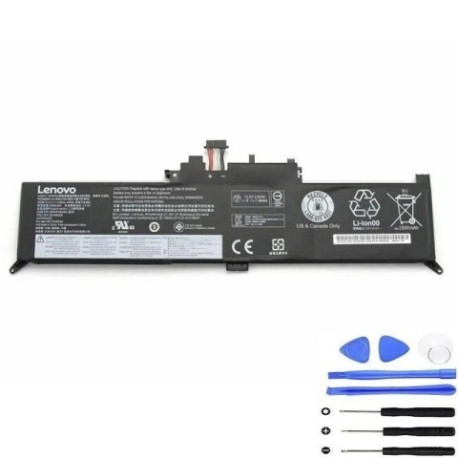
Battery models & part numbers
| Reference / P/N |
|---|
| 00HW026 |
| 00HW027 |
| 01AV432 |
| 01AV433 |
| 01AV434 |
| SB10F46464 |
| SB10K97590 |
| SB10K97591 |
Compatible laptop models
| Model |
|---|
| Lenovo ThinkPad Yoga 260 (20FD/20FE) |
| Lenovo ThinkPad Yoga 260 (20GS/20GT) |
| Lenovo ThinkPad Yoga 260 820FD |
| Lenovo ThinkPad Yoga 370 (20JJ/20JH) |
| Lenovo ThinkPad Yoga X380 (20LH/20LJ) |
Introduction
The Lenovo 00HW026 44Wh battery is designed to provide reliable power for your convertible laptop. With proper care, this high-quality replacement can restore your device’s mobility and performance.
Common signs you need a replacement
| Symptoms | Causes | Verification | Recommendation |
|---|---|---|---|
| Battery drains quickly | Ageing cells, reduced capacity | Check battery health in system settings | Consider replacement if under 2 hours runtime |
| Laptop won’t hold charge | Failed battery circuitry | Test with power adapter removed | Immediate replacement needed |
| Battery swelling | Internal damage, overheating | Visual inspection, trackpad lifting | Stop using immediately and replace |
| Overheating during charging | Faulty charging circuit | Monitor temperature with software | Replace if consistently over 45°C |
How to check compatibility
Verify your laptop model matches our compatibility list above. Check your current battery’s part number (usually printed on the battery itself) or use Lenovo’s official support website with your serial number.
When to replace
Replace your battery when runtime drops below 2 hours, you notice physical swelling, or the system reports critical battery health. Most batteries last 2-3 years with regular use.
Installation guide (overview)
1. Power off laptop and disconnect charger
2. Remove bottom cover screws (typically 8-10 Phillips head)
3. Carefully disconnect battery connector from motherboard
4. Remove mounting screws and lift out old battery
5. Install new battery and reconnect all components
6. Replace cover and charge fully before first use
Usage & care tips
• Avoid complete discharges – recharge at 20-30%
• Store between 15-25°C when not in use
• Calibrate monthly by fully charging then discharging to 5%
• Use original Lenovo charger for optimal performance
• Keep battery contacts clean and free of debris
Safety & recycling in AU/NZ
Never attempt to open or modify the battery casing. Dispose of old batteries at authorised collection centres – most electronics retailers offer free battery recycling services. Do not dispose in household waste.
FAQ
How long does shipping take within Australia?
Most metro areas receive orders within 3-5 business days. Regional areas may take 5-7 business days.
Is this battery genuine Lenovo?
Yes, this is an original Lenovo battery with full manufacturer warranty and compatibility guarantees.
What’s the warranty period?
This battery comes with a standard 12-month warranty covering manufacturing defects.
Can I use this battery with other Yoga models?
Only use with the compatible models listed above. Using with incompatible devices may cause damage.
How do I maximise battery lifespan?
Avoid extreme temperatures, don’t leave plugged in constantly, and perform monthly calibration cycles.
What tools do I need for installation?
You’ll need a Phillips screwdriver (size #00 or #0) and a plastic spudger for safe connector removal.
Is professional installation available?
Yes, we can recommend authorised service centres in major cities across Australia and New Zealand.