Battery models & part numbers
| Reference / P/N |
|---|
| 01AV400 |
| 01AV401 |
| 01AV402 |
| SB10J78997 |
| SB10J78998 |
| SB10J7899B |
Compatible laptop models
| Model |
|---|
| Lenovo ThinkPad 13 |
| Lenovo ThinkPad 13 (20GJ) |
| Lenovo ThinkPad 13 (20GK) |
| Lenovo ThinkPad 13 Chromebook |
| Lenovo ThinkPad 13 Chromebook (20GL/20GM) |
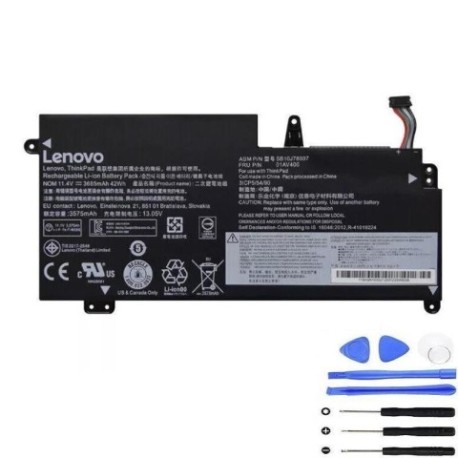
Introduction
Keep your Lenovo ThinkPad 13 performing at its best with our genuine replacement battery. This 42Wh power solution is specifically designed for your laptop model and meets all original equipment specifications.
Common signs you need a replacement
| Symptoms | Causes | Verification | Recommendation |
|---|---|---|---|
| Battery drains quickly | Ageing cells, reduced capacity | Check battery health in system settings | Consider replacement if under 50% capacity |
| Laptop shuts down unexpectedly | Faulty battery circuitry | Monitor shutdown patterns | Replace immediately for data safety |
| Battery won’t hold charge | Deep discharge, damaged cells | Test with different power adapters | Replace to restore mobility |
| Swelling or physical damage | Internal pressure buildup | Visual inspection, uneven surfaces | Replace urgently – safety hazard |
How to check compatibility
Verify your laptop model matches our compatibility list above. Check your current battery’s part number (usually printed on the battery) or locate your laptop model number on the bottom casing or in system information.
When to replace
Replace your battery when you notice significant runtime reduction, frequent unexpected shutdowns, or physical swelling. Most laptop batteries last 2-4 years with regular use before needing replacement.
Installation guide (overview)
Power off your laptop and disconnect the AC adapter. Remove the bottom cover (consult your user manual for specific instructions). Disconnect the battery connector and remove any securing screws. Install the new battery, reconnect the connector, and reassemble your laptop.
Usage & care tips
Avoid extreme temperatures (store between 15-25°C). Don’t leave your laptop plugged in constantly – occasional discharge cycles help maintain battery health. For optimal performance, avoid complete discharges and charge when battery reaches 20-30%.
Safety & recycling in AU/NZ
Never attempt to open or modify the battery. Dispose of old batteries at authorised collection points – most electronics retailers and council waste centres accept them for recycling. Never dispose of lithium batteries in household waste.
FAQ
How long does this battery last on a single charge?
Up to 6-8 hours depending on usage, screen brightness, and applications running.
Is this battery genuine Lenovo?
This is a high-quality replacement battery that meets or exceeds original specifications.
What’s the warranty period?
This battery comes with a 12-month warranty covering manufacturing defects.
How do I check my current battery’s health?
On Windows, type “battery report” in the search bar and run the command. On Chrome OS, check battery health in settings.
Can I use this battery with different ThinkPad models?
No, this battery is specifically designed for the compatible models listed above.
How should I store my spare battery?
Store at 40-60% charge in a cool, dry place away from direct sunlight.
What if my laptop isn’t recognising the new battery?
Try a full power reset: disconnect AC, remove battery, hold power button for 30 seconds, then reassemble and power on.