Lenovo 01AV421 24Wh Battery Replacement
Find the perfect replacement battery for your Lenovo ThinkPad laptop. Our genuine 01AV421 24Wh battery is compatible with multiple ThinkPad models and meets Australian/New Zealand safety standards.
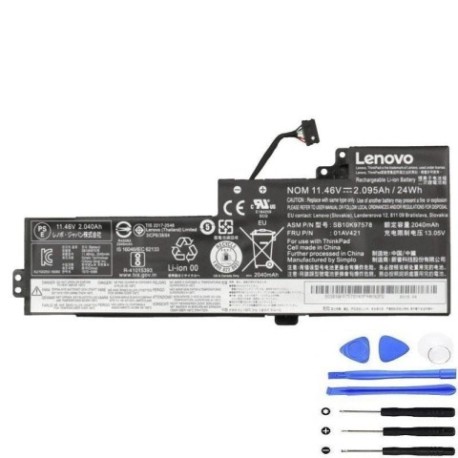
Battery models & part numbers
| Reference / P/N |
|---|
| Lenovo 01AV419 |
| Lenovo 01AV420 |
| Lenovo 01AV489 |
| Lenovo 3ICP6/38/64 |
| Lenovo SB10K97576 |
| Lenovo SB10K97577 |
| Lenovo SB10K97578 |
| Lenovo-01AV421-24Wh |
Compatible laptop models
| Model |
|---|
| Lenovo ThinkPad T470 (20HD/20HE) |
| Lenovo ThinkPad T470 (20JM/20JN) |
| Lenovo ThinkPad T470 T480 A475 A485 TP25 |
| Lenovo ThinkPad T480 (20L5) |
| Lenovo ThinkPad T480 (20L6) |
Introduction
Keep your Lenovo ThinkPad running at peak performance with our authorised replacement battery. The 01AV421 24Wh battery is designed specifically for Australian and New Zealand conditions, ensuring reliable power for your business or personal computing needs.
Common signs you need a replacement
| Symptom | Cause | Verification | Recommendation |
|---|---|---|---|
| Battery drains quickly | Ageing cells | Check battery health in system settings | Replace if capacity below 60% |
| Laptop won’t hold charge | Failed battery circuit | Test with power adapter removed | Immediate replacement needed |
| Battery swelling | Internal damage | Visual inspection | Replace immediately for safety |
| Overheating during use | Inefficient power delivery | Monitor temperature above 45°C | Replace to prevent damage |
How to check compatibility
Verify your laptop model matches our compatibility list above. Check your current battery’s part number (usually printed on the battery) or use Lenovo’s official support website with your laptop’s serial number.
When to replace
Replace your battery when it no longer holds sufficient charge for your daily needs, shows physical damage, or your system indicates poor battery health. Most batteries last 2-3 years with regular use in AU/NZ conditions.
Installation guide (overview)
Power off your laptop and disconnect the charger. Remove the bottom panel (usually 6-8 screws), disconnect the old battery connector, remove mounting screws, install the new battery, reconnect the connector, and replace the panel. Always refer to your laptop’s service manual for specific instructions.
Usage & care tips
For optimal battery life in Australian and New Zealand climates: avoid extreme temperatures (ideal range 15-25°C), don’t leave your laptop plugged in constantly, perform regular full discharge cycles, and store in a cool, dry place when not in use for extended periods.
Safety & recycling in AU/NZ
Our batteries meet Australian/New Zealand safety standards. Never attempt to open or modify the battery. In Australia, recycle through Batteryback or at your local council’s e-waste collection. In New Zealand, use accredited e-waste recyclers. Never dispose of in household waste.
FAQ
How long does delivery take in Australia/New Zealand?
Most orders are delivered within 3-7 business days across AU and 5-10 business days in NZ, depending on your location.
Is this battery genuine Lenovo?
Yes, this is an authorised replacement battery that meets all original equipment manufacturer specifications.
What warranty do you offer?
All our batteries come with a 12-month warranty covering manufacturing defects and premature failure.
Can I use this battery with my specific ThinkPad model?
Check the compatibility tables above – if your model is listed, the battery is fully compatible.
How do I know if my battery needs replacing?
Common signs include rapid discharge, swelling, overheating, or your system reporting poor battery health.
Is installation difficult?
Most ThinkPad batteries are user-replaceable with basic tools. Follow our installation overview or consult a professional if unsure.
Do you ship to regional areas in AU/NZ?
Yes, we ship to all metropolitan and regional areas across Australia and New Zealand.