Battery models & part numbers
| Reference / P/N |
|---|
| Lenovo 01AV496 |
| Lenovo 5B10W13952 |
| Lenovo L17L6P51 |
| Lenovo SB10K97634 |
| Lenovo-01AV495-90Wh |
Compatible laptop models
| Model |
|---|
| Lenovo ThinkPad P52 (20MA/20M9) |
Introduction
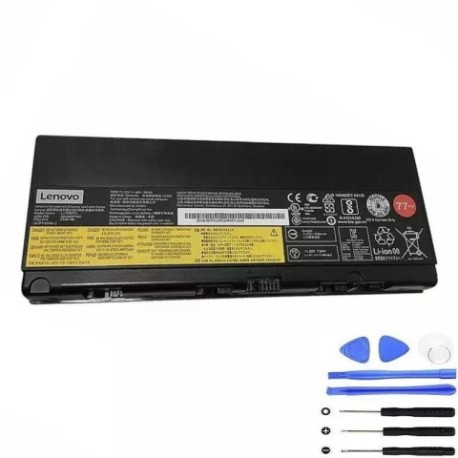
Keep your Lenovo ThinkPad P52 running at peak performance with our genuine 90Wh replacement battery. This high-capacity battery is designed specifically for Australian and New Zealand users who rely on their laptops for work and productivity.
Common signs you need a replacement
| Symptoms | Possible Causes | How to Verify | Recommendation |
|---|---|---|---|
| Battery drains quickly | Reduced capacity from age/cycles | Check battery health in system settings | Consider replacement if under 2 hours |
| Laptop won’t hold charge | Battery failure or damaged cells | Test with different power adapter | Replace immediately if persistent |
| Battery swelling/bulging | Internal damage or overheating | Visual inspection of battery compartment | Replace urgently – safety hazard |
| System shows battery errors | Communication failure with battery | Check device manager for errors | Replace if errors persist after reset |
How to check compatibility
Verify your laptop model matches our compatibility list above. Check your current battery’s part number (usually printed on the battery itself) against our reference numbers. For ThinkPad P52 models, ensure your serial number begins with 20MA or 20M9.
When to replace
Replace your battery when it holds less than 50% of its original capacity, shows physical damage, or causes system instability. Most laptop batteries need replacement after 2-3 years of regular use in Australian conditions.
Installation guide (overview)
Power off your laptop and disconnect all cables. Remove the bottom panel using the appropriate screwdriver. Disconnect the battery connector and remove any securing screws. Install the new battery, reconnect the connector, and reassemble. Always refer to your device’s service manual for detailed instructions.
Usage & care tips
Avoid extreme temperatures – store and use between 10°C and 35°C. Don’t leave your laptop plugged in constantly. Calibrate your battery monthly by fully charging then discharging to 10%. Keep firmware updated for optimal battery management.
Safety & recycling in AU/NZ
Never attempt to open or modify lithium-ion batteries. Dispose of old batteries at authorised collection centres – most electronics retailers offer free battery recycling. In Australia, check with Batteryback.org.au. In New Zealand, use recyclenow.co.nz for local options.
FAQ
How long does this battery last?
Our 90Wh battery typically provides 4-6 hours of normal use, depending on your power settings and applications.
Is this an original Lenovo battery?
This is a high-quality replacement battery designed to meet or exceed original specifications for Lenovo ThinkPad P52 models.
Do you ship to Australia and New Zealand?
Yes, we offer fast shipping to both Australia and New Zealand with tracking and insurance included.
What warranty do you offer?
All our batteries come with a 12-month warranty covering manufacturing defects and premature capacity loss.
How do I check my battery health?
In Windows, type “battery report” in the search bar and run the command to generate a detailed health analysis.
Can I use this battery with other ThinkPad models?
No, this battery is specifically designed for ThinkPad P52 (20MA/20M9) models only. Using it with incompatible devices may cause damage.
What if my laptop model isn’t listed?
Contact our support team with your laptop’s model number and serial number for compatibility verification before purchase.