Battery models & part numbers
| Reference / P/N |
|---|
| 2ICP4/59/138 |
| 5B10P23779 |
| Lenovo-0813007-32Wh |
Compatible laptop models
| Model |
|---|
| Lenovo IdeaPad 120S-11IAP (81A4) |
| Lenovo IdeaPad 120S-14IAP (81A5) |
| Lenovo IdeaPad 130S-11IGM (81KT) |
| Lenovo IdeaPad 130S-14IGM (81KU) |
| Lenovo IdeaPad S130-11IGM (81J1) |
| Lenovo IdeaPad S130-14IGM (81J2) |
Introduction
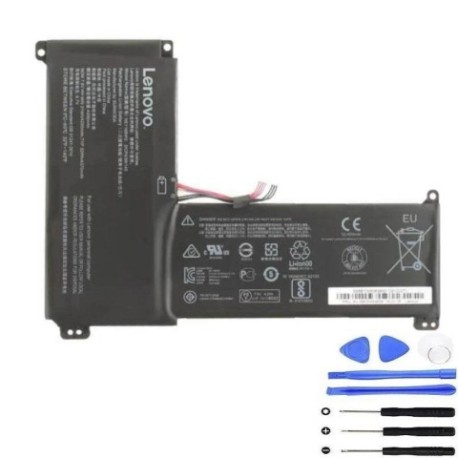
Keep your Lenovo IdeaPad performing at its best with our genuine replacement battery. This 32Wh power solution is designed specifically for your laptop model and meets all Australian safety standards.
Common signs you need a replacement
| Symptoms | Possible Causes | How to Verify | Recommendation |
|---|---|---|---|
| Battery drains quickly | Reduced capacity from age/cycles | Check battery health in system settings | Consider replacement if under 50% capacity |
| Laptop won’t hold charge | Battery cells degraded | Test with power adapter disconnected | Replace immediately if no power without adapter |
| Battery swelling/bulging | Internal damage or overheating | Visual inspection of battery compartment | Replace urgently – safety hazard |
| Inconsistent charging | Faulty battery circuitry | Monitor charging patterns | Replace if charging stops/starts randomly |
How to check compatibility
Verify your laptop model matches exactly with our compatibility list above. Check the model number on the bottom label of your laptop or in system information (type “msinfo32” in Windows search).
When to replace
Replace your battery when it holds less than 60% of its original capacity, shows physical damage, or causes unexpected shutdowns. Most laptop batteries last 2-4 years with regular use.
Installation guide (overview)
1. Power off laptop and disconnect charger
2. Remove bottom panel screws
3. Carefully disconnect old battery connector
4. Remove mounting screws
5. Install new battery and reconnect
6. Replace panel and power on
Note: Always use proper tools and follow manufacturer guidelines.
Usage & care tips
– Avoid extreme temperatures (ideal range 15-25°C)
– Don’t leave laptop plugged in constantly
– Calibrate battery monthly (full discharge/charge cycle)
– Store with 40-60% charge if not using for extended periods
– Use only authorised Lenovo chargers
Safety & recycling in AU/NZ
Batteries must be recycled responsibly. In Australia, use Batteryback or council e-waste services. In New Zealand, take to authorised recycling centres. Never dispose of batteries in household waste due to fire risk and environmental concerns.
FAQ
How long does delivery take in Australia?
Most metro areas 2-5 business days, regional areas 5-10 business days.
Is this battery genuine Lenovo?
Yes, this is an original Lenovo part with full manufacturer warranty.
What’s the battery warranty period?
12 months warranty from date of purchase.
Can I install this battery myself?
Yes, with basic technical skills and proper tools. Follow our installation guide.
How do I check my current battery health?
In Windows, type “cmd” then “powercfg /batteryreport” to generate detailed report.
What if my model isn’t listed?
Double-check your exact model number. If still not listed, this battery may not be compatible.
Do you ship to New Zealand?
Yes, we ship to both Australia and New Zealand with standard international shipping.