Lenovo 45N1102 42Wh Replacement Battery for ThinkPad Helix
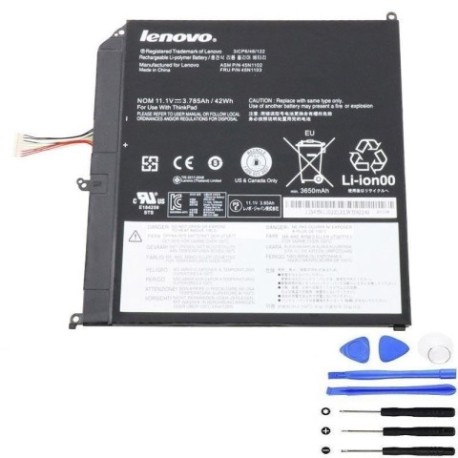
Battery models & part numbers
| Reference / P/N |
|---|
| 45N1102 |
| 45N1103 |
| Lenovo-45N1102-42Wh |
Compatible laptop models
| Model |
|---|
| Lenovo ThinkPad Helix 3697 |
| Lenovo ThinkPad Helix 3698 |
| Lenovo ThinkPad Helix 3700 |
| Lenovo ThinkPad Helix 3701 |
| Lenovo ThinkPad Helix 3702 |
| Lenovo ThinkPad Helix N3Y4DGE |
| Lenovo ThinkPad Helix N3Z6CGE |
| Lenovo ThinkPad Helix N3Z6DGE |
| Lenovo ThinkPad Helix N4B4MGE |
| Lenovo ThinkPad Helix Type 3xxx |
Introduction
Is your Lenovo ThinkPad Helix struggling to hold a charge? The Lenovo 45N1102 42Wh battery is the authorised replacement solution designed specifically for your device. This high-quality battery delivers reliable performance and extended usage time, ensuring your laptop stays powered throughout your workday.
Common signs you need a replacement
| Symptoms | Causes | Verification | Recommendation |
|---|---|---|---|
| Battery drains quickly (less than 1 hour) | Ageing battery cells, reduced capacity | Check battery health in system settings | Replace battery if capacity below 50% |
| Laptop won’t power on without charger | Battery no longer holds charge | Test with known working charger | Immediate replacement needed |
| Battery swelling or bulging | Internal damage, safety hazard | Visual inspection, measure thickness | Stop using immediately and replace |
| Overheating during charging | Faulty charging circuit, damaged cells | Monitor temperature above 45°C | Replace to prevent damage |
How to check compatibility
To ensure this battery fits your device, check the model number on the bottom of your laptop. It should match one of the compatible models listed above. You can also remove your current battery and verify the part number matches 45N1102 or 45N1103.
When to replace
Replace your battery when you notice significant performance degradation, typically after 2-3 years of regular use. If your battery shows any swelling, immediately stop using it and replace it to avoid potential safety risks.
Installation guide (overview)
1. Power off your laptop and disconnect the charger
2. Flip the laptop over and locate the battery release latch
3. Slide the latch to unlock and carefully remove the old battery
4. Align the new battery with the connectors and slide into place
5. Lock the battery in position with the latch
6. Charge fully before first use
Usage & care tips
• Avoid extreme temperatures (ideal range 15-25°C)
• Calibrate your battery monthly by fully charging then discharging
• Store in a cool, dry place when not in use
• Use only authorised Lenovo chargers
• Avoid leaving laptop plugged in constantly
Safety & recycling in AU/NZ
In Australia and New Zealand, lithium-ion batteries must be recycled properly. Do not dispose of in household waste. Many electronics retailers and local council recycling centres accept old batteries for safe disposal. Look for battery recycling symbols at your local shopping centre or office supply store.
FAQ
How long does this battery last?
Typically 2-3 years with normal use, or approximately 500 charge cycles.
Is this battery genuine Lenovo?
This is a high-quality replacement battery compatible with Lenovo ThinkPad Helix models.
What’s the warranty period?
Check the product page for current warranty details, typically 12 months.
How do I maximise battery life?
Avoid full discharges, keep between 20-80% charge when possible, and store in cool conditions.
Can I use this battery internationally?
Yes, the battery works worldwide with compatible chargers.
What if my model isn’t listed?
Double-check your laptop’s exact model number. If uncertain, contact customer support.
How long for delivery in AU/NZ?
Delivery times vary by location, typically 3-7 business days within Australia and New Zealand.