Lenovo 45N1111 24Wh Laptop Battery Replacement
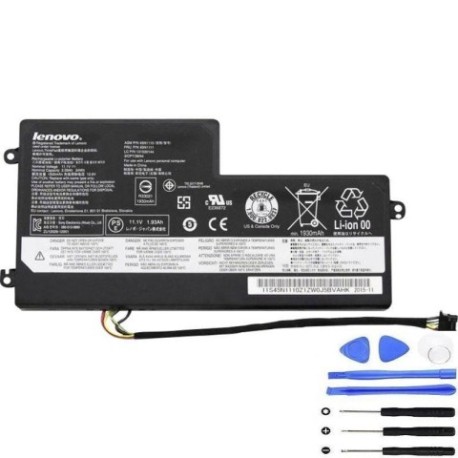
Battery models & part numbers
| Reference / P/N |
|---|
| 00HW031 |
| 00HW032 |
| 01AV459 |
| 121500144 |
| 45N1108 |
| 45N1109 |
| 45N1110 |
| 45N1112 |
| 45N1113 |
| 45N1773 |
| L16M3P71 |
| Lenovo-45N1111-24Wh |
| SB10K97602 |
Compatible laptop models
| Model |
|---|
| Lenovo ThinkPad A275 (20KC/20KD) |
| Lenovo ThinkPad T440 |
| Lenovo ThinkPad T440 (20B7/20B6) |
| Lenovo ThinkPad T440s |
| Lenovo ThinkPad T440s (20AQ/20AR) |
| Lenovo ThinkPad T440si |
| Lenovo ThinkPad T450 |
| Lenovo ThinkPad T450 (20BV/20BU/20DJ) |
| Lenovo ThinkPad T450s |
| Lenovo ThinkPad T450s (20BX/20BW) |
| Lenovo ThinkPad T460 |
| Lenovo ThinkPad T460 (20FN/20FM) |
| Lenovo ThinkPad X230s |
| Lenovo ThinkPad X240 (20AL) |
| Lenovo ThinkPad X240 (20AM) |
| Lenovo ThinkPad X240s |
| Lenovo ThinkPad X240s (20AK/20AJ) |
| Lenovo ThinkPad X250 (20CL/20CM) |
| Lenovo ThinkPad X260 (20F5/20F6) |
| Lenovo ThinkPad X270 (20HN/20HM) |
Introduction
Keep your Lenovo ThinkPad running at peak performance with our authorised 45N1111 24Wh replacement battery. This high-quality battery is designed specifically for multiple ThinkPad models commonly used across Australia and New Zealand.
Common signs you need a replacement
| Symptom | Cause | Verification | Recommendation |
|---|---|---|---|
| Short battery life | Ageing cells | Check Windows battery report | Replace if under 50% capacity |
| Laptop shuts down unexpectedly | Voltage drops | Monitor battery percentage | Immediate replacement needed |
| Battery won’t charge fully | Charging circuit failure | Check charging indicator | Replace battery |
| Battery swelling | Internal damage | Visual inspection | Replace immediately for safety |
How to check compatibility
Verify your laptop model matches our compatibility list above. Check your current battery’s part number (usually printed on the battery) or look up your laptop’s model number (found on the bottom case or in system information).
When to replace
Replace your battery when it holds less than 50% of its original capacity, shows physical damage, or fails to charge properly. Most laptop batteries need replacement every 2-3 years with regular use.
Installation guide (overview)
1. Power off your laptop and disconnect from power
2. Remove the bottom cover (consult your model’s service manual)
3. Disconnect the battery connector
4. Remove any screws securing the battery
5. Install the new battery and reconnect
6. Replace the cover and power on
Usage & care tips
• Avoid extreme temperatures (ideal range 15-25°C)
• Don’t leave laptop plugged in constantly
• Perform regular calibration cycles
• Store in cool, dry conditions when not in use
Safety & recycling in AU/NZ
Always purchase from authorised retailers. In Australia and New Zealand, dispose of old batteries at designated recycling centres – never in household waste. Many electronics retailers offer free battery recycling services.
FAQ
How long does shipping take to Australia/New Zealand?
Most orders arrive within 7-10 business days to major cities in Australia and New Zealand.
Is this battery genuine Lenovo?
This is a high-quality replacement battery designed to meet or exceed original specifications.
What warranty do you offer?
Our batteries come with a 12-month warranty covering manufacturing defects.
Will this work with my specific ThinkPad model?
Check the compatibility tables above – if your model is listed, this battery is designed for your device.
How do I know if my battery needs replacing?
Common signs include significantly reduced runtime, unexpected shutdowns, or the battery not holding a charge.
Can I install this battery myself?
Yes, most ThinkPad batteries are user-replaceable with basic tools and following proper safety procedures.
What’s the capacity of this battery?
This is a 24Wh lithium-ion battery providing reliable performance for compatible ThinkPad models.