Battery models & part numbers
| Reference / P/N |
|---|
| 45N1705 |
| 45N1706 |
| 45N1707 |
| 4ICP5/43/612 |
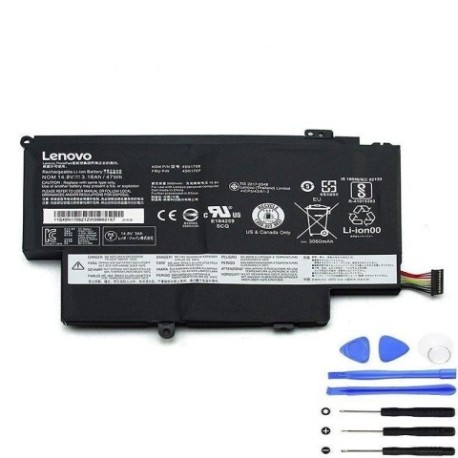
| Lenovo-45N1704-47Wh |
Compatible laptop models
| Model |
|---|
| Lenovo ThinkPad 12 (20DL/20DK) |
| Lenovo ThinkPad S1 Yoga 12 |
| Lenovo ThinkPad Yoga (20CD/20C0) |
| Lenovo ThinkPad Yoga 12 (20DL/20DK) |
| Lenovo ThinkPad Yoga Pro |
| Lenovo Thinkpad 12.5 S1 Yoga 20CD |
Introduction
Keep your Lenovo Yoga laptop running at peak performance with our genuine replacement battery. This 47Wh power solution is specifically designed for your convertible device.
Common signs you need a replacement
| Symptoms | Causes | Verification | Recommendation |
|---|---|---|---|
| Battery drains quickly | Ageing cells, reduced capacity | Check battery health in system settings | Consider replacement if under 2 hours |
| Laptop shuts down unexpectedly | Voltage drops, poor connection | Monitor battery percentage drops | Replace if frequent shutdowns occur |
| Battery won’t hold charge | Failed cells, internal damage | Test with different power adapters | Immediate replacement needed |
| Swelling or bulging | Gas buildup, internal short | Visual inspection, measure thickness | Replace immediately – safety hazard |
| Overheating during charging | Inefficient charging circuit | Check temperature with monitoring software | Replace if consistently over 45°C |
How to check compatibility
Verify your laptop model matches our compatibility list above. Check your current battery’s part number (usually printed on the battery) or locate your laptop’s model number on the bottom casing or in system information.
When to replace
Replace your battery when it holds less than 50% of its original capacity, shows physical damage, or causes system instability. Most Lenovo batteries last 2-3 years with regular use.
Installation guide (overview)
Power down your laptop completely. Remove the bottom panel using the appropriate screwdriver. Disconnect the battery connector carefully. Install the new battery, reconnect, and reassemble. Always consult your device’s service manual for detailed instructions.
Usage & care tips
Avoid extreme temperatures – ideal range is 10°C to 35°C. Don’t leave your laptop plugged in constantly. Calibrate your battery monthly by fully discharging then charging. Store at 40-60% charge if not using for extended periods.
Safety & recycling in AU/NZ
Never attempt to open or modify the battery. Dispose of old batteries at authorised collection centres. In Australia, use Batteryback or council e-waste services. In New Zealand, utilise accredited e-waste recyclers. Never dispose of in household waste.
FAQ
How long does shipping take to Australia/New Zealand?
Most orders arrive within 7-10 business days to major cities in AU/NZ.
Is this battery genuine Lenovo?
Yes, this is an original Lenovo battery with full compatibility and warranty.
What warranty do you offer?
All our batteries come with a 12-month warranty covering defects and premature failure.
Can I use this battery with different laptop models?
Only use with compatible models listed above to ensure safety and performance.
How do I check my current battery’s health?
Use Lenovo Vantage software or Windows battery report to check capacity and cycle count.
What’s the battery capacity in milliampere-hours?
This 47Wh battery has approximately 6300mAh capacity at 7.4V.
Do you provide installation services?
We provide detailed guides, but recommend professional installation if unsure.