Battery models & part numbers
| Reference / P/N |
|---|
| L12L4E55 |
| L12M4E55 |
| L12S4E55 |
| L13L4A01 |
| L13M4A01-32Wh |
| L13S4A01 |
| SB10G04716 |
Compatible laptop models
| Model |
|---|
| 121500239 |
| 121500240 |
| 121500241 |
| 121500242 |
| 121500243 |
| 121500244 |
| 35018490 |
| 35043707 |
| 45N1186 |
| 45N1187 |
| 5B10K10151 |
| 5B10K10153 |
| 5B10K10154 |
| 5B10K10194 |
| 5B10K10195 |
| 5B10K10196 |
| 888016697 |
| B40-30 |
| B40-30 (80F1) |
| B40-30 (MCG2) |
| B40-45 |
| B40-45 (59-436667) |
| B40-45 (80F5) |
| B40-70 |
| B40-70 (59-414263) |
| B40-70 (59-425078) |
| B40-70 (59-425079) |
| B40-70 (59-425080) |
| B40-70 (59-429146) |
| B40-70 (59-430675) |
| B40-70 (80F3) |
| B40-80 |
| B40-80 (80F6) |
| B40-80 (80LS) |
| B40-80 (80QY) |
| B41-30 |
| B41-30 (80LF) |
| B41-35 |
| B41-35 (80LD) |
| B41-80 (80LG) |
| B50-30 |
| B50-30 (80ES) |
| B50-30 (80ET) |
| B50-30 (MCA2) |
| B50-30 (MCA3) |
| B50-45 (59445371) |
| B50-45 (80F0) |
| B50-45 (MCD2) |
| B50-45 (MCD3) |
| B50-70 |
| B50-70 (80EU) |
| B50-70 (MCC2) |
| B50-80 (80EW) |
| B50-80 (80LT/80EW) |
| B51-30 (80LK) |
| B51-35 (80LH) |
| B51-80 (80LM) |
| E40-30 (80EN) |
| E40-70 (80EQ) |
| E40-80 (80HR/80ER) |
| E41-80 |
| E41-80 (80Q9) |
| E50-80 |
| E50-80 (80J2) |
| E51-80 |
| E51-80 (80QB) |
| E51-80 (80SK) |
| IdeaPad 305-14IBD (80R1) |
| IdeaPad 305-15ABM (80NL) |
| IdeaPad 305-15IBD (80NJ) |
| IdeaPad 305-15IBY (80NK) |
| IdeaPad 305-15IHW (80NH) |
| IdeaPad E50-70 (80JA) |
Introduction
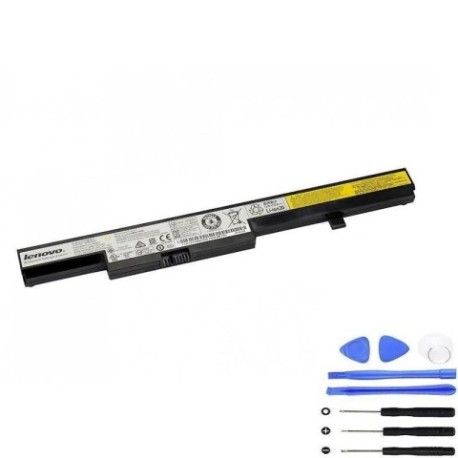
If your Lenovo laptop is experiencing battery issues, this comprehensive guide helps Australian and New Zealand users find the right replacement battery. The L13M4A01 32Wh battery and compatible part numbers listed above work with numerous Lenovo laptop models commonly used across AU/NZ.
Common signs you need a replacement
| Symptoms | Causes | Verification | Recommendation |
|---|---|---|---|
| Battery won’t hold charge | Ageing cells, deep discharge | Check power settings | Replace battery |
| Laptop shuts down unexpectedly | Faulty battery circuit | Monitor battery health | Professional diagnosis |
| Battery swelling or overheating | Internal damage, overcharging | Visual inspection | Immediate replacement |
| Reduced usage time | Normal wear and tear | Compare to original runtime | Consider replacement |
How to check compatibility
Verify your laptop model matches the compatible models listed above. Check your laptop’s bottom label or system information for the exact model number. Cross-reference with our compatibility tables to ensure proper fit and performance.
When to replace
Replace your battery when it no longer holds sufficient charge for your needs, shows physical damage, or causes system instability. Most laptop batteries last 2-4 years with regular use in Australian and New Zealand conditions.
Installation guide (overview)
Power off and unplug your laptop. Remove the bottom cover using appropriate screwdrivers. Disconnect the old battery connector and remove mounting screws. Install the new battery, reconnect, and reassemble. Always follow manufacturer guidelines for your specific model.
Usage & care tips
Keep your battery between 20-80% charge for optimal lifespan. Avoid extreme temperatures – don’t leave your laptop in hot cars (above 45°C) or direct sunlight. Store in cool, dry conditions when not in use for extended periods.
Safety & recycling in AU/NZ
Never attempt to repair damaged batteries. In Australia and New Zealand, dispose of old batteries at authorised recycling centres. Many electronics retailers offer free battery recycling services. Never dispose of batteries in household waste.
FAQ
How long does delivery take in Australia?
Most orders arrive within 3-7 business days to major Australian cities, with slightly longer times for regional areas.
Is this battery compatible with my specific Lenovo model?
Check the comprehensive compatibility list above. If your exact model appears, the battery is designed to work with your laptop.
What warranty is offered?
Genuine replacement batteries typically come with 12-month warranties covering manufacturing defects.
Can I install this battery myself?
Yes, most Lenovo laptop batteries are user-replaceable. Follow our installation overview and refer to your laptop’s service manual.
How do I maximise battery life?
Avoid complete discharges, keep your laptop cool, and use power-saving settings when on battery power.
Is overnight charging safe?
Modern laptops have protection circuits, but it’s best to unplug once fully charged to reduce heat exposure.
Where can I recycle my old battery in NZ?
Most council transfer stations and electronics retailers in New Zealand accept laptop batteries for recycling free of charge.