Battery models & part numbers
| Reference / P/N |
|---|
| 2ICP6/54/90 |
| 2ICP6/55/90 |
| 5B10Q39201 |
| 5B10Q39202 |
| 5B10Q39203 |
| 5B10Q39204 |
| 5B10Q39205 |
| 5B10Q39206 |
| 5B10W67199 |
| 5B10W67232 |
| 5B10W67294 |
| L14M2P21 |
| L15C3PB1 |
| L15L3PB0 |
| L15M3PB0 |
| Lenovo-L14L2P21-30Wh |
Compatible laptop models
| Model |
|---|
| Lenovo B330S (81JU/81JV) |
| Lenovo IdeaPad 330S-14AST (81F8) |
| Lenovo IdeaPad 330S-14ASTs |
| Lenovo IdeaPad 330S-14IKB (81F4/81JM) |
| Lenovo IdeaPad 330S-14IKBs |
| Lenovo IdeaPad 330S-15ARR (81FB/81JQ) |
| Lenovo IdeaPad 330S-15ARRs |
| Lenovo IdeaPad 330S-15AST (81F9) |
| Lenovo IdeaPad 330S-15ASTs |
| Lenovo IdeaPad 330S-15IKB (81F5/81JN) |
| Lenovo IdeaPad 330S-15IKBs |
| Lenovo IdeaPad B330S-14IKBR (81JU) |
| Lenovo IdeaPad B330S-15IKBR (81JV) |
| Lenovo IdeaPad GTX1050s |
Introduction
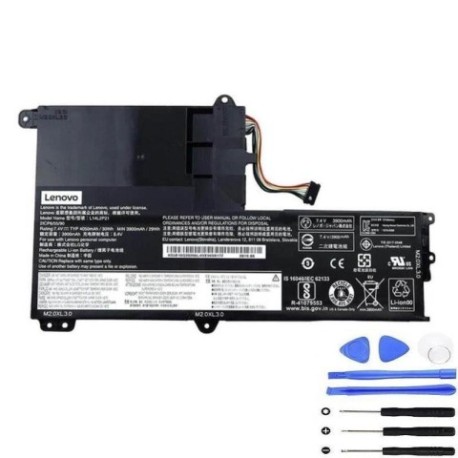
If your Lenovo laptop is struggling to hold a charge or won’t power on without being plugged in, you likely need a battery replacement. Our genuine Lenovo L14L2P21 30Wh battery is compatible with multiple Lenovo models and part numbers, ensuring optimal performance and safety.
Common signs you need a replacement
| Symptoms | Causes | Verification | Recommendation |
|---|---|---|---|
| Battery drains quickly | Ageing cells, high cycles | Check battery health in system settings | Replace if capacity below 60% |
| Laptop won’t charge | Faulty battery circuit | Try different power adapter | Replace battery if adapter works |
| Battery swelling | Internal damage, overheating | Visual inspection, uneven surface | Replace immediately for safety |
| Random shutdowns | Voltage instability | Monitor during heavy usage | Replace if persistent |
How to check compatibility
Check your laptop’s model number on the bottom case or in system information. Compare it with our compatibility list above. You can also remove your current battery and match the part number with our reference list.
When to replace
Replace your battery when it holds less than 60% of its original capacity, shows physical damage, or causes system instability. Most laptop batteries last 2-4 years with regular use.
Installation guide (overview)
1. Power off laptop and unplug charger
2. Remove bottom panel screws
3. Carefully disconnect old battery connector
4. Install new battery and reconnect
5. Replace panel and power on
Always consult your device’s service manual for detailed instructions.
Usage & care tips
• Avoid extreme temperatures (ideal range 15-25°C)
• Don’t leave laptop plugged in constantly
• Perform partial discharges rather than full cycles
• Store at 40-60% charge if not using for extended periods
• Keep battery contacts clean
Safety & recycling in AU/NZ
Never puncture or disassemble lithium-ion batteries. In Australia and New Zealand, recycle old batteries at authorised collection points like Officeworks, Battery World, or local council recycling centres. Do not dispose in household waste.
FAQ
How long does shipping take in Australia?
Typically 3-7 business days depending on your location.
Is this battery genuine Lenovo?
Yes, this is an authentic Lenovo replacement battery with full compatibility.
What’s the warranty period?
12 months warranty from date of purchase.
Can I install it myself?
Yes, most users can install it following our guide, but professional installation is available.
How do I calibrate the new battery?
Charge to 100%, use until it shuts down, then charge uninterrupted to 100% again.
Will this work with my specific model?
Check our compatibility tables above – if your model is listed, it’s fully compatible.
What if the battery doesn’t fit?
Contact us immediately for returns – we offer 30-day money back guarantee.