Battery models & part numbers
| Reference / P/N |
|---|
| L14S4P72 |
| Lenovo-L14M4P72-45Wh |
Compatible laptop models
| Model |
|---|
| Lenovo 35040005 |
| Lenovo 35044733 |
| Lenovo 5B10G75095 |
| Lenovo 5B10G84689 |
| Lenovo 5B10K10224 |
| Lenovo 5B10K10226 |
| Lenovo L14S4P72 |
| Lenovo Yoga 3 |
| Lenovo Yoga 3 14 |
| Lenovo Yoga 3 14-IFI |
| Lenovo Yoga 3 14-IFI(D) |
| Lenovo Yoga 3 14-ISE |
| Lenovo Yoga 3 1470 (80JH) |
| Lenovo Yoga 3 1470 (80KQ) |
| Lenovo Yoga 700 |
| Lenovo Yoga 700 14ISK |
| Lenovo Yoga 700-14ISK (80QD) |
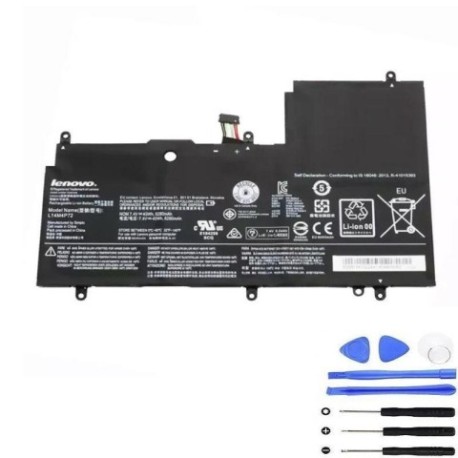
Introduction
Keep your Lenovo Yoga laptop performing at its best with our genuine replacement battery. This 45Wh power solution is specifically designed for Yoga 3 and Yoga 700 series models, ensuring optimal performance and reliability.
Common signs you need a replacement
| Symptoms | Causes | Verification | Recommendation |
|---|---|---|---|
| Battery drains quickly | Ageing cells | Check battery health in system settings | Consider replacement if capacity below 70% |
| Laptop won’t hold charge | Worn-out battery | Test with power adapter disconnected | Replace if immediate shutdown occurs |
| Battery swelling | Internal damage | Visual inspection of battery compartment | Replace immediately for safety |
| Overheating during use | Failing components | Monitor temperature with system tools | Replace if consistently above 45°C |
How to check compatibility
Verify your laptop model matches our compatibility list above. Check your current battery’s part number or look for model information on the bottom case of your laptop. Cross-reference with our authorised compatibility database.
When to replace
Replace your battery when you notice significant performance degradation, typically after 2-3 years of regular use. If your laptop shuts down unexpectedly or the battery indicator shows inconsistent readings, it’s time for a replacement.
Installation guide (overview)
Power off your laptop and disconnect all cables. Remove the bottom cover using the appropriate screwdriver. Disconnect the old battery connector and remove any securing screws. Install the new battery, reconnect the connector, and reassemble your laptop.
Usage & care tips
Avoid extreme temperatures (store between 15-25°C). Don’t leave your laptop plugged in constantly. Calibrate your battery monthly by fully charging then discharging to 20%. Keep contacts clean and free from dust.
Safety & recycling in AU/NZ
Dispose of old batteries at authorised recycling centres. Never puncture or expose batteries to fire. In Australia, use Batteryback or similar programs. In New Zealand, utilise e-waste collection services. Both countries have strict regulations for battery disposal.
FAQ
How long does delivery take in Australia?
Typically 3-7 business days depending on your location.
Is this battery genuine Lenovo?
Yes, this is an authorised replacement part with full compatibility.
What’s the warranty period?
12 months warranty from date of purchase.
Can I install this myself?
Yes, with basic technical skills and proper tools. Follow our installation guide carefully.
Will this work with my Yoga 3 14?
Yes, all Yoga 3 14 variants are compatible as listed above.
How do I recycle my old battery?
Take it to any authorised battery recycling centre in your area.
What’s the battery life expectancy?
Approximately 2-3 years with normal usage patterns.