Lenovo L15M3PB0 30Wh Laptop Battery Replacement
Looking for a genuine replacement battery for your Lenovo laptop? Our L15M3PB0 30Wh battery is compatible with multiple Lenovo models across the Flex, IdeaPad, and Yoga series. Made to meet Australian and New Zealand standards.
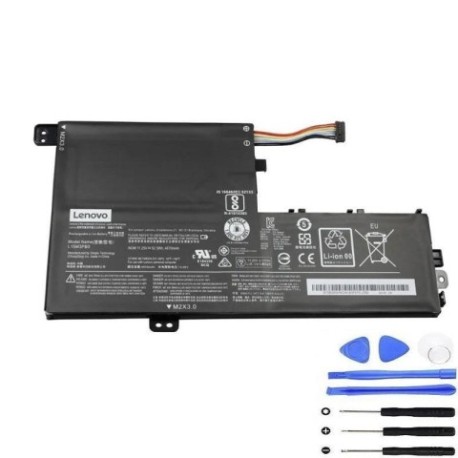
Battery models & part numbers
| Reference / P/N |
|---|
| Lenovo-L15M3PB0-30Wh |
Compatible laptop models
| Model |
|---|
| Lenovo 5B10M49821 |
| Lenovo 5B10M49822 |
| Lenovo 5B10M49823 |
| Lenovo 5B10M49824 |
| Lenovo 5B10M49825 |
| Lenovo 5B10M49826 |
| Lenovo 5B10W89290 |
| Lenovo 8S5B10M49821 |
| Lenovo 8S5B10M49824 |
| Lenovo 8S5B10M49826 |
| Lenovo Flex 5-1470 (80XA/81C9) |
| Lenovo Flex 5-1570 (80XB/81CA) |
| Lenovo IdeaPad 320S-14IKB (80X4/81BN) |
| Lenovo IdeaPad 320S-14IKBR (81BN) |
| Lenovo IdeaPad 320S-15ABR (80YA) |
| Lenovo IdeaPad 320S-15AST (80YB) |
| Lenovo IdeaPad 320S-15IKB (80X5/81BQ) |
| Lenovo IdeaPad 520s-14IKB (80X2/81BL) |
| Lenovo IdeaPad 520S-14IKBR |
| Lenovo L14L2P21 |
| Lenovo L14M2P21 |
| Lenovo L15C3PB1 |
| Lenovo L15L3PB0 |
| Lenovo Yoga 520-14IKB (80X8/80YM) |
| Lenovo Yoga 520-14IKB (81C8) |
Introduction
The Lenovo L15M3PB0 30Wh battery is designed as a direct replacement for compatible Lenovo laptops. This high-quality battery ensures your device maintains optimal performance and mobility throughout Australia and New Zealand.
Common signs you need a replacement
| Symptoms | Causes | Verification | Recommendation |
|---|---|---|---|
| Battery drains quickly | Ageing cells, reduced capacity | Check battery health in system settings | Consider replacement if under 2 hours runtime |
| Laptop won’t hold charge | Failed battery cells | Test with power adapter disconnected | Immediate replacement needed |
| Battery swelling | Internal damage, overheating | Visual inspection, case separation | Replace immediately for safety |
| Overheating during use | Inefficient battery operation | Monitor temperature, check vents | Replace to prevent damage |
How to check compatibility
Check your laptop’s model number on the bottom case or in system information. Compare it with our compatibility list above. For exact matching, remove your current battery and verify the part number matches L15M3PB0.
When to replace
Replace your battery when runtime drops below 50% of original capacity, typically after 2-3 years of regular use. Swelling, overheating, or failure to charge are urgent replacement indicators.
Installation guide (overview)
1. Power off laptop and disconnect charger
2. Remove bottom case screws
3. Carefully disconnect battery connector
4. Remove old battery
5. Install new L15M3PB0 battery
6. Reconnect connector and reassemble
7. Charge fully before first use
Usage & care tips
• Avoid extreme temperatures (ideal range 10°C to 35°C)
• Calibrate battery monthly by fully discharging then charging
• Store at 40-60% charge if not using for extended periods
• Use authorised Lenovo chargers only
Safety & recycling in AU/NZ
Batteries must be recycled responsibly. In Australia, use Batteryback or council e-waste services. In New Zealand, take to authorised recycling centres. Never dispose of in household waste due to fire risk.
FAQ
How long does shipping take in Australia?
Typically 3-7 business days depending on your location.
Is this battery genuine Lenovo?
Yes, this is an original specification replacement battery compatible with Lenovo laptops.
What warranty do you offer?
12-month warranty covering manufacturing defects.
Can I install this myself?
Yes, with basic technical skills and proper tools. Follow our installation guide carefully.
How do I recycle my old battery?
Contact your local council or visit an authorised e-waste recycling centre.
Will this improve my laptop’s performance?
It will restore original battery life and prevent performance throttling due to power issues.
Do you ship to New Zealand?
Yes, we ship to both Australia and New Zealand with standard international rates.