Lenovo L15M4P23 78Wh Replacement Battery
Find the perfect replacement battery for your Lenovo laptop with our comprehensive compatibility guide and expert installation advice.
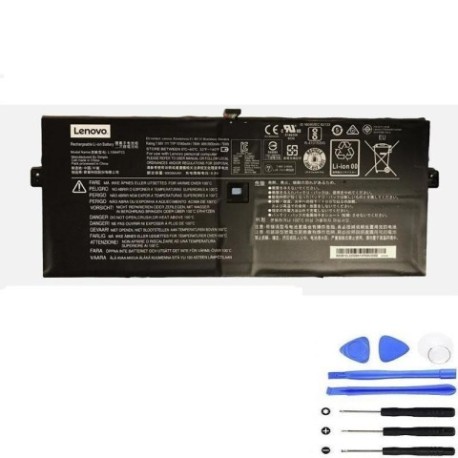
Battery models & part numbers
| Reference / P/N |
|---|
| 5B10L02190 |
| L15C4P21 |
| L15C4P22 |
| L15M4P21 |
| L15M4P23 |
| Lenovo-L15M4P23-78Wh |
Compatible laptop models
| Model |
|---|
| Lenovo Yoga 5 Pro |
| Lenovo Yoga 910-13IKB (80VF/80VG) |
Introduction
The Lenovo L15M4P23 78Wh battery is a high-quality replacement solution designed specifically for compatible Lenovo Yoga models. This genuine-compatible battery offers reliable performance and extended usage time for your laptop.
Common signs you need a replacement
| Symptoms | Causes | Verification | Recommendation |
|---|---|---|---|
| Battery drains quickly | Ageing cells, high cycles | Check battery health in system settings | Replace if capacity below 60% |
| Laptop won’t hold charge | Failed battery management system | Test with power adapter removed | Immediate replacement needed |
| Battery swelling | Internal damage, overheating | Visual inspection, trackpad lifting | Replace immediately – safety risk |
| Overheating during use | Inefficient charging, poor cells | Monitor temperature, check vents | Replace to prevent damage |
How to check compatibility
Verify your laptop’s compatibility by checking the model number on the bottom casing or in system information. Cross-reference with our compatibility tables above. For Lenovo Yoga models, ensure the physical dimensions match (typically 305mm × 95mm × 5mm).
When to replace
Replace your battery when it shows significant capacity loss (below 60% of original), physical swelling, or fails to hold charge. Most laptop batteries last 2-4 years with regular use. Don’t wait until complete failure – proactive replacement prevents data loss.
Installation guide (overview)
1. Power down laptop and disconnect charger
2. Remove bottom cover screws (Torx T5 recommended)
3. Carefully disconnect battery connector from motherboard
4. Remove old battery mounting screws
5. Install new battery and reconnect
6. Replace cover and power on
Note: Always use anti-static precautions and authorised tools.
Usage & care tips
• Avoid complete discharges – recharge at 20-30%
• Store between 15-25°C in dry conditions
• Don’t leave laptop plugged in constantly
• Calibrate battery monthly (full charge/discharge cycle)
• Use original or authorised chargers only
Safety & recycling in AU/NZ
In Australia and New Zealand, lithium-ion batteries must be recycled through authorised collection centres. Never dispose of in household waste. Many electronics retailers offer free battery recycling services. Damaged or swollen batteries should be handled with care and recycled immediately.
FAQ
How long does shipping take in Australia?
Typically 3-7 business days depending on your location.
Is this battery genuine Lenovo?
This is a high-quality compatible battery meeting original specifications.
What warranty is provided?
Most replacement batteries come with 12-24 month warranty coverage.
Can I install this myself?
Yes, with basic technical skills and proper tools. Follow our installation guide.
How do I recycle my old battery?
Use authorised recycling centres – many Officeworks and JB Hi-Fi stores accept them.
Will this affect my laptop’s warranty?
Installing third-party batteries may void manufacturer warranty – check your terms.
What’s the battery capacity?
78Wh (Watt-hours) providing extended usage time.