Battery models & part numbers
| Reference / P/N |
|---|
| Lenovo 3ICP6/54/90 |
| Lenovo 3ICP6/55/90 |
| Lenovo 5B10W13887 |
| Lenovo 5B10W13888 |
| Lenovo 5B10W13889 |
| Lenovo 5B10W13890 |
| Lenovo L17L3P51 |
| Lenovo L17M3P51 |
| Lenovo L17M3P52 |
| Lenovo SB10K97606 |
| Lenovo SB10K97607 |
| Lenovo SB10K97608 |
| Lenovo SB10K97609 |
| Lenovo SB10T83130 |
| Lenovo SB10T83131 |
| Lenovo SB10T83132 |
| Lenovo SB10T83133 |
| Lenovo-L17C3P51-45Wh |
Compatible laptop models
| Model |
|---|
| Lenovo 01AV445 |
| Lenovo 01AV446 |
| Lenovo 01AV447 |
| Lenovo 01AV448 |
| Lenovo E41-50 (82HW) |
| Lenovo E41-50 (82HX) |
| Lenovo E41-55 (82FJ) |
| Lenovo ThinkPad E14 (20RA/20RB) |
| Lenovo ThinkPad E15 (20RD/20RE) |
| Lenovo ThinkPad E480 (20KQ/20KN) |
| Lenovo ThinkPad E485 (20KU) |
| Lenovo ThinkPad E490 (20N8/20N9) |
| Lenovo ThinkPad E495 (20NE) |
| Lenovo ThinkPad E495 (20NE001GGE) |
| Lenovo ThinkPad E580 (20KS/20KT) |
| Lenovo ThinkPad E585 (20KV) |
| Lenovo ThinkPad E590 (20NB/20NC) |
| Lenovo ThinkPad E595 (20NF) |
Introduction
If your Lenovo laptop is struggling to hold charge or showing battery warnings, you’ve come to the right place. Our comprehensive guide helps Australian and New Zealand customers find the perfect replacement battery for their Lenovo devices.
Common signs you need a replacement
| Symptoms | Causes | Verification | Recommendation |
|---|---|---|---|
| Battery drains quickly (under 1 hour) | Ageing cells, high cycle count | Check battery health in system settings | Replace if capacity below 60% |
| Laptop won’t power on without charger | Dead battery cells | Remove charger – device shuts down | Immediate replacement needed |
| Battery swelling or bulging | Internal gas buildup | Visual inspection, uneven surface | Stop using immediately – safety hazard |
| Overheating during charging | Faulty charging circuit | Check temperature exceeds 45°C | Replace battery and check charger |
| System shows “battery not detected” | Connection issues, BMS failure | Reset battery, update drivers | Replace if persistent |
How to check compatibility
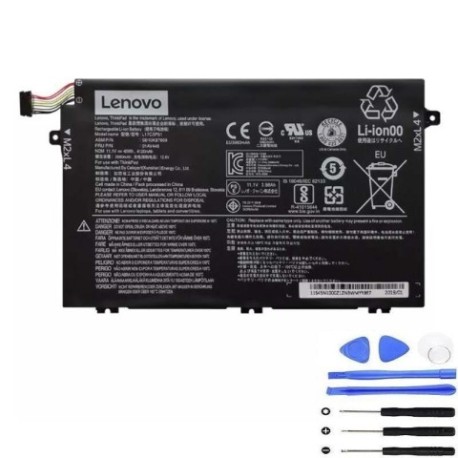
Always verify your laptop model matches our compatibility list above. Check the label on the bottom of your laptop or remove the current battery to find the part number. The L17C3P51 45Wh battery is designed to fit perfectly in all listed models with standard dimensions of 207mm x 138mm x 6mm.
When to replace
Most laptop batteries last 2-3 years with regular use. Replace when: battery health shows less than 60% capacity, you get frequent low-battery warnings, or the physical battery shows signs of swelling. In Australia’s climate, avoid leaving laptops in hot cars as temperatures above 50°C accelerate battery degradation.
Installation guide (overview)
1. Power off laptop and disconnect charger
2. Remove bottom panel screws (typically Phillips #1)
3. Carefully disconnect battery connector from motherboard
4. Remove mounting screws and lift out old battery
5. Install new battery and reconnect connector
6. Replace bottom panel and power on
Note: Always use proper anti-static precautions.
Usage & care tips
• Avoid frequent full discharges – charge between 20-80% for longest life
• Store in cool, dry conditions (15-25°C ideal)
• Use only authorised Lenovo chargers
• Calibrate battery monthly: fully charge, then discharge to 5%
• Remove battery if storing laptop for extended periods
Safety & recycling in AU/NZ
In Australia and New Zealand, lithium-ion batteries must be recycled responsibly. Never dispose of in household waste. Use battery recycling services at Officeworks, Bunnings, or local council recycling centres. Damaged or swollen batteries should be handled with care – place in fire-resistant container and take to specialist recycling facilities immediately.
FAQ
How long does shipping take to Australia?
Most orders arrive within 5-7 business days to major Australian cities, 7-10 days to regional areas.
Is this battery genuine Lenovo?
Our batteries meet or exceed original specifications and are fully compatible with your Lenovo device.
What warranty do you offer?
All our batteries come with a 12-month warranty covering manufacturing defects.
Will this work with my New Zealand voltage?
Yes, the battery is designed for global use and compatible with NZ’s 230V power system.
How do I check my current battery health?
On Windows: Open Command Prompt and type “powercfg /batteryreport” – this generates a detailed battery health report.
Can I install this myself?
Yes, most models have user-replaceable batteries. Follow our installation guide or consult your device’s service manual.
What if my model isn’t listed?
Contact our support team with your exact laptop model number for compatibility verification.