Battery models & part numbers
| Reference / P/N |
|---|
| Lenovo 3ICP6/55/90 |
| Lenovo 5B10T09092 |
| Lenovo 5B10T09093 |
| Lenovo 5B10T09094 |
| Lenovo 5B10T09095 |
| Lenovo 5B10T09096 |
| Lenovo 5B10T09097 |
| Lenovo 5B10W67177 |
| Lenovo 5B10W67195 |
| Lenovo 5B10W67217 |
| Lenovo 5B10W67277 |
| Lenovo 5B10W67289 |
| Lenovo 5B10W67426 |
| Lenovo L18C3PF6 |
| Lenovo L18C3PF7 |
| Lenovo L18L3PF2 |
| Lenovo L18L3PF3 |
| Lenovo L18M3PF6 |
| Lenovo L18M3PF7 |
| Lenovo SB10W6718 |
| Lenovo SB10W67218 |
| Lenovo SB10W67332 |
| Lenovo-L18C3PF7-52.5Wh |
Compatible laptop models
| Model |
|---|
| Lenovo IdeaPad C340-15IWL (81N5) |
| Lenovo IdeaPad Flex-15IIL (81XK) |
| Lenovo IdeaPad Flex-15IML (81XH) |
| Lenovo IdeaPad FLEX-15IWL (81SR) |
| Lenovo IdeaPad S340-14API (81NB) |
| Lenovo IdeaPad S340-14IIL (81VV/81WJ) |
| Lenovo IdeaPad S340-14IWL (81N7) |
| Lenovo IdeaPad S340-15API (81NC) |
| Lenovo IdeaPad S340-15API Touch (81QG) |
| Lenovo IdeaPad S340-15IWL (81N8) |
| Lenovo IdeaPad S340-15IWL (81RK) |
| Lenovo IdeaPad S340-15IWL Touch (81QF) |
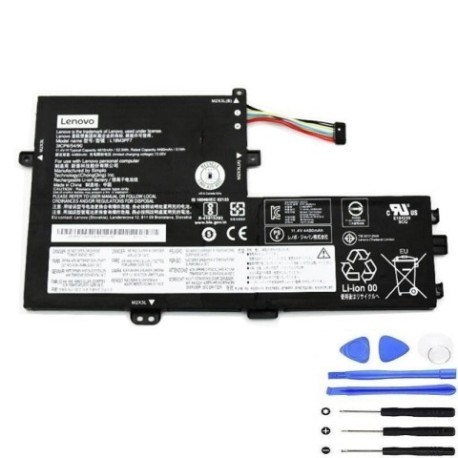
Introduction
If your Lenovo laptop is struggling to hold charge or shutting down unexpectedly, it’s likely time for a battery replacement. Our authorised replacement battery maintains the same performance and safety standards as the original equipment.
Common signs you need a replacement
| Symptom | Cause | Verification | Recommendation |
|---|---|---|---|
| Short battery life | Ageing cells | Check power settings | Consider replacement |
| Laptop won’t charge | Faulty battery | Try different charger | Replace battery |
| Swollen battery case | Internal damage | Visual inspection | Replace immediately |
| Random shutdowns | Power delivery issues | Monitor battery health | Professional assessment |
How to check compatibility
Verify your laptop model number (found on the bottom case or in system information) matches our compatibility list above. For additional confirmation, check your current battery’s part number against our reference list.
When to replace
Replace your battery when it holds less than 50% of its original capacity, shows physical damage, or causes system instability. Most laptop batteries need replacement every 2-3 years with regular use.
Installation guide (overview)
Power down your laptop completely. Remove the bottom cover using the appropriate screwdriver. Disconnect the old battery connector and remove mounting screws. Install the new battery, reconnect the connector, and reassemble. Always follow proper electrostatic discharge precautions.
Usage & care tips
Store batteries at room temperature (15-25°C). Avoid complete discharges – recharge when battery reaches 20-30%. Don’t leave your laptop plugged in constantly. Calibrate your battery monthly by fully charging then discharging to maintain accuracy.
Safety & recycling in AU/NZ
Never attempt to open or modify lithium-ion batteries. Dispose of old batteries at authorised recycling centres – never in household waste. In Australia, check with your local council for battery recycling options. In New Zealand, use dedicated battery recycling facilities.
FAQ
How long does shipping take to Australia/New Zealand?
Typically 7-14 business days depending on your location.
Is this battery genuine Lenovo?
This is a high-quality replacement battery that meets or exceeds original specifications.
What warranty do you offer?
All our batteries come with a 12-month warranty covering manufacturing defects.
Can I install this myself?
Yes, with basic technical skills and proper tools. Follow our installation guide carefully.
How do I recycle my old battery?
Contact your local council or visit an authorised battery recycling centre.
What if my model isn’t listed?
Contact our support team with your laptop and current battery details for verification.
Is overnight charging safe?
Modern laptops have protection circuits, but we recommend unplugging once fully charged.