Lenovo L18M4PF0 45Wh Battery Replacement Guide
If your Lenovo ThinkBook laptop is losing charge quickly or not holding power, it might be time for a new battery. This guide covers compatible models, signs you need a replacement, and how to install and care for your battery in Australia and New Zealand.
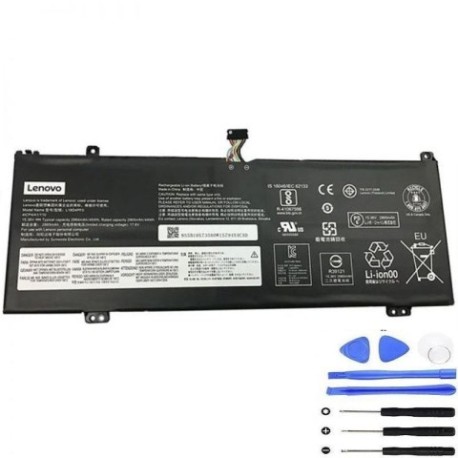
Battery models & part numbers
| Reference / P/N |
|---|
| Lenovo L18C4PF0 |
| Lenovo L18D4PF0 |
| Lenovo-L18M4PF0-45Wh |
Compatible laptop models
| Model |
|---|
| Lenovo 5B10S73499 |
| Lenovo 5B10S73500 |
| Lenovo 5B10S73501 |
| Lenovo 5B10W67315 |
| Lenovo 5B10W67334 |
| Lenovo 5B10W67399 |
| Lenovo SB10W67202 |
| Lenovo SB10W67259 |
| Lenovo ThinkBook 13s (20R9) |
| Lenovo ThinkBook 13s IWL (20R9) |
| Lenovo ThinkBook 13s-IML (20RR) |
| Lenovo ThinkBook 13s-IWL (20R9) |
| Lenovo ThinkBook 14s-IML (20RS) |
| Lenovo ThinkBook 14s-IWL (20RM) |
| Lenovo ThinkBook Plus (20TG) |
Introduction
The Lenovo L18M4PF0 45Wh battery is a genuine replacement part designed for various ThinkBook models. It ensures reliable performance and is backed by safety standards suitable for AU/NZ use.
Common signs you need a replacement
| Symptom | Cause | How to Check | Recommendation |
|---|---|---|---|
| Short battery life | Ageing cells | Check power settings | Consider replacement |
| Laptop shuts down unexpectedly | Battery failure | Monitor charge levels | Replace battery |
| Battery not charging | Faulty circuit | Test with different charger | Inspect battery |
| Swelling or overheating | Damage or defect | Visual inspection | Replace immediately |
How to check compatibility
Verify your laptop model matches the list above. Check the label on your old battery or use Lenovo’s support site for confirmation.
When to replace
Replace your battery if it holds less than 50% charge, shows physical damage, or is over 2–3 years old with heavy use.
Installation guide (overview)
Power off the laptop, remove the back panel, disconnect the old battery, and connect the new one. Secure it and reassemble. Refer to authorised service guides for details.
Usage & care tips
Avoid full discharges; keep between 20–80% charge. Store in a cool, dry place (15–25°C). Do not expose to extreme temperatures.
Safety & recycling in AU/NZ
Dispose of old batteries at designated recycling centres. Do not incinerate or puncture. Follow local regulations for hazardous waste.
FAQ
How long does shipping take in AU/NZ?
Typically 3–7 business days.
Is this battery genuine?
Yes, it’s an authorised replacement.
Can I install it myself?
Yes, with basic tools and caution.
What is the warranty?
Check the product page for details.
How do I recycle the old battery?
Use local council e-waste services.
Will it work with my charger?
Yes, if it’s compatible with your laptop model.
What if my model isn’t listed?
Contact support for verification.