Battery models & part numbers
| Reference / P/N |
|---|
| 3ICP6/55/90 |
| 5B10X02599 |
| 5B10X02602 |
| 5B10X02607 |
| L19D3PF5 |
| L19L3PF5 |
| Lenovo-L19C3PF7-45Wh |
| SB10X02596 |
| SB10X02601 |
Compatible laptop models
| Model |
|---|
| Lenovo IdeaPad 3-14ADA05 (81W0) |
| Lenovo IdeaPad 3-14ARE05 (81W3) |
| Lenovo IdeaPad 3-14IIL05 (81WD) |
| Lenovo IdeaPad 3-14IML05 (81WA) |
| Lenovo IdeaPad 3-14ITL05 (81X7) |
| Lenovo IdeaPad 3-15ADA05 (81W1) |
| Lenovo IdeaPad 3-15ARE05 (81W4) |
| Lenovo IdeaPad 3-15IIL05 (81WE) |
| Lenovo IdeaPad 3-15IML05 (81WR/81WB) |
| Lenovo IdeaPad 3-15IML05 (82BS) |
| Lenovo IdeaPad 3-15ITL05 (81X8) |
| Lenovo V14 G1-IML (82NA) |
| Lenovo V15 G1-IML (82NB) |
Introduction
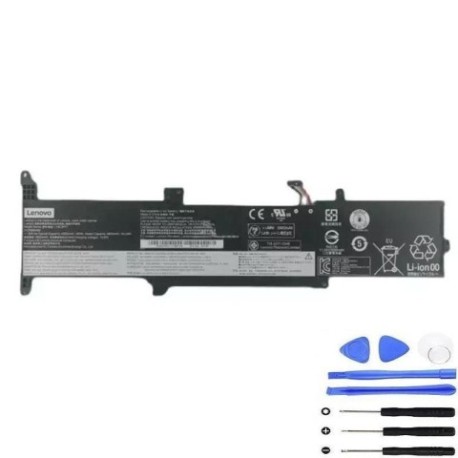
Keep your Lenovo laptop running at peak performance with our genuine L19C3PF7 45Wh replacement battery. This high-quality battery is specifically designed for multiple Lenovo IdeaPad and V series models, ensuring perfect compatibility and reliable power delivery for Australian and New Zealand users.
Common signs you need a replacement
| Symptoms | Causes | Verification | Recommendation |
|---|---|---|---|
| Battery drains quickly | Ageing cells, reduced capacity | Check battery health in system settings | Consider replacement if under 2 hours |
| Laptop won’t hold charge | Failed battery cells | Test with power adapter disconnected | Immediate replacement needed |
| Battery swelling | Internal damage, overheating | Visual inspection of battery compartment | Replace immediately for safety |
| Inconsistent charging | Worn connectors, battery wear | Monitor charging patterns | Replace if persistent issues |
How to check compatibility
Verify your laptop model matches our compatibility list above. Check your current battery’s part number (usually printed on the battery) or locate your laptop model number on the bottom casing or in system information. Cross-reference with our authorised compatibility tables for guaranteed fit.
When to replace
Replace your battery when you notice significant performance decline, typically after 2-3 years of regular use. If your battery lasts less than 60 minutes on a full charge, shows physical swelling, or causes system instability, it’s time for a replacement to maintain optimal laptop performance.
Installation guide (overview)
Power off your laptop and disconnect all cables. Remove the bottom panel (consult your laptop’s service manual). Disconnect the old battery connector and remove any mounting screws. Install the new battery, reconnect the connector, and reassemble. Always use proper anti-static precautions and authorised tools.
Usage & care tips
For optimal battery life: avoid extreme temperatures (ideal range 15-25°C), don’t leave your laptop plugged in constantly, perform regular full discharge cycles, and store in a cool, dry place when not in use. Calibrate your new battery by fully charging and discharging it once every few months.
Safety & recycling in AU/NZ
Never attempt to open or modify the battery. Dispose of old batteries at authorised recycling centres – most electronics retailers in Australia and New Zealand offer free battery recycling services. Never dispose of lithium batteries in household waste due to fire risk and environmental concerns.
FAQ
How long does delivery take in Australia?
Most metropolitan areas receive orders within 3-5 business days, regional areas may take 5-7 business days.
Is this battery genuine Lenovo?
Yes, this is an authentic Lenovo L19C3PF7 battery meeting all original specifications and safety standards.
What’s the warranty period?
This battery comes with a 12-month warranty covering manufacturing defects and performance issues.
Can I install it myself?
Yes, with basic technical skills and proper tools. However, we recommend professional installation if unsure.
How do I check my current battery health?
Use your laptop’s built-in battery diagnostic tools or third-party applications to check capacity and health status.
What if it doesn’t fit my laptop?
We offer a 30-day return policy for incompatible batteries – just ensure your model matches our compatibility list.
Is fast charging supported?
Yes, this battery supports standard Lenovo rapid charging technology when used with compatible power adapters.