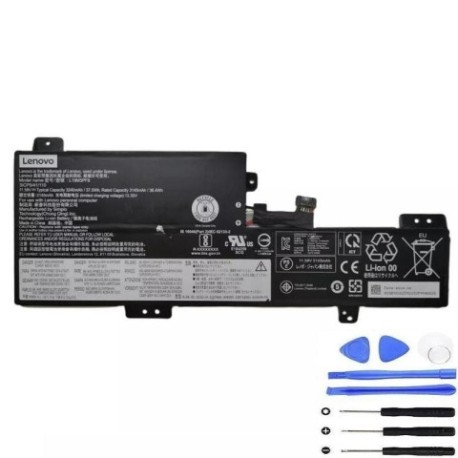
Lenovo L19C3PF8 37.5Wh Battery Replacement Guide
Introduction
Keep your Lenovo laptop running at peak performance with our authorised replacement battery guide. This comprehensive resource helps Australian and New Zealand consumers identify compatible models, recognise replacement signs, and maintain optimal battery health.
Battery models & part numbers
| Reference / P/N |
|---|
| Lenovo L19M3PF8 |
| Lenovo-L19C3PF8-37.5Wh |
Compatible laptop models
| Model |
|---|
| Lenovo 5B10X02593 |
| Lenovo 5B10X02604 |
| Lenovo IdeaPad Flex 3-11ADA05 (82G4) |
| Lenovo IdeaPad Flex 3-11IGL05 (82B2) |
| Lenovo SB10X02592 |
| Lenovo SB10X02595 |
Common signs you need a replacement
| Symptoms | Causes | Verification | Recommendation |
|---|---|---|---|
| Battery drains quickly | Ageing cells, reduced capacity | Check battery health in system settings | Consider replacement if below 60% capacity |
| Laptop won’t hold charge | Failed battery cells | Test with power adapter disconnected | Immediate replacement required |
| Battery swelling | Gas buildup, safety hazard | Visual inspection, case separation | Stop use immediately, replace urgently |
| Overheating during use | Inefficient charging, internal damage | Monitor temperature, check vents | Replace to prevent further damage |
How to check compatibility
Verify your laptop model matches our compatibility list above. Check the label on your current battery for part number confirmation. For Australian and New Zealand consumers, always purchase from authorised retailers to ensure warranty coverage and safety standards compliance.
When to replace
Replace your battery when runtime drops below 2 hours, swelling occurs, or system warnings indicate battery failure. Most Lenovo batteries last 2-3 years with regular use. Don’t wait until complete failure – plan replacement when performance noticeably declines.
Installation guide (overview)
Power down and unplug your laptop. Remove the bottom panel using appropriate screwdrivers. Disconnect the old battery connector, remove mounting screws, and install the new battery. Reverse the process to reassemble. Always consult your device’s service manual or seek professional installation if unsure.
Usage & care tips
Maintain battery health by avoiding extreme temperatures (ideal range 15-25°C). Don’t leave your laptop plugged in constantly – occasional discharge cycles help calibration. Store in cool, dry conditions when not in use for extended periods. Australian conditions require extra care during summer heat.
Safety & recycling in AU/NZ
Never puncture or disassemble batteries. Dispose of old batteries at authorised recycling centres across Australia and New Zealand. Many electronics retailers offer free battery recycling services. Never dispose of in household waste due to fire risk and environmental concerns.
FAQ
How long does delivery take in Australia?
Most metropolitan areas receive orders within 3-5 business days. Regional areas may take 5-7 business days.
Is this battery genuine Lenovo?
We supply high-quality replacement batteries that meet or exceed original specifications and are fully compatible with your Lenovo device.
What warranty do you offer?
All our batteries come with a 12-month warranty covering manufacturing defects and performance issues.
Can I install this battery myself?
Yes, most Lenovo batteries are user-replaceable with basic tools. Follow our installation guide or consult a professional if uncomfortable.
How do I check my current battery health?
On Windows, type “battery report” in the search bar or check power settings. Mac users can check System Information under Power.
What if my model isn’t listed?
Contact our support team with your exact laptop model number for compatibility verification before purchase.
Do you ship to New Zealand?
Yes, we ship throughout New Zealand with similar delivery timeframes to Australian orders.