Battery models & part numbers
| Reference / P/N |
|---|
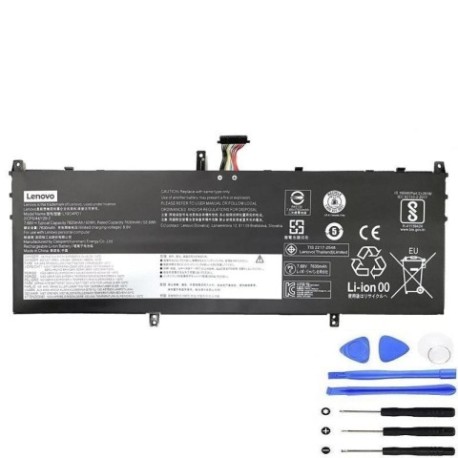
| L19C4PD1 |
| L19D4PD1 |
| L19M4PD1 |
| Lenovo-L19C4PD1-60Wh |
Compatible laptop models
| Model |
|---|
| Lenovo 2CP5/44/129-2 |
| Lenovo 5B10U65274 |
| Lenovo 5B10U65275 |
| Lenovo 5B10W67329 |
| Lenovo 5B10W67385 |
| Lenovo Yoga 6 13ARE05 (82FN) |
| Lenovo Yoga 6-13ALC6 (82ND) |
| Lenovo Yoga C640-13IML (81UE) |
| Lenovo Yoga C640-13IML LTE (81XL) |
Introduction
Keep your Lenovo Yoga or compatible laptop running at peak performance with our authorised replacement battery. The Lenovo L19C4PD1 60Wh battery is designed to meet original specifications and provide reliable power for Australian and New Zealand users.
Common signs you need a replacement
| Symptoms | Possible Causes | How to Verify | Recommendation |
|---|---|---|---|
| Battery won’t hold charge | Ageing cells, wear and tear | Check battery health in system settings | Consider replacement if under 50% capacity |
| Laptop shuts down unexpectedly | Voltage drops, faulty cells | Monitor battery percentage during use | Replace if occurring regularly |
| Battery swelling or bulging | Internal damage, overheating | Visual inspection, uneven surfaces | Replace immediately for safety |
| Charging takes much longer | Reduced efficiency, worn components | Time charging from 10% to 90% | Replace if taking 50% longer than new |
How to check compatibility
Verify your laptop model matches one in our compatibility table above. Check your current battery’s part number (usually printed on the battery) or look up your laptop’s specifications in system information. All compatible models use the same 60Wh capacity and physical dimensions.
When to replace
Replace your battery when it no longer holds sufficient charge for your needs, shows physical damage, or your system reports significantly reduced capacity. Most laptop batteries last 2-4 years with regular use in Australian conditions.
Installation guide (overview)
1. Power off laptop and disconnect charger
2. Remove bottom panel screws
3. Carefully disconnect old battery connector
4. Remove mounting screws and old battery
5. Install new battery and reconnect
6. Replace bottom panel and power on
Note: Refer to your specific model’s service manual for detailed instructions.
Usage & care tips
• Avoid extreme temperatures (ideal range 15-25°C)
• Don’t leave laptop in hot cars or direct sunlight
• Calibrate battery monthly by fully charging then discharging
• Store at 40-60% charge if not using for extended periods
• Use only authorised chargers and accessories
Safety & recycling in AU/NZ
Never attempt to open or modify lithium-ion batteries. Damaged batteries should be taken to authorised recycling centres. In Australia, use Batteryback or council e-waste services. In New Zealand, check with local council recycling facilities. Never dispose of batteries in household waste.
FAQ
How long does shipping take to Australia/New Zealand?
Most orders arrive within 5-10 business days depending on your location.
Is this battery genuine Lenovo?
This is a high-quality replacement battery designed to meet original specifications and performance standards.
What’s the warranty period?
This battery comes with a 12-month warranty covering manufacturing defects.
Will this work with my specific Yoga model?
Check the compatibility table above – if your model is listed, it’s fully compatible.
How do I know if my battery needs replacing?
Refer to the common signs table for symptoms like reduced runtime, swelling, or unexpected shutdowns.
Can I install this myself?
Yes, with basic technical skills and proper tools. Follow our installation overview or seek professional help if unsure.
What’s the battery capacity?
This is a 60Wh (watt-hour) battery providing typical runtime of 6-8 hours depending on usage.