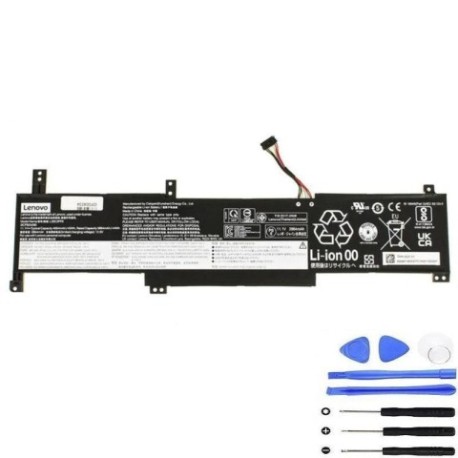
Battery models & part numbers
| Reference / P/N |
|---|
| 5B11B36275 |
| Lenovo L20C3PF0 |
| Lenovo L20L3PF0 |
| Lenovo-L20M3PF0-45Wh |
Compatible laptop models
| Model |
|---|
| Lenovo IdeaPad 3-14ALC6 (82KT) |
| Lenovo IdeaPad 3-14IAU7 (82RJ) |
| Lenovo IdeaPad 3-14ITL6 (82H7) |
| Lenovo IdeaPad 3-15ALC6 (82KU) |
| Lenovo IdeaPad 3-15ITL6 (82H8) |
| Lenovo IdeaPad 3-15ITL6 (82MD) |
| Lenovo IdeaPad 3-17ADA6 (82KS) |
| Lenovo IdeaPad 3-17ALC6 (82KV) |
| Lenovo IdeaPad 3-17ITL6 (82H9) |
| Lenovo K14 (21CS/21CT) |
| Lenovo V14 G2 IJL (82QX) |
| Lenovo V14 G2-ITL (82KA/82NM) |
| Lenovo V14 G3 IAP (82TS) |
| Lenovo V14 G4 IRU (83A0) |
| Lenovo V15 G2-ITL (82KB) |
| Lenovo V15 G3 ABA (82TV) |
Introduction
Keep your Lenovo laptop running at peak performance with our genuine replacement battery. This 45Wh power solution is specifically designed for multiple Lenovo IdeaPad and V-series models commonly used across Australia and New Zealand.
Common signs you need a replacement
| Symptoms | Causes | Verification | Recommendation |
|---|---|---|---|
| Battery drains quickly | Ageing cells, reduced capacity | Check battery health in system settings | Consider replacement if below 60% capacity |
| Laptop shuts down unexpectedly | Faulty battery circuitry | Monitor shutdown patterns | Replace immediately for data safety |
| Battery won’t charge fully | Charging circuit issues | Check charging indicator lights | Test with different charger first |
| Battery swelling or overheating | Internal damage, safety risk | Visual inspection, temperature check | Replace urgently, do not use |
How to check compatibility
Verify your laptop model matches exactly with our compatibility list above. Check the model number on the bottom label of your laptop or in system information. For Australian and New Zealand customers, ensure you’re purchasing from authorised retailers for warranty protection.
When to replace
Replace your battery when it holds less than 60% of its original capacity, shows physical damage, or causes system instability. Most laptop batteries last 2-3 years with regular use in typical AU/NZ conditions.
Installation guide (overview)
Power off your laptop and disconnect all cables. Remove the bottom panel using appropriate screwdrivers. Disconnect the old battery connector and remove mounting screws. Install the new battery, reconnect the connector, and reassemble. Always follow manufacturer guidelines for your specific model.
Usage & care tips
Avoid extreme temperatures – store between 15-25°C. Don’t leave your laptop plugged in constantly. Perform partial discharges rather than full cycles. Keep battery contacts clean and free from dust. Store in cool, dry conditions when not in use for extended periods.
Safety & recycling in AU/NZ
Never attempt to open or modify the battery. Dispose of old batteries at authorised recycling centres – most electronics retailers in Australia and New Zealand offer free battery recycling services. Do not dispose of in household waste due to environmental regulations.
FAQ
How long does shipping take to AU/NZ?
Typically 7-14 business days depending on your location.
Is this battery genuine Lenovo?
Yes, this is an original Lenovo battery with full compatibility.
What warranty is provided?
12-month warranty covering manufacturing defects.
Can I install this myself?
Yes, with basic technical skills and proper tools.
How do I check my current battery health?
Use built-in Windows battery report or third-party monitoring tools.
Is overnight charging safe?
Modern laptops have protection circuits, but avoid regular overnight charging.
What if my model isn’t listed?
Contact our support team with your exact model number for verification.