Battery models & part numbers
| Reference / P/N |
|---|
| MSI-BTY-L76-58.8Wh |
Compatible laptop models
| Model |
|---|
| Medion Erazer X7613 |
| Medion Erazer X7615 |
| MSI 2PE-025CN |
| MSI 2QE-083CN |
| MSI GS70 2OD |
| MSI GS70 2OD 2PC 2PE 2QC 2QD 2QE |
| MSI GS70 2PC Stealth GTX 860M |
| MSI GS70 2PC-633XCN |
| MSI GS70 2PE Stealth Pro GTX 870M MS-1772 |
| MSI GS70 2QD |
| MSI GS70 2QE |
| MSI GS70 2QE GTX970M 2QE 034 |
| MSI GS70 2QE Stealth Pro |
| MSI GS70 2QE Stealth Pro Red Edition |
| MSI GS70 2QE Stealth Pro Silver Edition |
| MSI GS70 2QE-084CN |
| MSI GS70 MS-1771 |
| MSI GS70 MS-1772 |
| MSI GS70 MS-1774 |
| MSI GS72 |
| MSI GS72 MS-1773 |
| MSI WS72 |
| Schenker XMG C703 |
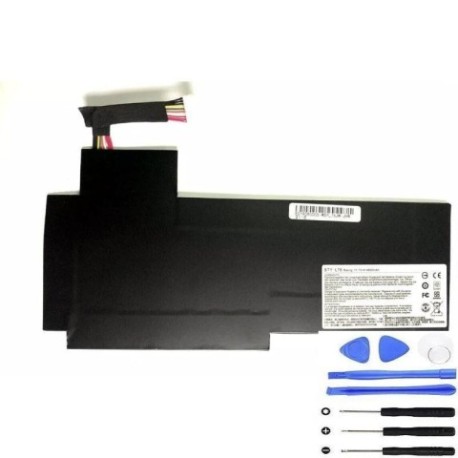
Introduction
Keep your MSI or compatible laptop running at peak performance with our genuine MSI BTY L76 58.8Wh replacement battery. Designed specifically for Australian and New Zealand conditions, this high-quality battery ensures reliable power for work, gaming, and entertainment.
Common signs you need a replacement
| Symptoms | Causes | Verification | Recommendation |
|---|---|---|---|
| Battery drains quickly | Ageing cells, reduced capacity | Check battery health in system settings | Consider replacement if under 50% capacity |
| Laptop won’t hold charge | Failed battery cells | Test with power adapter disconnected | Immediate replacement needed |
| Battery swelling or overheating | Internal damage, safety risk | Visual inspection, temperature check | Replace immediately, do not use |
| Inconsistent charging | Worn connectors, battery wear | Monitor charging patterns | Replace if persistent issues |
How to check compatibility
Verify your laptop model matches our compatibility list above. Check your current battery’s part number (usually printed on the battery) or consult your laptop’s documentation. For Australian and New Zealand customers, ensure you’re purchasing from authorised retailers for warranty protection.
When to replace
Replace your battery when you notice significant performance decline, typically after 2-3 years of regular use. In AU/NZ’s varying climate conditions, batteries may degrade faster in extreme temperatures. Monitor your battery health through your operating system’s power management centre.
Installation guide (overview)
1. Power off laptop and disconnect all cables
2. Remove the battery compartment cover
3. Disconnect the old battery connector
4. Insert the new MSI BTY L76 battery
5. Reconnect the battery connector
6. Replace the cover and power on
Always refer to your specific model’s service manual for detailed instructions.
Usage & care tips
• Avoid extreme temperatures (ideal range 15-25°C)
• Calibrate new battery by fully charging then discharging
• Store in cool, dry conditions when not in use
• Use original charger for optimal performance
• Regular partial discharges are better than full cycles
Safety & recycling in AU/NZ
In Australia and New Zealand, lithium-ion batteries must be recycled responsibly. Do not dispose of in household waste. Use designated battery recycling centres available at most electronics retailers. Damaged or swollen batteries should be handled with care and recycled immediately.
FAQ
How long does shipping take to AU/NZ?
Typically 7-14 business days depending on your location.
Is this battery genuine MSI?
Yes, we supply authentic MSI batteries with full manufacturer warranty.
What’s the battery capacity?
58.8Wh with standard voltage compatibility for listed models.
Do you offer installation services?
We recommend professional installation at authorised service centres.
What’s the warranty period?
12 months warranty covering manufacturing defects.
Can I use this battery for gaming?
Yes, it’s designed specifically for gaming laptops in the compatibility list.
How do I recycle my old battery?
Use battery recycling services at Officeworks, JB Hi-Fi, or similar electronics retailers across Australia and New Zealand.