Battery models & part numbers
| Reference / P/N |
|---|
| MSI-BTY-L78left-75.24Wh |
Compatible laptop models
| Model |
|---|
| MSI GT62VR |
| MSI GT62VR 6RD |
| MSI GT62VR 6RD Dominator |
| MSI GT62VR 6RE |
| MSI GT62VR 6RE Dominator Pro |
| MSI GT62VR 7RD |
| MSI GT62VR 7RD Dominator |
| MSI GT62VR 7RE |
| MSI GT62VR 7RE Dominator Pro |
| MSI GT62VR Dominator Pro-005 |
| MSI GT62VR Dominator Pro-238 |
| MSI GT62VR-6RE |
| MSI GT63 8SF (MS-16L5) |
| MSI GT63 9SF (MS-16L5) |
| MSI GT63 Titan 10SG (MS-16L5) |
| MSI GT63 Titan 8RE |
| MSI GT63 Titan 8RF |
| MSI GT63 Titan 8RG |
| MSI GT63 Titan 8SG (MS-16L5) |
| MSI GT63 Titan 9SG (MS-16L5) |
| MSI GT80 |
| MSI GT80 001812-SKU1 |
| MSI GT80 2QC-221CN |
| MSI GT80 2QD-042CN |
| MSI GT80 2QE |
| MSI GT80 2QE TITAN SLi |
| MSI GT80 Titan SLI |
| MSI GT80 TITAN-047 |
| MSI GT80S |
| MSI GT80S 6QD |
| MSI GT80S 6QE |
| MSI GT80S 6QE Titan SLI |
| MSI GT80S 6QF |
| MSI GT80S 6QF-218CN |
| MSI GT80S TITAN SLI-012 |
| MSI GT80S-6QD |
| MSI GT80S-6QD16H11BW |
| MSI GT80S-6QE |
| MSI GT80S-6QE32SR42BW |
| MSI GT80S-6QE32SR42HOS Heroes |
| MSI GT80S-6QEX32SR42BW |
| MSI GT80S-6QF |
| MSI GT80S-6QFX32SR45BW Anniversary |
| MSI GT83 8RF |
| MSI GT83 8RG |
| MSI GT83 8RG (MS-1816) |
| MSI GT83 Titan 8RF |
| MSI GT83 Titan 8RF (MS-1816) |
| MSI GT83 Titan 8RG |
| MSI GT83 Titan 8RG-020CN |
| MSI GT83VR |
| MSI GT83VR 6RE |
| MSI GT83VR 6RE-007CN |
| MSI GT83VR 6RE32SR451Titan SLI |
| MSI GT83VR 6RF |
| MSI GT83VR 6RF Titan SLI |
| MSI GT83VR 6RF-011ES TITAN SLI |
| MSI GT83VR 6RF64SR451(001815-SKU1) |
| MSI GT83VR 7RE |
| MSI GT83VR 7RF |
| MSI GT83VR 7RF Titan SLI |
| MSI GT83VR 7RF-206 Titan SLI |
| MSI GT83VR 7RF-230FR Titan SLI |
| MSI GT83VR Titan SLI |
| MSI MS-17A1 |
| MSI MS-17A2 |
| MSI MS-17A3 |
| MSI MS-17A5 |
| MSI MS-1812 |
| MSI MS-1814 |
| MSI MS-1815 |
| MSI MS-1816 |
Introduction
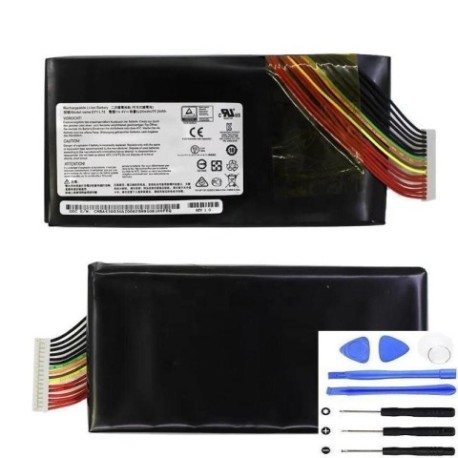
Keep your MSI gaming laptop performing at its best with our authorised replacement battery. The MSI BTY L78left 75.24Wh battery is designed specifically for high-performance MSI laptops across the GT series.
Common signs you need a replacement
| Symptoms | Causes | Verification | Recommendation |
|---|---|---|---|
| Battery won’t hold charge | Ageing cells, deep discharges | Check power meter, run diagnostics | Replace if under 50% capacity |
| Laptop shuts down unexpectedly | Voltage drops under load | Monitor during gaming sessions | Immediate replacement needed |
| Battery swelling or overheating | Internal damage, manufacturing defect | Visual inspection, temperature check | Stop use immediately, replace |
| Charging time increases significantly | Reduced battery efficiency | Time full charge cycles | Replace if over 4 hours |
How to check compatibility
Verify your laptop model matches our compatibility list above. Check your current battery’s part number (usually printed on the battery) matches MSI-BTY-L78left-75.24Wh. For MSI laptops, you can also check compatibility through the MSI Dragon Center software.
When to replace
Replace your battery when it no longer holds sufficient charge for your needs, shows physical damage, or reaches 2-3 years of regular use. Gaming laptops typically experience faster battery degradation due to high power demands.
Installation guide (overview)
Power off and unplug your laptop. Remove the bottom panel (usually requires Phillips screwdriver). Disconnect the old battery connector, remove mounting screws, and install the new battery. Reverse the process to reassemble. Always refer to your laptop’s service manual for specific instructions.
Usage & care tips
Avoid extreme temperatures (ideal range 15-25°C). Don’t leave your laptop plugged in constantly. Calibrate your battery monthly by fully discharging then charging. Store at 40-60% charge if not using for extended periods. Keep connectors clean and free from dust.
Safety & recycling in AU/NZ
Never attempt to open or modify the battery. Dispose of old batteries at authorised recycling centres. In Australia, check with your local council for battery recycling programs. In New Zealand, use designated battery recycling drop-off points. Never dispose of lithium batteries in household waste.
FAQ
How long does delivery take in Australia?
Typically 3-7 business days depending on your location.
Is this battery genuine MSI?
This is a high-quality replacement battery compatible with MSI laptops.
What warranty do you offer?
12-month warranty covering manufacturing defects.
Can I install this myself?
Yes, with basic technical skills and proper tools.
Will this affect my laptop’s performance?
No, it will restore your laptop’s portable functionality.
How do I recycle my old battery?
Take it to any authorised battery recycling centre.
What if my model isn’t listed?
Contact our support team with your exact laptop model for verification.