Battery models & part numbers
| Reference / P/N |
|---|
| MSI 3ICP5/40/99-2 |
| MSI BP-M6F-32/2320 |
| MSI BTY-M6F MS-16H2 |
| MSI-BTY-M6F-52Wh |
Compatible laptop models
| Model |
|---|
| MSI 16H2 |
| MSI 2PMi581(0016H4-SKU4) |
| MSI Ghost-003 9S7-16H212-003 |
| MSI Ghost-265 |
| MSI Ghost-607 9S7-16H515-607 |
| MSI GS60 |
| MSI GS60 2PC |
| MSI GS60 2PC 2PE 2PL 2PM 2QC 2QD 2QE 6QC 6QD 6QE |
| MSI GS60 2PC Ghost |
| MSI GS60 2PC Ghost Gold Edition |
| MSI GS60 2PC(MS-16H2) |
| MSI GS60 2PE |
| MSI GS60 2PE GHOST PRO |
| MSI GS60 2PE GHOST PRO 3K EDITION |
| MSI GS60 2PE GHOST PRO 3K GOLD EDITION |
| MSI GS60 2PE(MS-16H2) |
| MSI GS60 2PL |
| MSI GS60 2PM |
| MSI GS60 2QC(MS-16H7) |
| MSI GS60 2QD |
| MSI GS60 2QE |
| MSI GS60 2QE GHOST PRO |
| MSI GS60 2QE GHOST PRO 3K |
| MSI GS60 2QE GHOST PRO GOLD EDITION |
| MSI GS60 2QE(MS-16H7) |
| MSI GS60 6C |
| MSI GS60 6C GHOST |
| MSI GS60 6QD(Ghost 4K)(MS-16H8) |
| MSI GS60 6QE |
| MSI GS60 6QE Ghost Pro |
| MSI GS60 6QE(MS-16H7) |
| MSI GS60(MS-16H2) |
| MSI GS60(MS-16H4) |
| MSI GS60(MS-16H7) |
| MSI GS60-036UK |
| MSI GS60-2PC |
| MSI GS60-2PCI581 |
| MSI GS60-2PCI78H11 |
| MSI GS60-2PEI716SR21 |
| MSI GS60-2PEWI716SR21 |
| MSI GS60-2PMI581 |
| MSI GS60-2PMI781 |
| MSI GS60-2QCUI781 |
| MSI GS60-2QDU16H11 |
| MSI GS60-2QEUI716SR21 |
| MSI GS60-6QC |
| MSI GS60-6QC(MS-16H8) |
| MSI GS60-6QE4K16H21 |
| MSI MS-16H2 MS-16H3 MS-16H4 MS-16H5 MS-16H6 MS-16H7 16H8 |
| MSI MS-16H6 |
| MSI MSI GS60 Ghost Pro-002 |
| MSI MSI PX60 |
| MSI MSI WS60 |
| MSI Prestige PX60-6QE |
| MSI Pro 3K-097 |
| MSI Pro 4K-053 |
| MSI Pro 4k-605 |
| MSI Pro-606 |
| MSI PX60 |
| MSI PX60 2QD |
| MSI PX60 2QD 6QD 6QE |
| MSI PX60 6QD |
| MSI PX60 6QE |
| MSI PX60 6QE(MS-16H8) |
| MSI PX60(MS-16H6) |
| MSI PX60(MS-16H8) |
| MSI PX60-6QD(MS-16H8) |
| MSI PX60-6QE |
| MSI WS60 2OJ |
| MSI WS60 2OJ 3K IPS EDITION |
| MSI WS60 2OJ 4K EDITION |
| MSI WS60 2OJ 6QJ 6QI 6QH 7RJ 2PE-060UK 2PC-265NL 2PL-011UK |
| MSI WS60 7RJ(MS-16H8) |
| MSI WS60-20JU |
| MSI WS60-20JU(MS-16H3) |
| MSI WS60-2OJ |
| MSI WS60-6QI |
| MSI WS60-6QJ |
Introduction
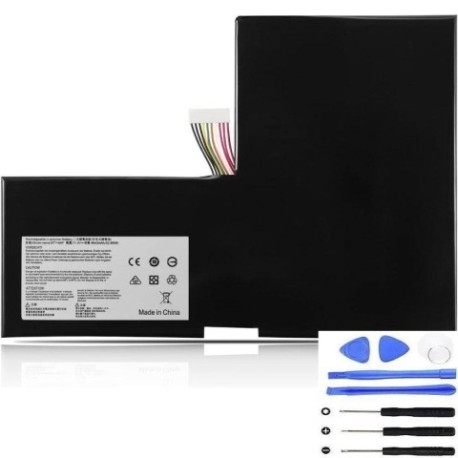
If your MSI laptop is showing signs of battery fatigue, our genuine MSI BTY-M6F 52Wh replacement battery restores optimal performance. Compatible with numerous GS60, PX60, and WS60 models across Australia and New Zealand.
Common signs you need a replacement
| Symptom | Cause | Verification | Recommendation |
|---|---|---|---|
| Battery drains quickly | Reduced capacity from age/cycles | Check battery health in system settings | Replace if capacity below 60% |
| Laptop shuts down unexpectedly | Battery can’t maintain voltage | Monitor battery percentage drops | Immediate replacement needed |
| Battery won’t charge fully | Internal cell degradation | Check charging indicator behaviour | Replace to prevent damage |
| Battery swelling/bulging | Gas buildup from chemical breakdown | Visual inspection of battery compartment | Stop using immediately and replace |
| Overheating during use | Inefficient power delivery | Monitor temperature during operation | Replace to prevent safety risks |
How to check compatibility
Verify your laptop model matches our compatibility list above. Check your current battery’s part number (usually printed on the battery) or locate your laptop model number on the bottom casing or in system information.
When to replace
Replace your battery when it holds less than 60% of its original capacity, shows physical damage, or is over 2-3 years old with regular use. Don’t wait until complete failure.
Installation guide (overview)
Power down your laptop and disconnect from power. Remove the bottom panel (consult your laptop’s manual for specific screws). Disconnect the old battery connector and remove any mounting screws. Install the new battery, reconnect, and reassemble. First charge should be uninterrupted for optimal calibration.
Usage & care tips
Avoid extreme temperatures (ideal range 15-25°C). Don’t leave your laptop plugged in constantly – occasional discharge cycles help maintain battery health. Store in cool, dry conditions if not used for extended periods.
Safety & recycling in AU/NZ
Never attempt to open or modify the battery. Damaged batteries should be taken to authorised recycling centres. In Australia, check with your local council for battery recycling options. In New Zealand, use designated battery recycling facilities.
FAQ
How long does shipping take to Australia/New Zealand?
Typically 7-14 business days depending on your location.
Is this battery genuine MSI?
Yes, this is an authentic MSI replacement battery with full compatibility.
What’s the warranty period?
12 months warranty from date of purchase.
Can I install this myself?
Yes, with basic technical skills and proper tools. Follow our installation overview.
How do I dispose of my old battery?
Take it to an authorised battery recycling centre in your area.
Will this work with my specific GS60 model?
Check our comprehensive compatibility list above for your exact model.
What’s the battery capacity?
52Wh capacity, providing reliable performance for compatible MSI laptops.